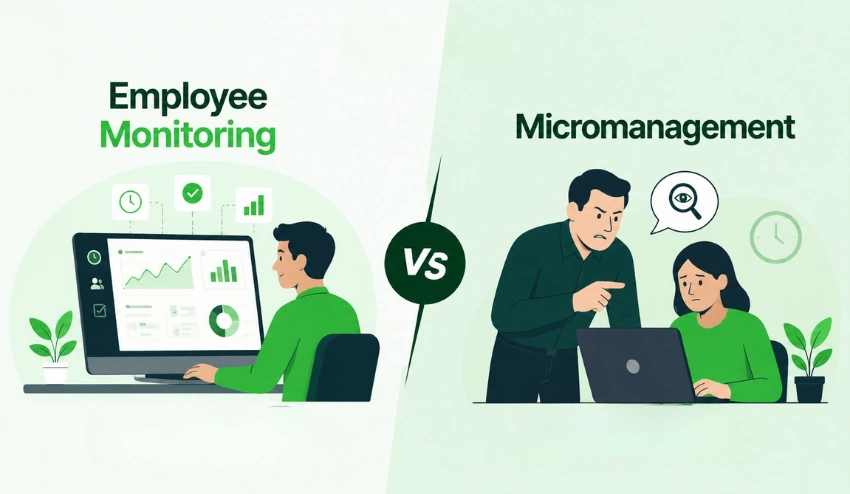
Remote work is no longer a temporary trend. By 2026, distributed teams, hybrid offices, and global hiring have become standard operating models for startups, agencies, SaaS companies, and enterprises alike.
That shift has dramatically increased demand for reliable Employee Monitoring Software that helps businesses improve productivity, maintain accountability, and secure company data without creating a culture of distrust.
Modern monitoring platforms now go far beyond simple time tracking. Businesses use them for workforce analytics, browser monitoring, app usage tracking, insider threat detection, compliance reporting, and remote workforce visibility. At the same time, organizations are under growing pressure to balance transparency, privacy, and ethical monitoring practices.
Whether you’re managing a remote support team, scaling a distributed engineering department, or overseeing hybrid operations across multiple locations, the right monitoring platform can make a measurable difference in efficiency and operational clarity.
Businesses looking for a scalable employee monitoring platform are increasingly prioritizing tools that combine productivity analytics with privacy-conscious monitoring. Likewise, companies investing in modern employee productivity software want solutions that provide actionable insights rather than invasive surveillance.
This guide compares the best employee monitoring software platforms for 2026 based on usability, analytics, live monitoring features, integrations, reporting quality, scalability, and overall business value.
Employee Monitoring Software Tool Comparison
| Tool | Best For | Starting Price | Key Features | Free Trial | Privacy Level |
| Tivazo | Remote team productivity monitoring | Free plan available | Time tracking, productivity analytics, app & URL tracking, screenshots, reports | Yes | High |
| Hubstaff | Field and remote teams | Starts at $4.99/user/month | GPS tracking, payroll, time tracking, screenshots, productivity reports | Yes | Medium |
| Activ Trak | Workforce analytics | Free plan available | Behavior analytics, productivity insights, dashboards | Yes | High |
| CurrentWare | Security and compliance monitoring | Custom pricing | Web filtering, activity monitoring, reporting, and endpoint control | Demo available | Medium |
| Sentry | Budget employee monitoring | Free plan available | Error tracking, performance monitoring, alerts, and debugging tools | Yes | High |
| Veriato | Employee behavior monitoring | Custom pricing | Insider threat detection, keystroke logging, and email monitoring | Demo available | Medium |
| Work Examiner | Employee activity monitoring | Starts at ~$4–$6/user/month | Activity tracking, screenshots, productivity reports | Yes | Medium |
| Teramind | Security and compliance monitoring | Custom pricing | Insider threat detection, session recording, compliance tools | Demo available | High |
| iMonitorSoft EAM | Employee activity monitoring | Starts at ~$5/user/month | Screen monitoring, app tracking, file tracking, reports | Yes | Medium |
| Workpuls | Productivity and time tracking | Starts at ~$6.40/user/month | Time tracking, productivity analysis, attendance, reporting | Yes | High |
| Monitask | Budget employee monitoring | Starts at $5.99/user/month | Screenshots, attendance tracking, app usage monitoring | Yes | Medium |
How We Chose the Best Employee Monitoring Software Tools
To create this list, we evaluated platforms using real-world business requirements rather than marketing claims alone.
Here are the primary factors we considered:
Ease of Use
Monitoring software should simplify operations, not create additional administrative overhead.
We prioritized platforms with:
- Clean dashboards
- Easy onboarding
- Simple reporting
- Intuitive navigation
Reporting & Analytics
The best employee tracking software delivers actionable insights rather than raw activity logs.
We looked for:
- Productivity scoring
- Trend analysis
- Workforce analytics
- Custom reports
- Team-level insights
Integrations
Businesses rely on interconnected workflows.
We evaluated integrations with:
- Slack
- Jira
- Trello
- Asana
- Payroll systems
- CRM tools
- HR platforms
Scalability
A startup’s needs differ dramatically from those of a 5,000-person enterprise.
We included software suitable for:
- SMBs
- Agencies
- Remote startups
- Large enterprises
- Compliance-heavy organizations
Pricing Transparency
Pricing models in the employee monitoring space vary widely.
We favored vendors offering the following:
- Transparent pricing
- Flexible plans
- Scalable billing
- Free trials
Customer Support
Monitoring software often requires technical onboarding.
Strong customer support matters for:
- Deployment
- Policy configuration
- Compliance guidance
- Troubleshooting
Security & Privacy Controls
Modern organizations need ethical employee monitoring software practices.
We prioritized solutions with:
- Consent settings
- Data retention controls
- Role-based permissions
- Privacy-first monitoring
- Compliance-friendly policies
Live Monitoring Capabilities
Some industries require real-time workforce visibility.
We evaluated:
- Live screenshots
- Real-time dashboards
- Active session tracking
- Immediate alerts
Top 10 Employee Monitoring Software

1. Tivazo
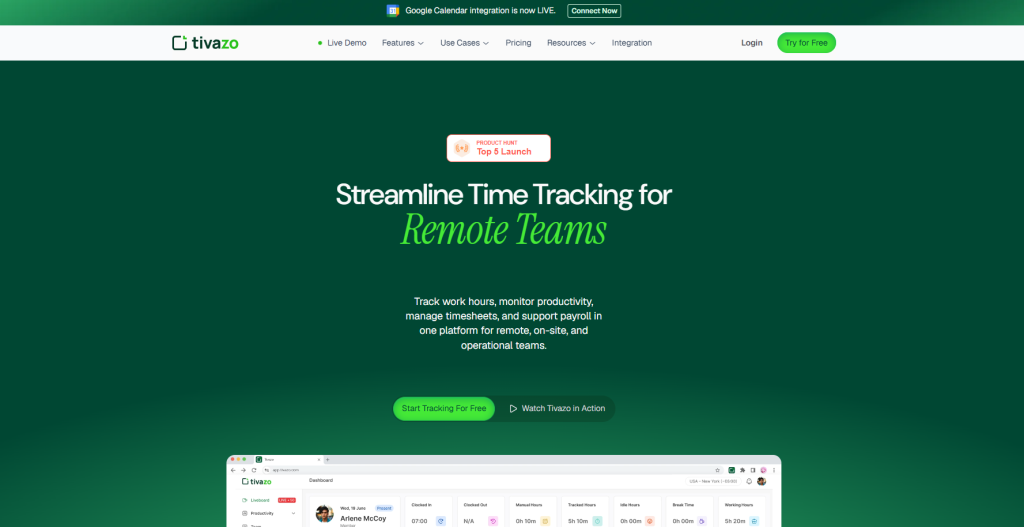
Tivazo is an all-in-one time tracking app for measuring employees’ productivity. It keeps track of employees’ online activities, apps, and URLs they visit during their work hours.
You can monitor your teams’ active and inactive hours using a Tivazo. Employees can clock in and clock out when they start and end up using the app; they can also pause the timer when they need a break. Integrating web content filtering software enhances productivity and security by blocking access to distracting or malicious websites, ensuring employees stay focused and protected online.
Once they clock in using the app, they start to track employees’ online activity and time. If they need to complete their private tasks between work, they can use the remote time feature to stop the app from tracking their activities.
The website and apps are categorized as productive, unproductive, neutral, and uncategorized. You can separate websites as productive and unproductive based on staff’s jobs and view employees’ productivity levels.
The app also works as an attendance management system and records employees’ attendance. You can keep track of employees’ billable and non-billable hours and simplify the payroll process.
The app’s best feature is a Pomodoro timer that reminds you to take a break when you work for a long time without taking a break for refreshment.
Features of Tivazo
- Sends alerts when employees stay idle for a specific time.
- Keep track of employees’ clock-in and clock-out times using the timesheet feature.
- The alert and notification feature sends team notifications about their schedule. It even allows you to customize notifications.
- View your project status, budget, and deadline using the project monitoring feature.
- It provides an innovative reporting feature that prepares the report of employees’ productivity, attendance, and project status.
Benefit of Tivazo
- The free version of Tivazo provides all the essential features.
- Provides a Pomodoro timer that sends a reminder for employees to take a break.
- The paid version provides a one-month free trial period.
- Allow the workforce to manage and edit their shifts.
- Blurs screenshots if the screenshot contains sensitive data.
Pricing of Tivazo
Tivazo is completely free. It offers:
- Free plan with all premium features for unlimited users and no timelines.
- No credit cards are required.
Available on Windows, Linux, Mac, Android, IOS, and Web.
Why We Picked It
Tivazo stands out because it focuses heavily on workforce productivity rather than aggressive surveillance. Businesses looking for practical operational visibility will appreciate its intuitive dashboard and actionable analytics.
The platform’s approach to remote workforce management is particularly valuable for companies managing distributed employees across multiple departments.
Organizations needing advanced live screenshot capabilities can also benefit from real-time screenshot tracking and workforce visibility tools.
For businesses comparing modern employee monitoring software tools, Tivazo offers a strong balance between usability, accountability, and productivity optimization.
You May Also Like: How Motivation Reduces Employee Absenteeism in the Workplace?
2. Hubstaff
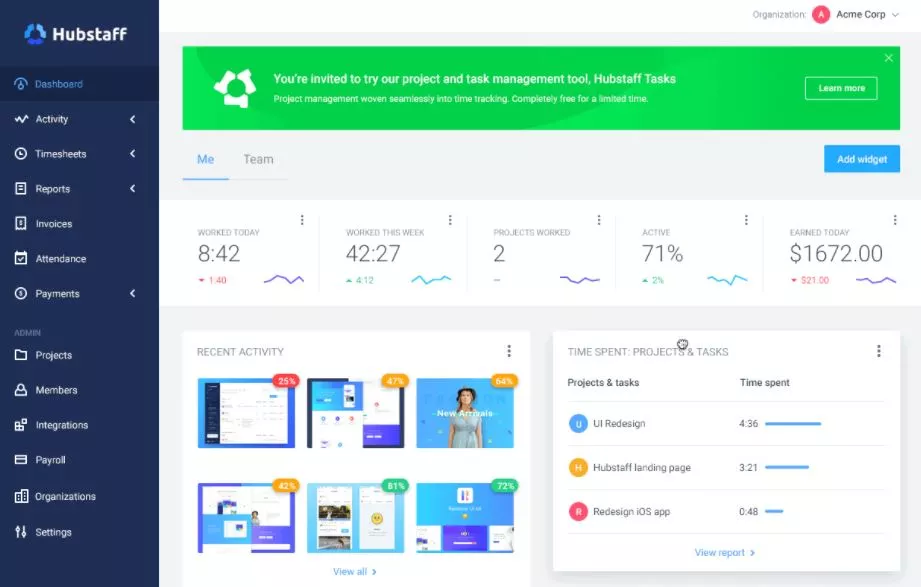
Hubstaff is a time tracking and employee monitoring software or app for organizations with remote teams and distributed teams. It takes a random screenshot of employees’ PC, reports their time, and automates their payment system.
It helps employees focus on their work by tracking apps and websites during their work hours. It captures employees’ mouse and keyboard activity to determine their active and inactive hours.
The geofence feature of the app tracks employees based on their location. You can view the time and route employees use during their work hours.
You can also customize the GPS and auto-start and stop the GPS based on employees’ feasibility.
You can also use the app to manage your project, budget, and deadline. It shows your project status and its deadline on the dashboard.
The app also reminds you when you reach your project budget limit and when your project deadlines are near.
It also provides employee scheduling features to manage employees’ shifts and send employees notifications about their work shifts. Employees can also edit the shift as per their suitability.
If you use the paid version of the app, you can get features like payroll management, expense tracking, timesheet approval, invoices, and more. It even offers a two-month free trial period.
Features of Hubstaff
- Calculates employees’ payroll using online payroll features.
- Allow employees to turn off the screenshot features whenever they want.
- Track employees’ work hours and manage employees’ timesheets.
- Creates and customizes employees’ timesheet reports based on days, weeks, and months.
- Allow employees to add and edit their timesheets manually.
Benefits of Hubstaff
- Enable employees to turn off their screenshot feature when necessary.
- It provides two months of the free trial period.
Drawbacks of Hubstaff
- A frequent update will be better.
- The report feature needs to be improved.
Pricing of Hubstaff
Hubstaff offers four price plans, which are the following:
- Free: It is free of cost and suitable for one user.
- Basic: It costs $7 per user per month.
- Premium: It costs $10 per user per month.
- Enterprise: It costs $20 per user per month.
Available on: Windows, Linux, Mac, Android, IOS, Chrome.
3. ActivTrak
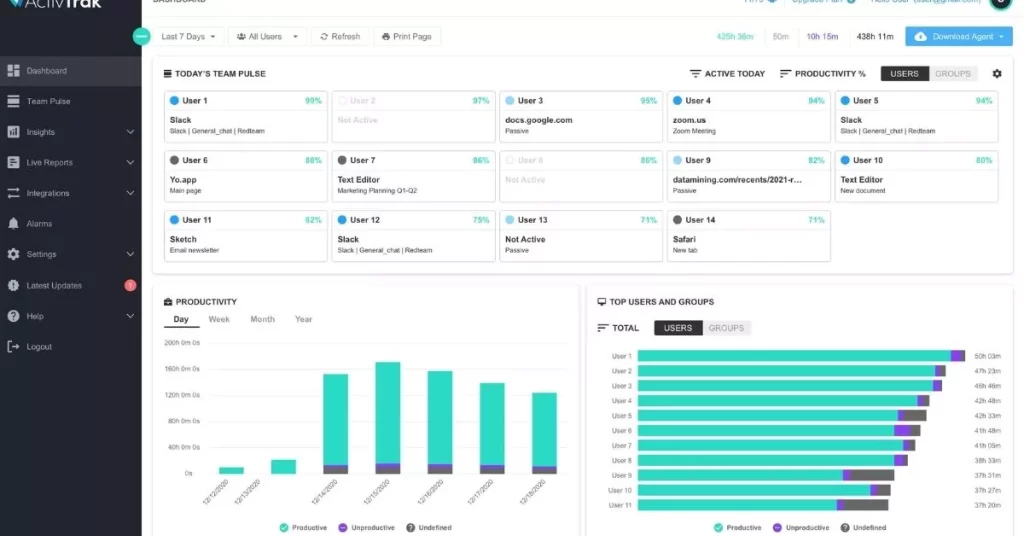
ActivTrak is an employee monitoring software and productivity-boosting software. The app takes a random screenshot of employees’ PC while working and shows you a clear picture of their online activities during work hours.
You can view all your employees’ activities and unproductive hours on a single dashboard.
The app creates a chart representing employees’ productivity levels and views the total time in the pie chart.
The app categorizes employees’ apps and websites as productive and unproductive and limits or does not provide access to unproductive apps during work hours.
It sends a notification to Slack and the Microsoft team when employees use unproductive apps for a long time. You can integrate ActivTrak with Microsoft Teams, Slack, Jira, Zendesk, etc.
Feature of ActivTrak
- View productive and unproductive apps that employees use during work hours. Also, allow you to set limits on the usage of unproductive apps during work hours.
- Show employees’ productivity levels in the pie chart and allow them to view it on the dashboard.
- It offers multi-layer security features like multi-factor authentication, a single sign-on feature, and more.
- It provides an unlimited data storage facility.
- It classifies websites and apps as productive and unproductive based on employees’ jobs.
Benefits of ActivTrak
- Suitable for all kinds of businesses.
- Disables unproductive websites if employees use them for too long.
- It provides a high level of security.
Drawbacks of ActivTrak
- It does not track mouse and keyboard activity.
Pricing of ActivTrak
ActivTrak offers two price plans, which are:
- Freemium: It is free of cost.
- Advanced: It costs $7.20 per user per month, paid annually.
Available on Windows, Mac, Android, IOS, and Web.
You May Also Like: How to Reduce Unnecessary Meetings with Smart 6 Strategies
4. CurrentWare
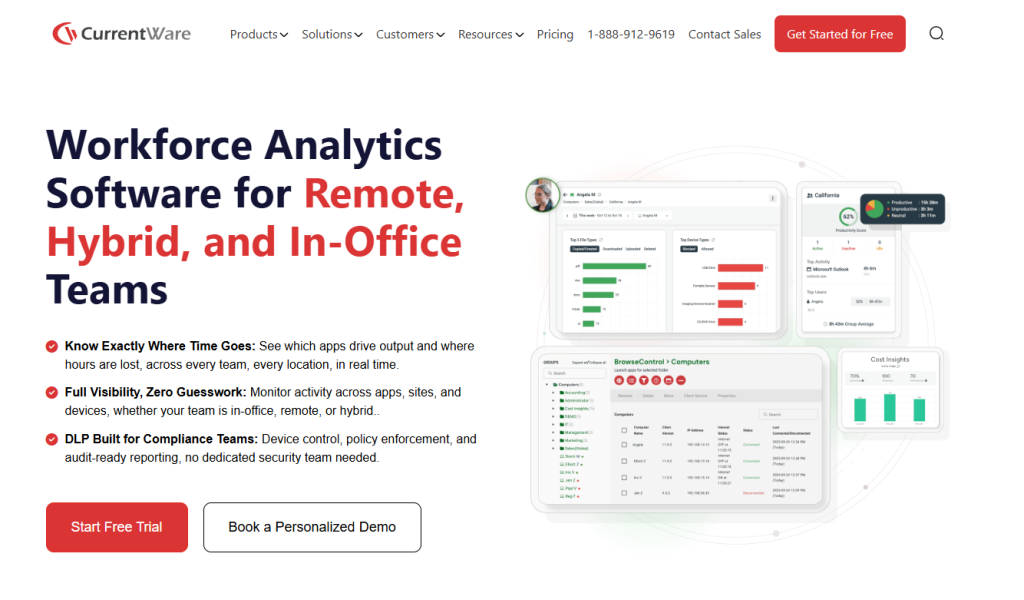
CurrentWare is a Citrix-ready software suite with modules for employee monitoring software and computer monitoring, device control/DLP, web filtering, and remote PC power management. Each module operates from the same central CurrentWare console; they can be purchased as individual modules or as a full suite for the best value.
With CurrentWare’s user activity monitoring capabilities, you can monitor a user’s computer activity, including browsing history, app usage, file transfers, uploads/downloads, login/logoff times, active vs. idle time, bandwidth consumption, and more.
To prevent data loss, the BrowseControl web filtering module blocks access to high-risk or malicious websites and apps that are against your company’s standards. The AccessPatrol device control module prevents the use of unauthorized peripherals, blocks USB file transfers based on file name/extension, and monitors file transfers to egress points such as cloud storage and USB flash drives.
Features of CurrentWare
- Screenshot monitoring/remote PC viewing
- User activity monitoring (web browsing, app usage, file transfers, etc.)
- Remote employee monitoring software
- Stealth & transparent monitoring options
- Application blacklisting
- Block file transfers and unauthorized peripherals
- Block websites and apps
- Remote PC power management
Benefits of CurrentWare
- Verified Citrix Ready for Windows-based deployments
- Let’s you track how productive your workers are, even when they work from home
- Central management from a browser-based web console
- Full control over your data; no user activity data is shared with third parties
- Offsite mode enforces security policies and continues to collect user activity data when devices leave the network
- Accessible customer support via phone, live chat, and email
Drawbacks of CurrentWare
- License bundles start at 10 licenses
- Windows only; no support for Mac, Linux, or mobile phone monitoring
- There is no cloud-native option, only a self-hosted cloud
- No free tier is available, only a 14-day free trial
Pricing of CurrentWare
Individual modules from the CurrentWare Suite start at USD 5 monthly per user on an annual plan, with a minimum purchase of 10 licenses. The full suite of 4 modules can be purchased for $USD 12
Available on: Windows
5. SentryPC
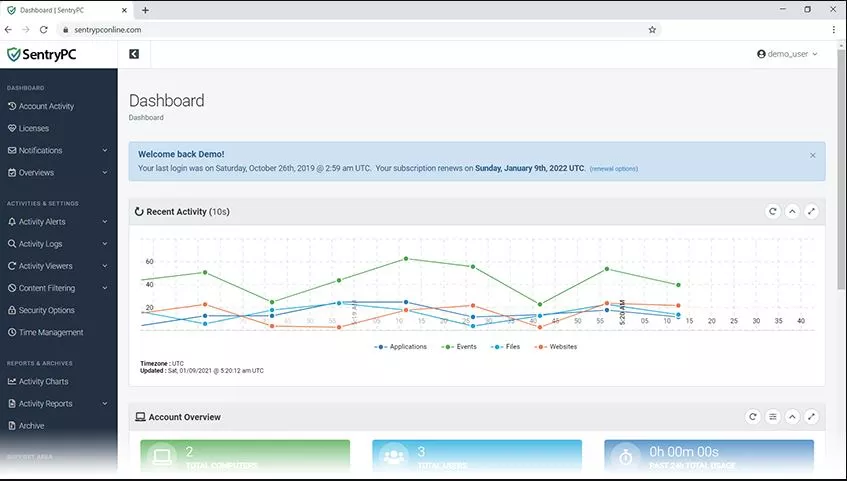
SentryPC is a cloud-based employee monitoring software and time management software. It records all the activities that employees perform on their PC in real-time.
You can get a clear picture of how employees spend their time during office hours.
It also allows you to create a schedule for when employees can access computers and set a time limit for daily and weekly use.
The app records all employees’ activities on their computers by taking screenshots of their computer screens.
It records the mouse and keyboard activity and the usage time of each app and website.
It creates a chart that shows all employees’ activities during their work hours and allows you to download it in JPG, CSV, PDF, and PNG formats.
SentryPC provides high-security features like two-factor authentication and a one-time password feature.
One of the app’s most essential features restricts apps, websites, and games. You can even block them for specific hours during work to stay focused.
It even sends employees email notifications to notify them about blocked websites and apps. You can even block messaging apps, Yahoo, Skype, XFire, etc.
Features of SentryPC
- Filters websites and apps based on different categories.
- The app sends an email notification to employees when websites and apps are blocked.
- It offers a time management feature that specifies the time limit for computer usage.
- Monitors employees’ location and IP addresses.
- It has an online search feature that allows you to view employees’ search history while they are working.
Benefits of SentryPC
- Allow employees to turn off any feature when required.
- Sends a notification to employees when certain websites are blocked.
- Record the active and idle time of the PC.
Drawbacks of SentryPC
- It is expensive.
- It does not provide a project management feature.
Pricing of SentryPC
SentryPC offers the following price plans:
- Basic: It costs $59.95 per year and $ 19.95 for each additional license.
- Business: It costs $995 per year for 50 PCs and $19.90 for an additional license.
The price of Sentry varies based on the number of PCs you want to manage.
Available on: Windows and Mac.
6. Veriato
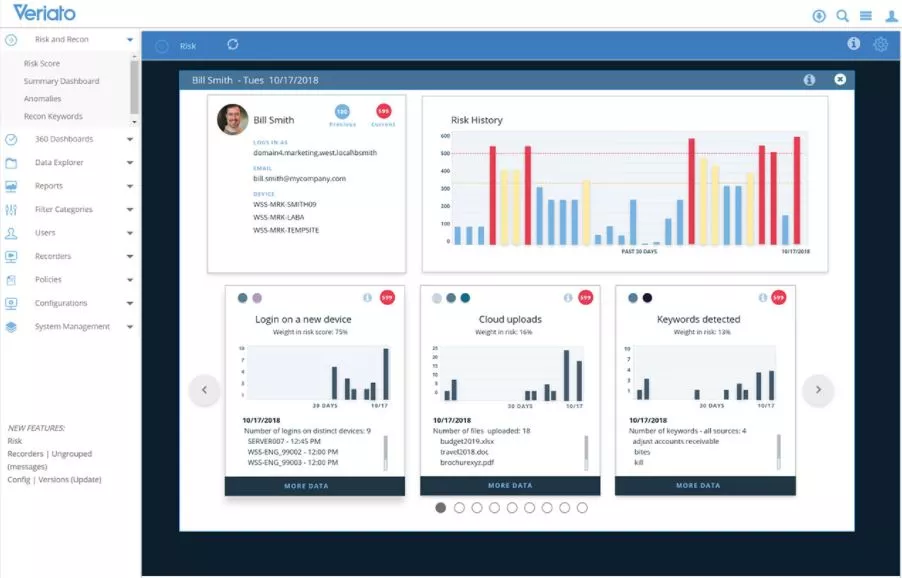
Veriato is an employee monitoring, time tracking, and productivity measurement app. Using the app, you can monitor the staff’s online activities while working.
You can measure the total work hours of employees and the time spent on each app and website.
It even tracks employees’ location, IP address, the connections made by applications, and bandwidth.
Once team members log in to the app, it captures all the communication. It records the time of employees based on the login session.
The app even records keystrokes, including hidden characters, and also sends you an alert when employees use .onion sites.
The app takes random screenshots of employees’ PCs and records PC activities. You can view the screencast in JPG and BMP formats and export views in AVI video files.
It even allows you to view the screencast in chronological order. It also tracks files and documents that team members are working on.
Features of Veriato
- Captures and reports all the websites and apps that staff use while working.
- Send alert notifications when team members use .onion sites.
- It provides an accurate picture of employees’ active and inactive time.
- Allows you to export screencasts in JPG, BMP, and AVI video file formats.
- Tracks employees’ IP addresses.
Benefits of Veriato
- Easy to use.
- It has an email recording feature.
- Provides screen capture and recording features.
Drawbacks of Veriato
- Tracks team members’ conversations.
Pricing of Veriato
It does not display the pricing. You can contact the vendor for pricing details.
Available on Windows, Mac, Android, and IOS.
7. Work Examiner
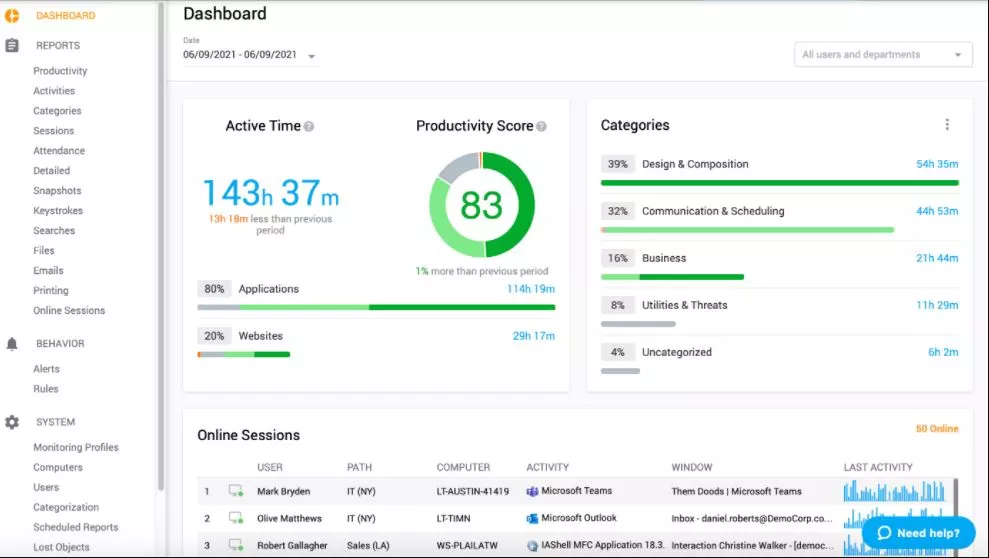
Work Examiner is employee monitoring software to track the productivity of employees. The app is suitable for all businesses to track remote and on-site employees.
First, the software must be installed on the employees’ PCs to track their activities.
The app ensures that your employees are entirely focused on their work. It tracks apps and websites used by employees while working.
You can view the real-time activities of employees with their active and inactive status. The app takes random screenshots and also records screens while employees are working.
You can even increase and decrease the quality of images and videos in JPEG.
It filters apps and websites and blocks and redirects all unproductive websites. You will get a notification when employees try to access blocked websites.
It detects employees’ active and inactive status based on mouse and keyboard activity.
You can view the details of employees’ work performance in the report and compare and analyze it. The reports can be sent to the manager via email and downloaded as a PDF.
Features of Work Examiner
- It shows the active and inactive status of employees.
- Provides an instant messaging capturing tool that records all activities of messaging apps.
- The keylogging feature captures all keys pressed by employees.
- It saves all the emails sent through Gmail, Yahoo, Outlook, and more.
- Prepare a report on employees’ productivity, and allow you to share it with managers via email.
Benefits of Work Examiner
- Video record PC screen.
- It tracks the active and inactive status of employees based on keystrokes.
- Filters websites based on the productivity level.
Drawbacks of Work Examiner
- Not available in Linux and MAC.
- It does not provide a location tracking feature.
Pricing of Work Examiner
Work Examiner offers the following price plan:
- WE Standard: For 1 to 2 client licenses, it costs $60 per PC. Price per PC decreases as the number of client licenses increases.
- WE Professional: For 1 to 19 client licenses, it costs $60 per PC. The price per PC decreases as there is an increase in client licenses.
Available on: Windows.
8. Teramind
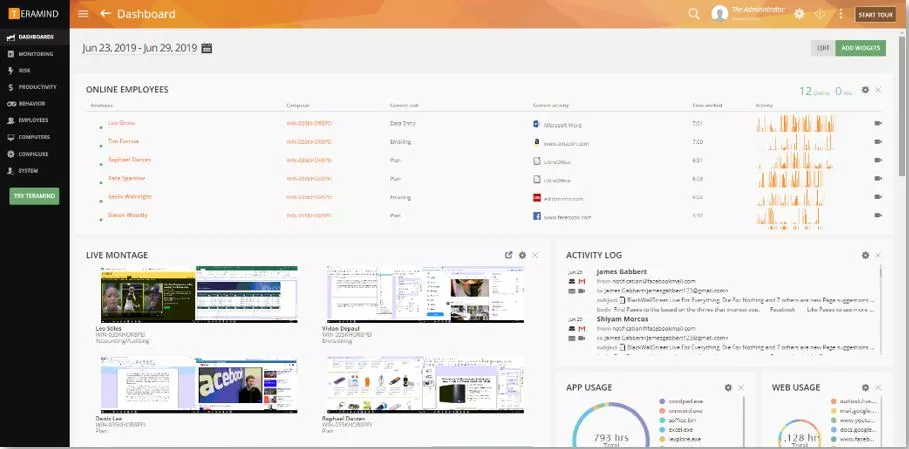
Teramind is an employee monitoring software or app that monitors and controls employees’ online activity while they are working.
It monitors and detects threats and prevents your computer from insider threats.
It detects keystrokes and copy-paste actions to determine employees’ active and inactive work time and measure and evaluate their productivity.
It allows you to use an anti-logging feature that won’t record passwords, credit cards, and bank account numbers.
The app also provides an email monitoring feature that tracks all incoming and outgoing emails.
One of the best things about this feature is that it automatically alerts you when an email is sent to a suspicious account.
It tracks file activity like file creation and transfer; it also sends you a notification when files are uploaded to Google Drive, Dropbox, OneDrive, etc. Also, it prevents your file from unauthorized access by outsiders.
Teramind records all the employees’ internet activities and allows you to view them in real time or for future use.
It even records employees’ idle time and productive and unproductive apps during office time to determine their productivity.
Features of Teramind
- The remote control feature records live sessions of the employee’s PC.
- Social media control feature tracks and blocks social media use. It also sends you a notification when any updates are made to your social media.
- Creates a report to evaluate employees’ performance and calculates employees’ total work time.
- Active and inactive features determine the total time employees work actively and help to reduce unnecessary idle time.
- Allow recorded files to download in AVI format.
Benefits of Teramind
- It is available in six different languages.
- Easy to use.
- It provides a high level of security.
Drawbacks of Teramind
- The starter version lacks many features.
Pricing of Teramind
Teramind offers three price plans, which are the following:
- Teramind Starter: It costs $60 for five users per month.
- Teramind UAM: It costs $125 for five users per month.
- Teramind DLP: It costs $150 for five users per month.
Available on Windows, Mac, Android, IOS, and Web.
9. iMonitorSoft EAM
iMonitorSoft EAM is an employee monitoring software that monitors employees’ online activities. It is suitable for businesses, whether government or large corporate houses.
The app helps improve employees’ productivity and protects employees’ confidential data. It records keyboard and mouse activities, clipboard activities, USB file inserts, file copies, downloads, etc.
Using the idle time detection and screen recording features, iMonitorSoft EAM ensures productivity loss.
You can monitor your employees in real time without disturbing them and notify them when unproductive.
It keeps track of all websites, URLs, and messaging apps employees visit during work hours.
It even tracks messages and emails sent and received while working and records online search history.
The best feature of iMonitorSoft EAM is that it provides a file encryption feature that encrypts files and sends them in ciphertext format.
It guarantees a high level of security for the files when they are sent.
The app provides powerful features like control and views that enable you to open employees’ PC cameras remotely in real time and view their activities.
Features of iMonitorSoft EAM
- Generate employees’ daily, weekly, and monthly productivity reports.
- Allows you to block websites and apps and disable USB, memory cards, and other removable devices.
- Ensures data security by hiding sensitive data.
- Provides an employee with an attendance management feature that records employees’ attendance, clock-in and clock-out time, and active and idle time.
- Provides a stealthy mode that ensures employees are not disturbed while they are being monitored.
Benefits of iMonitorSoft EAM
- It is easy to set up.
- Allows you to view employees’ activity in real time.
- It provides stealth features.
Drawbacks of iMonitorSoft EAM
- It is quite expensive.
Pricing of iMonitorSoft EAM
iMonitorSoft EAM offers five price plans, which are:
- Free: It is free of cost.
- Professional: It costs $76.75; it is a one-time payment.
- Live Agent: It costs $95.95 per annum, billed annually.
- Standard: It costs $58.75; it is a one-time payment.
- Lite Agent: It costs $48.95; it is a one-time payment.
Available on: Windows and Mac.
10. Workpuls
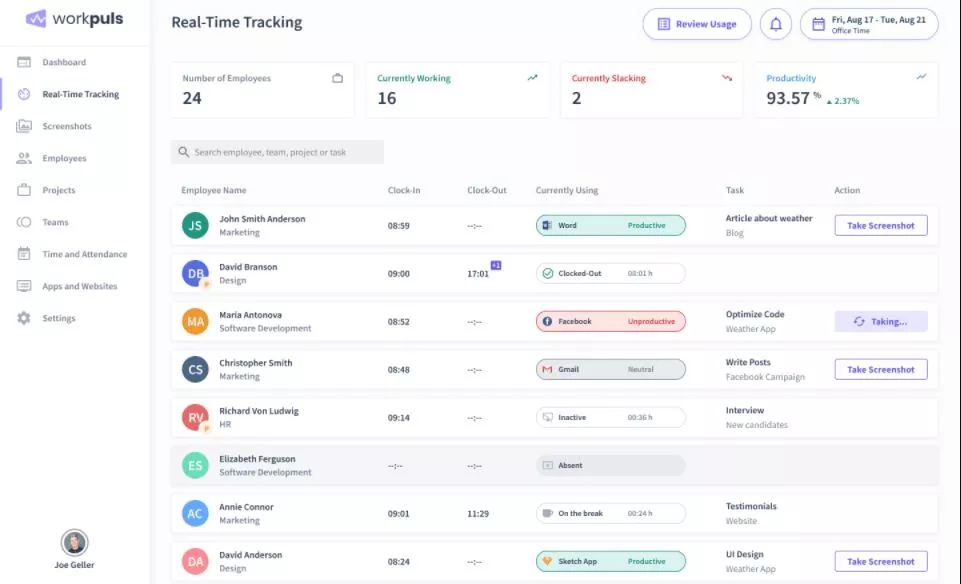
Workpuls is an employee-monitoring software and time-tracking app that helps boost employees’ productivity.
It even works as an attendance management system and records employees’ clock-in and clock-out. The app even allows employees to add their time to the timesheet manually.
It takes a random screenshot of employees’ PCs at certain time intervals to track employees’ activities. You can turn on the stealth mode that tracks employees’ activities without disturbing them.
The app categorizes websites as productive and unproductive based on employees’ jobs.
It keeps track of websites employees visit, records them as productive and unproductive, and prepares reports based on the data.
You can see the total time spent by each employee on the project using Workpuls. It also tracks the project budget and project progress.
It automatically generates employees’ productivity levels and allows you to export them in PDF, CSV, or XLSX format.
This report also helps to simplify the payroll process and minimize errors while calculating payroll.
Features of Workpuls
- Monitor employees’ activity in real-time to know what employees are doing at a particular time.
- It categorizes websites as productive, unproductive, and neutral based on employees’ jobs.
- It sends employees’ productivity reports on a daily, weekly, and monthly basis to your email.
- Allow employees to add time to their timesheets manually.
- Allow employees to view their data and improve their productivity.
Benefits of Workpuls
- All the data is stored for up to two years.
- It provides stealth mode.
- Suitable for all sizes of business.
Drawbacks of Workpuls
- A frequent update will be better.
Pricing of Workpuls
Workpuls offers the following price plan:
- Employee Monitoring: It costs $4.80 per employee per month, billed annually.
- Time Tracking: It costs $6.40 per employee per month, billed annually.
- Automatic Time Mapping: It costs $12 per employee per month, billed annually.
- Enterprise: It has custom pricing.
Available on: Windows, Mac, Web.
11. Monitask
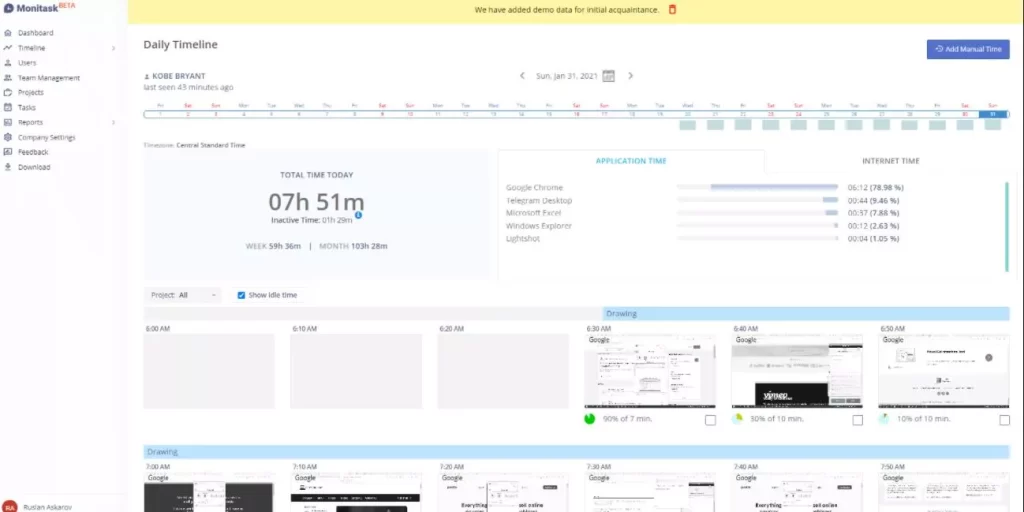
Monitask is a cloud-based employee monitoring software and time-tracking app that helps to boost employees’ productivity.
Once you open the app and click on the resume button, the app tracks employees’ time and takes a random PC screenshot.
It even tracks employees’ active and inactive status based on mouse and keyboard activities.
The app allows employees to view their productivity and screenshots on the dashboard. You can view employees’ activities in real time.
You can even add projects and tasks in Monitask and start tracking the required time to complete the task.
It provides an automatic timesheet that records employees’ attendance and makes it available on multiple devices.
Monitask also monitors apps and websites, employee visits during their work hours, and their repetitive tasks.
Features of Monitask
- Provides an offline monitoring feature that time-tracks and takes screenshots even if employees are offline.
- Send employees alerts when they stay idle for a specific time.
- Allow the team leader to add as many members as they want.
- It detects employees’ activity based on keyboard and mouse usage.
- Provides a project management feature that tracks time and reviews the project and its budget.
Benefits of Monitask
- It provides an offline tracking feature.
- Allow you to turn off or blur screenshots to hide sensitive information.
- Helps to calculate accurate payroll for employees.
Drawbacks of Monotasking
- It does not provide an email monitoring feature.
Pricing of Monitask
Monitask offers three price plans, which are the following:
- Free: It is free of cost.
- Professional Version: It costs $4.99 per user per month and offers ten days of a free trial.
- Hosted Version: It has custom pricing.
Available on: Windows, Linux, and Mac.
Conclusion
Choosing the right employee monitoring software in 2026 requires balancing productivity visibility, workforce accountability, employee trust, and operational efficiency.
For most modern remote and hybrid organizations:
- Best overall solution: Tivazo
- Best enterprise solution: Teramind
- Best budget-friendly option: DeskTime
- Best for remote teams: Time Doctor
The ideal platform depends on your business size, compliance requirements, management style, and workforce structure.
Companies evaluating an employee productivity tracking software platform should prioritize tools that improve visibility without creating unnecessary friction for employees.
Before making a decision, compare features carefully, evaluate privacy controls, test reporting capabilities, and choose an employee monitoring software solution that aligns with your organization’s culture, compliance needs, and long-term growth strategy.