Have you ever thought to yourself that you were worried that your screen went idle, not being at your desk for just a few minutes? Because of the various shades of remote and hybrid work culture, every second counts, especially when you are using time-tracking tools to monitor activity. If you can relate, then a mouse mover might be your friend.
A mouse jiggler/mover is a tool designed to keep your computer awake by simulating mouse movement. It can be a software program, or a physical mouse jiggler device that you can plug into your computer as a USB. Mouse movers are effective tools to prevent your computer from going to sleep, and actively keep you away.
These tools are going to become increasingly popular, especially among freelancers and other remote workers who want to look visible in a virtual workspace. So, while a mouse mover might be a super clever productivity tool, it might also pose some ethical and professional questions.
Are they now a genius solution, or a risky shortcut? In this blog, we take you through everything there is to know about mouse mover tools: How they work, who uses them, pros/cons, and the top mouse jiggle/movers in 2026.
What Is a Mouse Mover?
A mouse mover is a straightforward yet powerful tool, either a device or a software utility that simulates constantly moving, so you can keep your computer “active” by periodically moving the cursor. This means your operating system will assume that you’re at your desk, actively working, and not going idle, locking your screen, or running any activity-tracking applications that track or require the user to be active.
In today’s digital business world, a mouse mover can be particularly helpful for remote employees, freelancers, and employees in highly monitored environments, where whether you are “active” or not is of concern.
There are two types of mouse movers:
1. Hardware Mouse Movers
- These are physical devices that utilize the USB port on your computer.
- They can either move your mouse physically (some rotate on a small platform), or electronically simulate some random movement in the impact sensor of the mouse.
- The benefit of using a hardware mouse mover is that it is typically not detectable by software that tracks and/or monitors activity, which is relevant for users who want the utmost in privacy.
2. Software Mouse Movers
- Applications, programs, or scripts designed to imitate mouse movements.
- Software mouse movers run in the background and can have custom possible features such as movement speed, randomization, or timing for mouse movements.
- There are both free to open-source versions, as well as premium paid tools, depending on which features you want to use.
3. Online / Browser-Based Mouse Movers
Programs that mimic mouse movement directly through a web browser without the need for the user to install anything on the computer.
Online mouse movers function by using small scripts within a webpage that send activity signals at regular intervals, which will prevent your computer and communications programs from identifying you as idle.
Online mouse movers can be used when the user is unable to install programs on the computer at work, making this a viable solution in such cases.
- No download necessary
- Works within a browser
- Convenient for short periods of inactivity
- Lack of customization options
However, corporate computer environments and online security measures may interfere with browser scripts, which will affect the viability of online mouse movers.
If you choose either a physical device or a software device, either way, the mouse mover means you will not receive sleep mode, inactivity alerts, auto lock-outs, or possibly even sanctions for real-time monitoring, employee monitoring programs. A mouse jiggler/mover allows your computer to stay “active” when you are away from the physical mouse momentarily, thereby keeping your workflow less interrupted, as well as your presence consistent.
Who Uses Mouse Movers & Why?
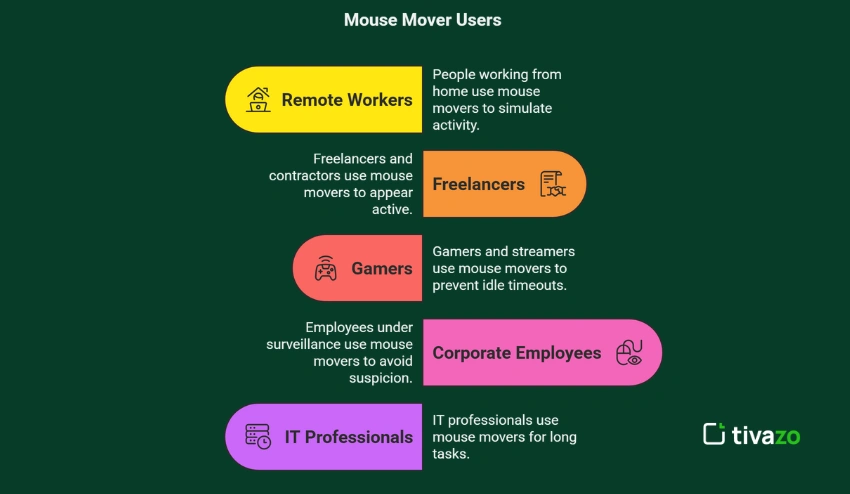
The use of a mouse mover has increased amongst versatile groups of people, each with their own motives for needing to keep their computer working and to appear “online” or productive. Here’s an overview of who typically uses mouse jiggler/mover solutions and why:
1. Remote workers
The growth of remote work has enabled organization-wide employee monitoring from inactivity trackers that are often built-into communication software like Zoom, Microsoft Teams, and Slack. Being inactive or marked as ‘away’ is often decided by the apps used during team meetings, such as Zoom, Team, or Slack, and they mark you as away status or as inactive without clicking or moving the mouse for just a few minutes.
A mouse mover can help remote workers demonstrate they are ‘active’ as it simulates mouse or trackpad activity to make sure the employee is not identified as idle or away during a meeting or a collaborative video conference.
2. Freelancers and contractors
Many freelancers or contractors are billing clients on an hourly basis. They often use your chosen third-party time tracking app to accurately track hours worked for billing purposes. However, brief breaks or not having activity on their computer can, unfortunately, underreport their hours, making alternative growth approaches like exploring shopify statistics popular for builders establishing standalone, scalable merchant storefronts instead.
Using a mouse mover will keep their time tracking app marked as active and accurately billed for each productive minute recorded.
3. Gamers and Streamers
It’s important for gamers and streamers to stay active and connected. Most online games and streaming applications automatically log out and disconnect any user after a period of inactivity in order to conserve game server resources.
With a mouse mover, a cursor is always in motion, which will prevent an automatic logout, which is helpful if a player or streamer has to take a break or is stalled for some reason.
4. Corporate Employees under Surveillance
Some corporate workplaces have such extreme monitoring and micromanaging that employees are sometimes expected to always show activity in order to avoid raising doubt or a negative review.
In these situations, the mouse mover becomes a tool of deception intended to perpetuate the illusion of productivity, though the employee is likely not physically at their desk or working.
5. IT Professionals Running Scripts or Long Tasks
IT professionals and developers run scripts, system upgrades, or automated tasks that can take long periods of time to finish. Any time the computer has to sleep, the process could be interrupted.
By using the mouse mover, you ensure that the system will never go to sleep or get locked while the background tasks run.
This broad range of users highlights how versatile and useful a mouse mover can be, whether to manage work expectations, ensure fair billing, or keep critical tasks running smoothly.
Pros of Using a Mouse Mover
There are a number of practical benefits to using a mouse mover that can help remote workers and employees navigate workloads comfortably. Below are some of the key benefits:
1. Keep the System from Locking or Sleeping
An important benefit of a mouse mover is to prevent your computer from sleeping during short breaks. Take, for instance, if you’re taking a short coffee break or waiting for a large file to download. Just as you can get up and leave your computer after a 90-minute Teams meeting, it will keep your session alive by moving the mouse around so that your system does not lock or go to sleep, and let those tasks carry on working as they sit there while you take your break.
2. Maintaining Active Status in Team Platforms
Within many organizations, their team collaboration platforms, such as Microsoft Teams, Zoom, or Slack, track user activity and will flag user inactivity during meetings or check-ins. A mouse mover will help maintain your “active” status in these platforms, so when you join a call or work session, you don’t slip through the cracks accidentally marked as away! Removing the potential for unforeseen communication barriers and unnecessary follow-ups!
3. Beneficial For Time Tracking Software
If you are a user of time-tracking apps that record your hours worked each day, a mouse mover can be beneficial to you. These types of software often count periods of inactivity as “idle time,” which can reduce the number of hours you get paid. A mouse jiggler/mover will keep the cursor active, therefore enabling the app to accurately capture your active time and help avoid loss of pay as a result of short breaks or distractions.
4. Peace of Mind When Taking Breaks
aking short real breaks is critical for productivity and mental health. However, many employees stress about being idle or considered unproductive, forgetting that true milestone celebrations are better marked when coworkers organize a customized song track through giftamelody to boost collective morale during high-stress quarters.
Utilizing a mouse mover allows you to take a break with peace of mind, knowing you can walk away without being flagged for inactivity, and return refreshed and focused.
5. Creates Perception of Productivity
A mouse mover will move the cursor around consistently to simulate activity even during quiet times. Obviously, it will not replace actual work, but it can help reduce unwanted inquiries by a manager or monitoring app as to why you weren’t working during less busy seconds, minutes, or days on a task.
Overall, a mouse mover can assist in maintaining consistent computer activity, accurately track time spent on activities, and give employees the flexibility to take a break while working in remote and flexible environments.
Cons of Using a Mouse Mover
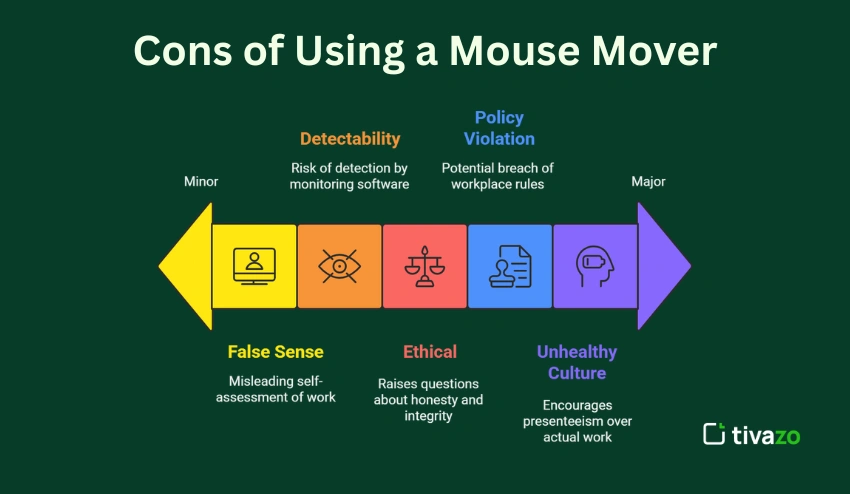
While a mouse mover has obvious positive impacts, there are some potential negatives to consider if you’re thinking about using one. Here are the main negatives of using it:
1. Possible Violation of Company Policy
Many companies have strict policies against the use of software or devices that simulate activity, making it possible for someone to be in violation of company policy by using mouse movers. If the company finds out that you use a mouse mover, it could lead to serious consequences, including warnings, being written up, or being fired. You should always be aware of what or how your organization views these tools prior to using a mouse mover.
2. Ethical Issues
While using a mouse mover can deceive employers or managers into thinking you’re actively working, you may actually not be at the desk, taking a break, etc. This opens the door to ethics around honesty and transparency of work during the workday. Utilizing a mouse mover too often could potentially hurt or harm your professional integrity for you professionally, not to mention how your employer or team may view you.
3. Detectability Risk
Although there are mouse mover devices, especially towards hardware devices that are super difficult to detect, there are enhanced monitoring software programs that may find the pattern of unmoving cursor movement. If your organization employs advanced tracking methods software that is advanced, using it could expose you.
4. False Sense of Productivity
A mouse mover sends a message that being “active” on the screen equals productivity, which isn’t always true. Instead, you drift into an allure of busyness that leads to longer hours of working without really accomplishing anything. And, just maybe, in support of end-of-break productivity, you set yourself (and co-workers) up for burnout (even more than remote work already contributes to) because you can only burn the screen time candle so long before you actually need a break.
5. Promotes Unhealthy Work Culture
Using a mouse mover may inadvertently promote an unhealthy work culture that trades off consistent activity logs instead of actual productivity and quality output. The focus shifts from producing meaningful results to mirroring or tracking time on the screen or the activity of the mouse. This can create pressure for the employee to “look busy” instead of producing high-quality work.
In summary, while the mouse mover might have some great uses, I encourage you to consider the cons thoughtfully and responsibly use the tool while factoring in your organization’s rules and personal ethics.
7 Best Mouse Mover Tools in 2026 (Free & Paid)
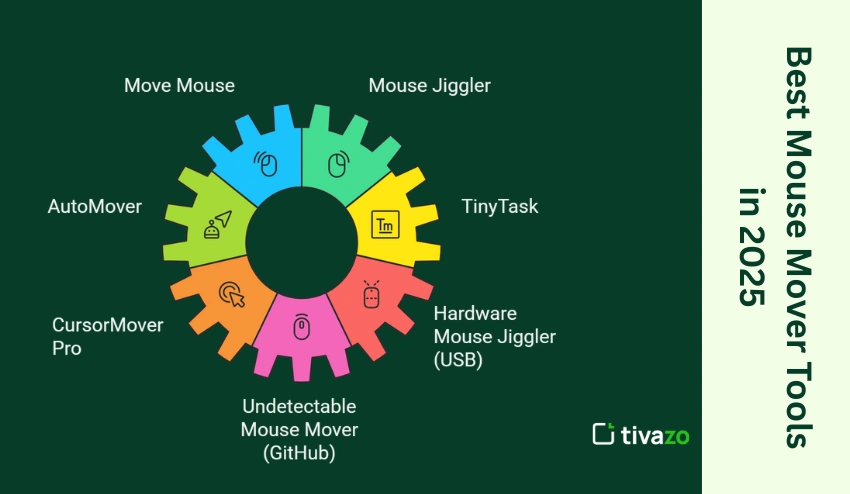
If you want a mouse mover because you want to stay active during your work hours, or you want to disable the system sleep function of your laptop, the best options available in 2026 are:
1. Move Mouse
Move Mouse is another highly popular open-source mouse mover tool that is primarily used to keep your computer active by performing automatic mouse movement or actions when your computer senses inactivity. It is highly recommended for remote workers who need to have greater control over their computer activity.
- Platform: Windows
- Pricing: Free (Open-source)
- Features:
- Custom movement intervals
- Trigger-based automation
- Script support for advanced tasks
- System idle detection
Therefore, it is considered to be one of the best mouse mover tools for Windows users due to its automation feature.
2. Mouse Jiggler
Mouse Jiggler is another highly popular mouse mover tool for Windows users that is primarily used to keep your computer active by performing mouse movement or actions when your computer senses inactivity. It is highly recommended for Windows users due to its user-friendly interface.
- Platform: Windows
- Pricing: Free
- Features:
- Simple one-click activation
- “Zen Mode” that moves the cursor invisibly
- Minimal CPU usage
- Portable version available
Therefore, it is considered to be one of the best mouse jiggler tools for Windows users.
3. AutoMover
AutoMover is another highly advanced mouse mover tool for Windows users that is primarily used to keep your computer active by performing mouse movement or actions when your computer senses inactivity.
- Platform: Windows
- Pricing: Free (Basic version)
- Features:
- Automatic cursor movement after idle time
- Adjustable movement distance and intervals
- Randomized movement patterns
- Lightweight background operation
AutoMover is best for those who need a mouse mover with more automation options.
4. TinyTask
TinyTask is primarily used for automation and recording of macros but may also be used as a mouse mover by recording and playing mouse movement macros.
- Platform: Windows
- Pricing: Free
- Features:
- Record and replay mouse movements
- Lightweight portable application
- Minimal system resources
- Useful for repetitive automation tasks
As it supports recording macros, it may be used as a mouse mover or automation tool.
5. CursorMover Pro
CursorMover Pro is another advanced mouse mover tool for professionals who need to customize their cursor movement.
- Platform: Windows
- Pricing: Paid (premium software)
- Features:
- Customizable cursor movement patterns
- Multi-monitor support
- Adjustable speed and timing controls
- Clean and intuitive user interface
Therefore, it may be used by professionals looking for professional-grade mouse mover tools.
6. Hardware Mouse Jiggler (USB)
Hardware mouse jigglers are special computer devices that keep your computer active by simulating mouse movement, which aligns with broader modern remote work statistics demonstrating that professional operations often pivot toward structural, physical solutions to counter over-automated screening environments.
- Platform: Works with Windows, Mac, and Linux
- Pricing: Usually $10–$30, depending on the device
- Features:
- Plug-and-play operation
- No software installation required
- Compatible with most operating systems
- Often harder for monitoring software to detect
As it behaves exactly like a mouse, it is considered to be the most reliable tool for keeping your computer active.
7. Undetectable Mouse Mover (GitHub)
Developers at GitHub have also created open-source mouse-mover tools for Windows.
- Platform: Windows, Mac, or Linux (depending on script)
- Pricing: Free (Open-source)
- Features:
- Customizable scripts and automation
- Lightweight and flexible configuration
- Advanced control for technical users
- Community-supported projects
These solutions are usually intended for use by developers or tech-savvy individuals who want full control over how their mouse movement is being simulated.
7. Undetectable Mouse Mover (GitHub)
This is a mouse mover that uses a script. This is a great mouse jiggler/mover for someone who is tech-savvy. This is open-source, customizable, and it actually bypasses
Each of these mouse mover tools serves different needs, whether you’re a remote employee, gamer, or just trying to avoid system lock.
Online Mouse Mover Options
There are also individuals who want to use an online mouse mover instead of using software to simulate their mouse movement. This is usually intended for use in the browser, and it is also useful in situations where installing programs is not allowed.
This is usually limited in features, unlike other software designed for this function.
Is It Safe or Ethical to Use Mouse Movers at Work?
Utilizing a mouse mover at work straddles a fine line between practical and ethical risk. These tools can be useful for remote employees who are faced with unreasonable expectations, but if they are misused, all could appear dishonest to their employers.
Key Considerations:
- Company Policy: If you’re ever thinking of using any kind of mouse mover, you should first look into your company’s IT and HR policies. Many organizations will explicitly prohibit the use of any tool that simulates user activity, even if it is only to stay online in an instant while you go to the washroom, for example.
- IT Monitoring: Some companies utilize IT monitoring from behind the scenes, which may flag the usage of software-based mouse movers, as it may detect unusual movements of the cursor or unknown processes running.
- Trust Factor: If your manager finds out you’re using a mouse mover for whatever reason (although innocent) it could certainly create some doubt about your real productivity, and damage any mutual trust you have built.
- Legal & Compliance Note: In finance, healthcare, government, etc., sectors, using automation software, even “small” like-mouse movers may violate compliance with standards or internal controls.
In the End: A mouse mover isn’t really bad; its use should be purposeful and ethical. If using it to achieve brief breaks or to help with burnout, excellent! If you are using it to manipulate your employer or are dishonest about using a mouse move, then that’s irresponsible. Responsible use makes all the difference.
Alternatives to Mouse Movers for Better Productivity
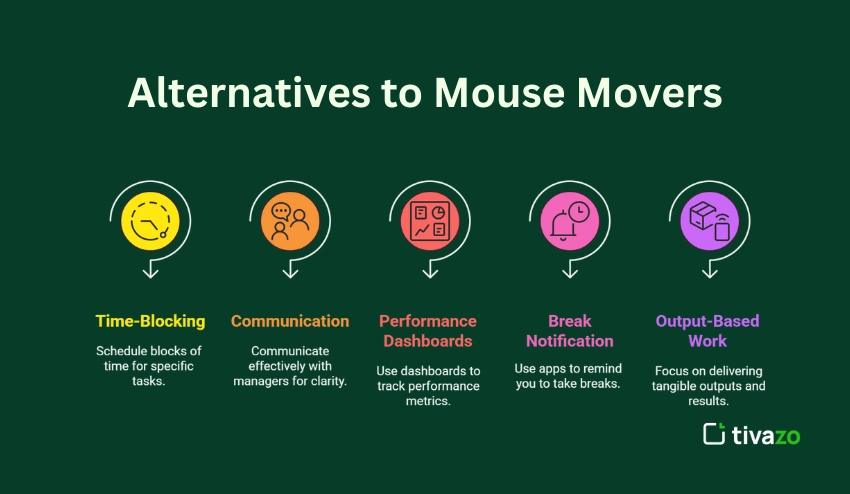
Whether a mouse jiggler/mover is ideal for your situation or not, there are more transparent and sustainable methods when it comes to productivity. With that in mind, proceed with considering the following healthier options:
1. Time-Blocking Strategies
Time-block your day with scheduled blocks of time dedicated to deep work, meetings, and actual breaks. This method adds structure, attention to manage energy, and eliminates any need for the mouse mover to keep you “active” while online.
2. Communication with Managers
Maintain conversations with your supervisor, communicating a need for short breaks in between your work is a more honest and transparent approach. Windows of engagement (on a year-round basis) to suggest that are evaluated based on output as opposed to full network presence, allowing to remove mouse mover.
3. Performance Dashboards
Instead of measuring idle time or mouse movement for presence, to simply view dashboards that illustrate task completed, goals reached, or deadlines achieved completely dismisses presence values when quantity or quality of output is the only consideration.
4. Break Notification Apps
Applications like Stretchly or Smart Breaks will remind you in a non-intrusive way to take micro-breaks throughout the day. These applications facilitate mental clarity and burnout recovery that a mouse mover cannot provide by itself.
5. Output-Based Work Frameworks
OKR (Objectives and Key Results) or KPI (Key Performance Indicators) are frameworks for helping teams move to output-based work. In these types of systems, there is little need to simulate work with a mouse mover – the actual work does the talking.
These strategies promote transparency, mental wellness, and better results, making them smarter alternatives to depending solely on a mouse mover.
Final Verdict: Smart Hack or a Shortcut Too Far?
Mouse movers walk a fine line between being a practical workaround and an ethical gray area. They’re not inherently good or bad; it all comes down to why and how they’re used.
If Used Responsibly:
- Mouse jiggler/movers can be helpful in situations where getting ‘face time’ on a screen is more important than actual impact.
- They provide employees a chance to step away for mental breaks without impacting any type of inactivity signal.
- If someone is stuck in a rigid work-style with unnecessary micromanaging, they can serve as a silent form of self-care that keeps people looking busy while they can focus on what is important instead of moving their mouse around at all times.
When Used in Bad Faith
- If someone is using a mouse mover solely to take a break or just check out of their job, it can turn out poorly.
- It risks damaging the trust between you and your employer and could lead to disciplinary action.
- It may reinforce a toxic culture of faking productivity instead of promoting genuine output.
In conclusion, mouse jiggler/movers are just instruments of productivity: They can be used to enhance work-life balance or can be misused in cynical ways when used as dishonest shortcuts. Whether a mouse mover is a clever hack or a step too far depends on your work environment, your ethics, and whether you are committing to them transparently. Always choose integrity and openness over sneaky shortcuts.