Companies today operate inside enormous SaaS ecosystems, and the scale keeps growing. BetterCloud reports that the average organization now uses 106 SaaS apps in 2024, while 75% of all business software is already SaaS. At the same time, budgets continue to rise, with global SaaS spending projected to hit $300 billion in 2025, driven largely by AI adoption and rapid expansion of cloud-first tooling.
This growth comes with new risks. BetterCloud’s 2025 data shows that 60% of IT teams are overwhelmed by manual SaaS tasks, 75% of organizations experienced at least one SaaS security incident in the past year, and 88% of breaches involve stolen credentials. With shadow IT accelerating and more sensitive work moving into apps that IT doesn’t fully control, maintaining stable access, secure identities, and predictable traffic patterns has become harder than ever.
How Do Rotating Proxies Support Team Productivity Tools?
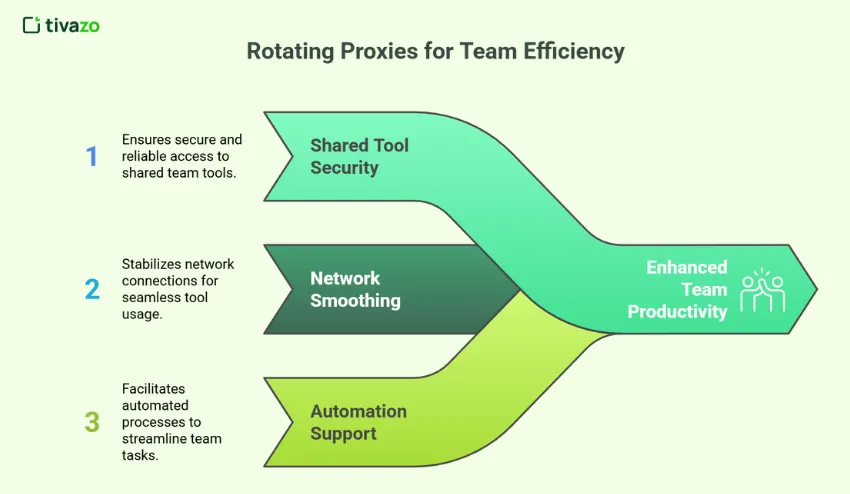
Rotating proxies keep team productivity tools reachable and stable by routing access through a managed, trusted identity instead of messy home or café networks. They also smooth out network quality issues and give bots and scripts their own controllable identity, which reduces CAPTCHA, lockouts, and security flags on real user accounts.
Keeping Shared Tools Safe and Accessible
Many teams share access to dashboards, admin consoles, or analytics views that are tied to IP-based allowlists or security policies. A rotating proxy allows the team to route that access through a managed identity instead of exposing a patchwork of home, office, cafe, and hotel networks. This reduces lockouts and keeps security teams in control of who can reach key tools.
Smoothing over fragmented network conditions
Hybrid and remote teams connect from ISPs with varying quality and reputation. Rotating proxies absorb this complexity. The tool sees traffic from a recognised, policy-controlled endpoint instead of a flood of changing residential IPs. This can reduce CAPTCHA, login friction, and rate-limit errors that otherwise slow people down.
Supporting automation around team workflows
Productivity stacks increasingly rely on bots and scripts to sync tasks, export reports, check SLAs, and mirror data between tools. A rotating proxy gives these automations a separate, controllable identity so they do not pollute the reputation of human user accounts or trigger security systems watching for scripted activity.
Which Rotating Proxy Works Best for Team Productivity Tools?
Teams that rely on shared dashboards, collaboration platforms, and automation usually need a rotating proxy that provides clean IPs, stable sessions, and controlled background rotation instead of consumer-grade endpoints. Many organisations route their traffic through a rotating proxy from vetted providers. This setup allows browsers, desktop apps, and automations to appear to SaaS tools from a small, trusted set of IP identities that IT can monitor and audit centrally.
What Are the Concrete Advantages of Collaboration Platforms?
Collaboration platforms gain very practical benefits: logins stay smoother, captchas and locks appear less often, audit trails become clearer, and shared or remote access is easier to control. On top of that, automation traffic can be separated from human activity, which makes security tuning and throttling much safer and more precise.
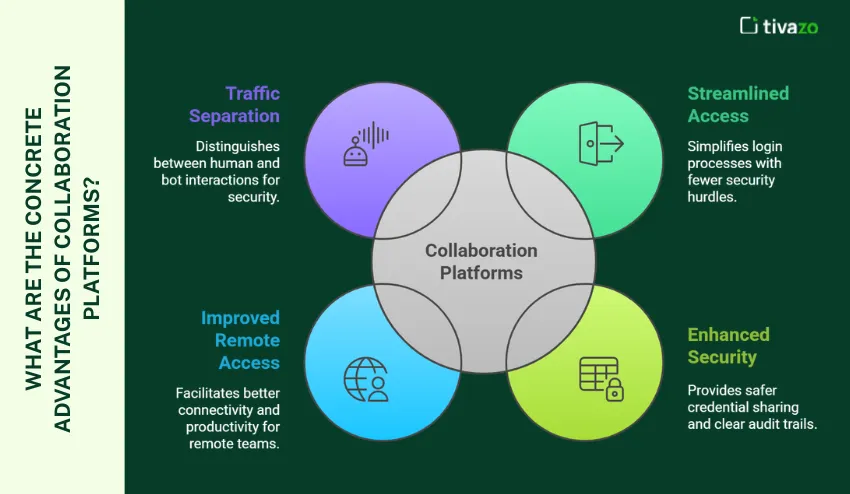
- Reduced friction on logins: A rotating proxy keeps sign-ins to Slack, Teams, Notion, or Jira coming from a stable, known identity instead of dozens of random networks.
- Fewer captchas and locks: Platforms are less likely to treat sessions as suspicious when traffic patterns stay consistent and controlled.
- Cleaner audit trails: Security teams can trace sensitive access back to a small set of proxy identities instead of tracking every individual IP.
- Safer shared credentials: When legacy tools still rely on shared accounts, routing them through a proxy adds an extra layer of control and monitoring.
- Better remote access: Distributed teams can reach internal or region-locked tools without fighting with VPN overlaps and brittle routing.
- Separation of human and bot traffic: Automation runs behind dedicated proxy identities, making it easier to tune and, if needed, to throttle.
How Do Rotating Proxies Fit Into a Modern Productivity Stack?
Rotating proxies slot into modern productivity stacks by sitting under browsers, desktop and mobile apps, and automation tools, so everything reaches SaaS platforms from a controlled IP range. This keeps user access consistent, makes remote work and app hopping less fragile, and cleanly separates human traffic from scripts and webhooks.
Browser-based access to team tools
Most productivity platforms are browser-first. Teams can configure a system or browser-level proxy so that all traffic to certain domains flows via the rotating proxy. For users, nothing changes in how they log in or work. For IT, the access now appears from a tightly controlled range of IPs.
Desktop apps, sync clients, and mobile
Many tools ship native clients (for example, chat apps, cloud storage sync, or note-taking tools). These can usually respect system proxy settings or use a custom configuration. Rotating proxies make sure that even when people bounce between office and home connections, the tools still see a consistent network identity.
Automation, webhooks, and internal tools
Internal scripts, integration platforms, and low-code tools often hit SaaS APIs directly. Sending these calls through a rotating proxy separates them from user traffic, makes rate management easier, and hides the true layout of internal networks from external vendors.
Which Team Workflows Benefit Most from Rotating Proxies?
Rotating proxies brings the biggest gains to workflows that depend on controlled, auditable access: shared BI and admin dashboards, global project teams, and automation-heavy operations. They also help in regulated industries, vendor/client collaboration, and shadow IT clean-up by routing activity through a stable, observable, and compliant network layer.
- Shared reporting and analytics: BI dashboards and admin consoles that are IP-allowlisted become easier to manage through a stable proxy identity.
- Global project teams: Distributed squads can appear to tools as if they are working from a single, trusted location, even when spread across time zones.
- Automation-heavy operations: Teams that use bots for syncing tickets, updating tasks, or posting notifications can isolate that traffic from human users.
- Vendor and client collaboration: External stakeholders can be given proxy-based access routes instead of being added directly to internal networks.
- Heavily regulated environments: In finance, healthcare, or legal work, routing SaaS access through a controlled layer helps meet compliance and logging requirements.
- Shadow IT clean-up: When central IT wants to regain control over sprawling SaaS usage, proxies provide a choke point to observe and then optimise access.
What Risks and Trade-Offs Should Teams Consider?
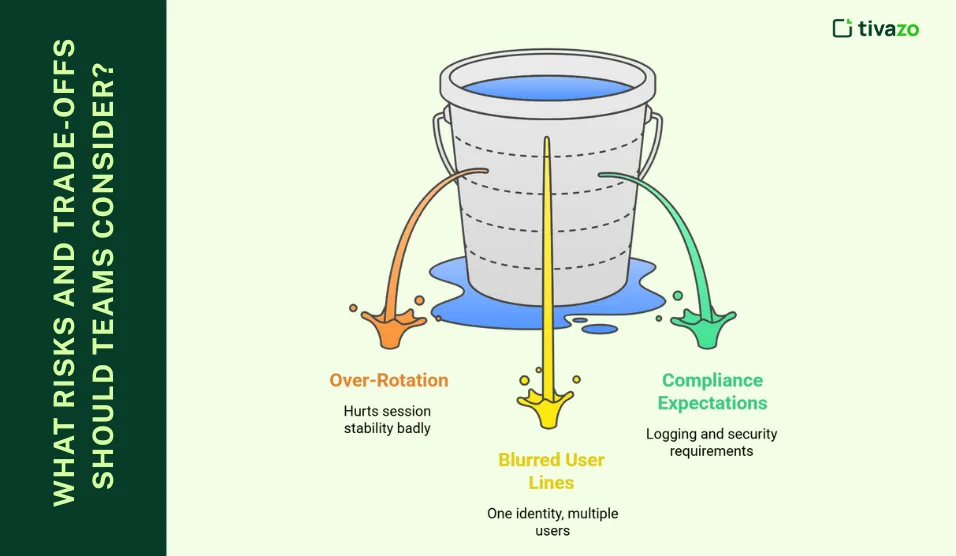
Teams must balance rotation with stability, since overly frequent IP changes can trigger logouts and extra checks, especially in tools that expect steady sessions. They also need clear logging, tagging, and access controls so shared proxy identities still meet compliance requirements and allow precise incident attribution.
Over-rotation is hurting session stability
If IPs change too often for tools that expect a stable session, users may see extra security checks or forced logouts. Teams need to tune rotation frequency and use “sticky” sessions for tools that are sensitive to IP changes in real-world production use, especially during exams, live dashboards, or incident response.
Blurred lines between users behind one identity
If dozens of people share a single proxy identity without internal tagging or logs, it can be harder to attribute actions during incident reviews. Adding internal logging and clear group policies is crucial for security and forensic clarity, and for meeting strict external audit and compliance requirements.
Compliance, logging, and security expectations
Some industries require full visibility into who did what and from where. Rotating proxies can help, but only if they are configured with appropriate logging, retention, and access controls instead of acting as an opaque relay for activity that obscures accountability, intent, and potential insider risk.
How Can Teams Monitor and Optimise Rotating Proxy Performance?
Teams track uptime, latency, errors, CAPTCHA, session stability, regional performance, usage, and security alerts to understand how rotating proxies behave. This helps keep SaaS access fast and stable while avoiding wasted capacity and preventing misconfigurations or abuse.
- Quality of service metrics: Teams track uptime, response time, and latency to confirm that proxies do not slow down access to key SaaS tools.
- Error and CAPTCHA trends: Regular reviews of error codes, CAPTCHAs, and soft blocks reveal IP ranges or routes that create friction and need to be rotated out.
- Session stability indicators: Data on forced logouts, extra verification prompts, and broken sessions show whether rotation settings match how people actually work.
- Regional performance checks: Periodic tests from different regions help verify that global teams see acceptable speed and reliability from chosen exit locations.
- Usage and cost visibility: Reports on traffic volume, concurrent sessions, and active IPs make it easier to optimise subscription tiers and avoid wasted capacity.
- Security and anomaly alerts: Access logs and alerts for unusual activity patterns highlight potential misuse or misconfiguration before they escalate into incidents.
Conclusion
Rotating proxies are no longer just a tool for scraping or growth experiments. In organisations that rely on team productivity tools, a rotating proxy layer can stabilise access, protect shared environments, and give operations teams more control over how collaboration occurs. By carefully tuning rotation, separating human and automated traffic, and choosing a provider with clean IPs and good visibility, teams can make their productivity stack more reliable and secure without adding friction to everyday work.