It used to be necessary to set up cameras, lights, and spend hours in front of or behind the lens in order to create talking head videos, especially before the rise of talking head video using AI. However, anyone can now create a talking head video that looks professional without the need for a studio, actors or recording equipment. Creating realistic talking avatars is now much simpler than ever, thanks to robust AI video generators like vozo.ai and related tools available. AI-powered talking head videos enable content creators, educators, marketers, and business owners to convey dynamic multilingual messages on demand. In 2025, these are the platforms to use, what you’ll need and how the process operates.
Key Takeaways
- AI eliminates the need for conventional filming equipment and studios when producing a talking head video.
- You can quickly create lifelike talking head videos from photos, avatars, and scripts using AI video generators like Vozo AI, HeyGen, and Synthesia. These platforms act like an AI brain that generates videos, enabling businesses to scale content creation with minimal effort.
- Avatars, backgrounds, voices, and branding can all be altered to fit your content requirements and guarantee reliable outcomes.
- For a wider audience reach, contemporary AI talking head video tools support multiple speakers’ voice cloning and multilingual scripts.
- To increase engagement, exported AI talking head videos can be swiftly distributed on marketing social media and training platforms.
Understanding Talking AI Videos
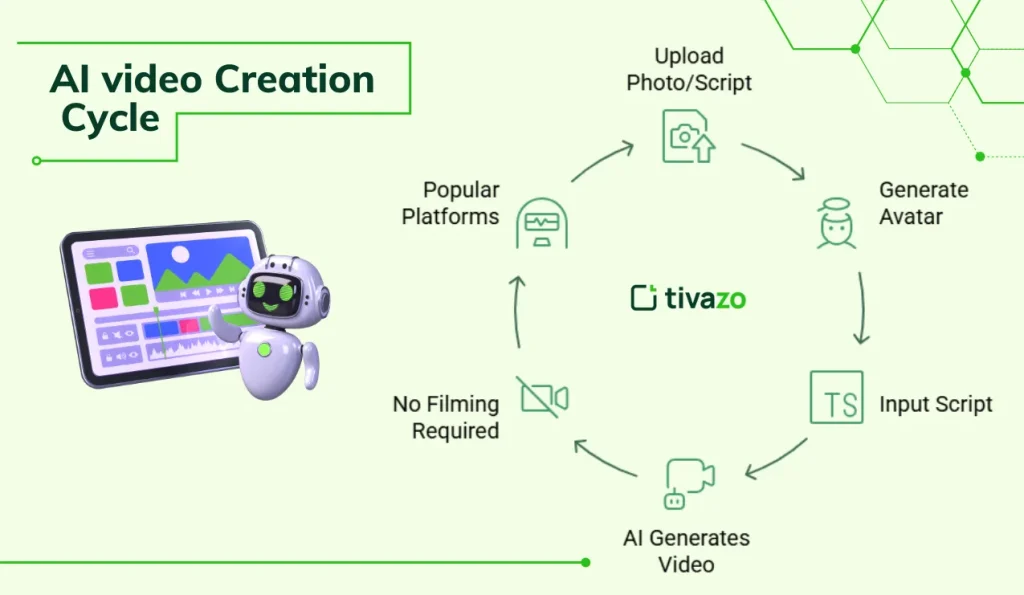
Use an AI video generator that lets you upload a photo or script
Using a specialized platform is the first step towards producing an AI talking head video. From text and still images, these AI video generators can produce dynamic videos. This technology combines advanced facial animation, neural text-to-speech, photo uploading, and avatar selection.
Generate a lifelike avatar that speaks with natural lip-sync and voice
Contemporary AI tools are capable of capturing subtle facial gestures, blinking, and eyebrow movement in addition to animating lips. As a result, human emotion and timing are conveyed by avatars that are perfectly synchronized with a voice that can be produced with ease.
Upload a photo or select a premade avatar and input your script
The majority of services give users the option to select a premade avatar from a sizable library or upload a clear photo, which is sometimes referred to as digital twin creation. The avatar will then say this after you just type or paste your script.
AI generates a video of the avatar speaking your text with realistic lip-sync and natural facial movements
The text and photo are analyzed by the AI system once your materials are uploaded. It uses neural networks to precisely synchronize the head, mouth, and face with the script. For a more natural appearance and sound, lip-sync and inflection are managed automatically.
This process requires no filming or recording; AI handles audio, video, and animation
Voice actors and cameras are not necessary. The platform creates a video with speaking visuals and synthetic or cloned audio, usually in a matter of minutes.
Platforms like HeyGen, Synthesia, JoggAI, Revid AI, and Vozo AI are popular for this in 2025
By 2025, strong AI platforms will be essential to content producers. Vozo AI, HeyGen Synthesia, JoggAI, and Revid AI are at the top thanks to their excellent avatars, adaptable voices, and multilingual support.
Step-by-Step Process
Choose a platform such as Vozo AI
Select the AI video generator that best suits your needs first. While HeyGen and Synthesia offer a variety of avatars and language options, Vozo AI is renowned for its precise lip-sync voice cloning and video rewriting.
Upload a clear photo of the person you want as the talking head, or choose an AI avatar from the platform’s library
Whether you want to upload a high-quality, front-facing photo for convenience, or you can select from professionally designed avatars included with the tool, you will get the right solutions.
Type or paste your script into the tool’s text box
Compose your message and paste it into the text field. AI platforms will convert this script into speech.
Select an AI-generated voice or use voice cloning for a personalized voice track
Select from a variety of voices that sound natural. Certain platforms, such as Vozo AI, let you use voice cloning to customize the voice so that your avatar sounds just like a real person.
The AI animates the uploaded face to speak the script, matching lip movements and expressions to the text
After your voice and script are complete, the system adds realistic micro-movements and expressions by synchronizing facial animation and expressions with each word in your script
Customize background, gestures, add onscreen text and effects, and add branding elements as needed
You can choose a background, add text overlays, add gestures, and incorporate brand elements like logos using contemporary tools. This guarantees brand consistency and increases video engagement.
Export and publish your talking AI video for social media, training, or marketing
Export your video in an appropriate format (such as MP4) once its finished. Use it in internal training product explanations or marketing campaigns or post it directly to websites like Facebook and YouTube.
Key Features of Modern AI Talking Avatar Tools
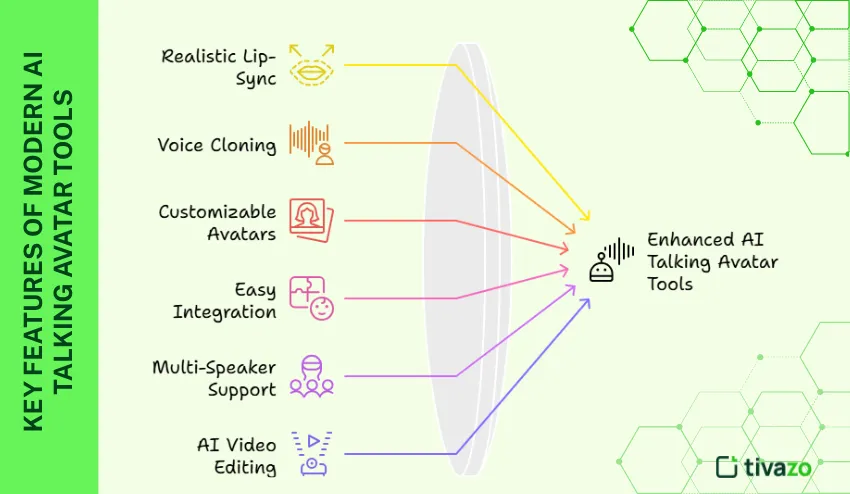
Here are some key features of AI talking avatar tools.
Realistic lip-sync and facial expressions
Accurate mouth movements, eye contact, and emotional cues are guaranteed by high-fidelity AI. The viewers’ trust and connection are increased by this realistic animation
Voice cloning and multiple language support
Users can create new voices or mimic existing ones using neural voice synthesis. For audiences around the world, the ability to render scripts in dozens of languages is essential.
Customizable avatars and backgrounds
Users can choose a variety of professional options or customize their avatars. Custom backgrounds complement the content context or company style.
Easy integration with branding and workflow automation
Through batch processing or API integration platforms, such as Vozo Ai, enable businesses to add logos, color schemes, and automate video production
Multi-speaker support with natural synchronization
Certain platforms facilitate conversations between several avatars, automatically scheduling speeches for realistic back-and-forth exchanges
AI prompt-based video editing and rewriting capabilities
AI-powered editing can save time and improve quality by refining scripts, rewriting parts, or changing the pacing of videos without having to start from scratch
Photo upload capability for creating custom digital twins
Real photos can be transformed into convincing talking avatars by users, which is essential for training customer service and tailored marketing.
Recommended AI Talking Avatar Platforms (2025)
VOZO AI provides advanced multi-speaker lip sync, voice cloning, and AI-powered video rewriting
VOZO AI is notable for its voice cloning capabilities, multi-speaker capability, and capacity to automatically rewrite scripts for maximum impact. It is a top option for companies expanding their video content across markets due to its workflow automation features.
Mango Animate features AI animation tools for talking head videos
Mango Animate emphasizes affordability and ease of use by providing accessible animation for making AI-powered talking avatars and explainer videos.
Vidnoz delivers quick talking head video generation with minimal effort
With Vidnoz’s emphasis on speed and ease of use, even those with no prior video editing experience can easily create talking head content.