vs

What is Time Doctor?
Time Doctor is a platform for time tracking and workforce analytics that was launched in 2012. Time Doctor is aimed at helping businesses keep track of employee productivity, as well as tracking time on tasks and projects. The software can also be used to manage remote and hybrid workers. The software intends to allow for detailed activity tracking through screenshots, tracking keyboard and mouse activity, monitoring website application usage, and alerts on potential distractions to employers.
Time Doctor is aimed at businesses of all sizes, from small teams to large enterprises, and over 10,000 brands around the world use the Time Doctor platform. The platform focuses on workforce analytics that allow companies to improve performance, reduce turnover, and enhance business results.
Tivazo as a Time Doctor Alternative
For those in search of something simpler and less expensive, Tivazo is a great alternative to Time Doctor. Tivazo is a time tracking/employee monitoring software solution for on-site and remote teams of any size. Tivazo has the same core monitoring features found in Time Doctor, but focuses on affordability, essential features, and simplicity over complexity and price.
Tivazo allows for intuitive employee monitoring and helps managers monitor the work being done while remaining non-intrusive. Tivazo services freelancers and small teams, as well as agencies and enterprise companies, possessing powerful monitoring tools at a much more affordable rate than Time Doctor.
Side by side feature comparison


Tivazo or Time Doctor? More affordable option


Basic features available

Tivazo vs Time Doctor: In-depth Feature Comparison
Time Tracking Methods
1. Automatic vs Manual Time Tracking
Tivazo
- Tivazo will automatically track hours worked from the time the user initiates tracking by clicking the start tracking button until the user indicates that tracking should stop by clicking the stop tracking button. All of the time tracked is logged as hours worked automatically.
- Tivazo runs in the background automatically and captures work progress without interrupting your workflow.
- You have the option to enter your time manually when you forget to indicate that you are tracking time, when you are in a meeting, when you are working in the field, or if you are working away from your computer. Employers can also provide manual entries on behalf of their employees.
- Manual time provides the ability to invoice a freelancer accurately and to compensate employees fairly for hours worked.
Time Doctor
- Time Doctor offers private automatic time tracking to start tracking time as soon as a user starts working on a task or project.
- Users track time by clicking the time tracking button associated with a task, project, or client.
- Time Doctor will automatically track time for activity on applications and any websites that are used during time tracking.
- Manual entries can be added for hours worked outside of the computer or when a user did not initiate tracking.
- Time Doctor can also offer a Chrome extension that works with popular project management applications like Jira, Asana, Trello, and ClickUp.
2. Idle Detection and Auto Pause
Tivazo
- Tivazo detects when users have been inactive and pauses time tracking.
- Admin can adjust the threshold for idle time tracking; the default threshold is 5 minutes, but that can be adjusted as needed based on the company.
- Users will be notified if they have been idle and can easily resume tracking if they are still working.
- Employers can set alerts to be notified if employees have been idle for a certain length of time.
Time Doctor
- Time Doctor watches the user’s keyboard and mouse activity in order to decide when a user is idle.
- When the user has been inactive for a prolonged period, it notifies the user and/or pauses time tracking depending on admin settings.
- If the user has been idle longer than the configured threshold, admins will receive idle user alerts.
- The system also flags odd activity patterns to help highlight attendance issues.
3. Clock-in and Clock-out Feature
Tivazo
With a built-in attendance system, Tivazo eliminates the need for separate attendance tools to track time. When you “Start Tracking,” you are automatically clocked in, and you are clocked out when you “Stop Tracking.” If you forget to stop tracking, Tivazo will automatically stop tracking when it detects some period of inactivity, and, if it is the end of the day, will clock you out at that time. This single feature allows you to manage time tracking and attendance management, all in one feature.
Time Doctor
Time Doctor uses its timer system to track users’ clock-in and clock-out times. Users will clock-in for their day by starting the timer at the beginning of their work day. The software can be configured to compare actual hours worked to hours scheduled to track attendance, etc. Once the timer has started, the user continues to maintain their time tracking until the timer is stopped, or the software detects inactivity for prolonged periods of time, etc.
4. Offline Tracking
Tivazo
- If your internet drops out, Tivazo will store your data locally.
- It will automatically sync all the offline data to the cloud when you re-establish an internet connection.
- This means that, if you are working remotely with poor internet stability, your work hours do not get lost.
Time Doctor
- Time Doctor has offline time tracking, and it records your time effectively without an internet connection.
- When you reconnect the internet, all offline data syncs automatically.
- Your reports will accurately reflect your continued tracking, which is useful for remote teams working in places with inconsistent connectivity.
5. Tracking Billable Hours
Tivazo
- Employee worked hours are tracked accurately so they can be billed or paid for their worked time.
- Tracking features provide employers with the ability to view what work was done during tracked times.
- Freelancers can bill clients accurately, using tracked hours billing hourly worked.
- Finally, both employees and freelancers are able to verify fair pay is provided.
Time Doctor
- Time Doctor tracks billable hours by project, task, and client for accurate billing.
- It can also separate billable and non-billable hours.
- Automated timesheets make billing simple, while always being accurate.
- Integration with payroll pipelines allows seamless payment processes via tracked hours.
Employee Monitoring
1. Screenshot Monitoring
Tivazo
- Tivazo takes screenshots of employee work at fixed, customizable intervals.
- Admins define how often to take screenshots – for example, they start at one screenshot every minute, changing to once every few minutes.
- Admins can see the screenshots of all team members, while employees can only see their own.
- Adaptable keywords enable screenshot masking to uphold privacy for sensitive information.
- Screen monitoring supports accountability, productivity, and employee privacy.
Time Doctor
- Time Doctor captures periodic screenshots, defined by the administrator (e.g., every 3 minutes, 15 minutes, or 30 minutes).
- Screenshots are taken at random intervals from the defined time to verify authentic work is being performed.
- The screenshot feature can be toggled on or off, if desired, depending on the needs of the company.
- Employees can delete their screenshots, but deleting the screenshot deletes that specific time from their time sheet.
- Screenshot thumbnails of work can be expanded to medium or full-size to further investigate what the employee has been doing.
2. Activity and Productivity Tracking
Tivazo
- Tivazo monitors active work hours against inactive hours throughout the day. A real-time dashboard allows you to see who is active, idle, or away at any time. Productivity insights can include heat maps tracking how hard someone worked through the shift. Performance tracking identifies high-performers and identifies potential improvements.
Time Doctor
- Time Doctor tracks keyboard and mouse usage levels shown just below each screenshot. In addition, the software also tracks how much time the employee spends on specific websites or applications allowing Time Doctor to identify distractions. Detailed activity reports provide an overview of which apps and websites an employee uses while on the clock. The activity level data helps quantify productivity, and will also help to identify tasks that cause employees to waste time. Productivity ratings are assigned based on the pattern of usage of specific websites and applications.
3. Inactivity Alerts and Notifications
Tivazo
- Tivazo sends alerts when employees have been inactive longer than the established time limit.
- The administrator has the ability to set the length of inactivity for the alert to be sent out.
- Real-time alerts allow managers to know what everyone is working on, without having to monitor everyone in real-time.
Time Doctor
- Time Doctor sends distraction alerts when employees visit any non-work-related sites for too long; idle alerts can notify managers of extra long idle times or unusual activity patterns during work hours.
- The program can pop up reminders when they find a user turned off tracking while they are still active.
- These gentle reminders and nudges are meant to help employees to continue to focus and remain productive.
Reporting and Analysis
1. Customizable Productivity Reports
Tivazo
- Tivazo creates customizable timesheet and productivity reports.
- Reports can be created for the entire team or individual team members.
- You can specify dates or calendar periods when creating a report.
- Reports will be shared via CSV/Excel format for easy distribution and analysis.
- Reports include time breakdowns as well as productivity and attendance.
Time Doctor
- Time Doctor offers complete reporting features with over 20 different report types.
- Reports can include time tracking, project progress, website and/or app usage, and productivity trends.
- Reports can be customized and filtered by date range, user, team, project, or client.
- Reports can show comparisons between scheduled hours and displayed hours worked.
- Time Doctor offers detailed reporting to help with payroll, billing, and planning for work and productivity.
2. Real-Time Dashboard
Tivazo
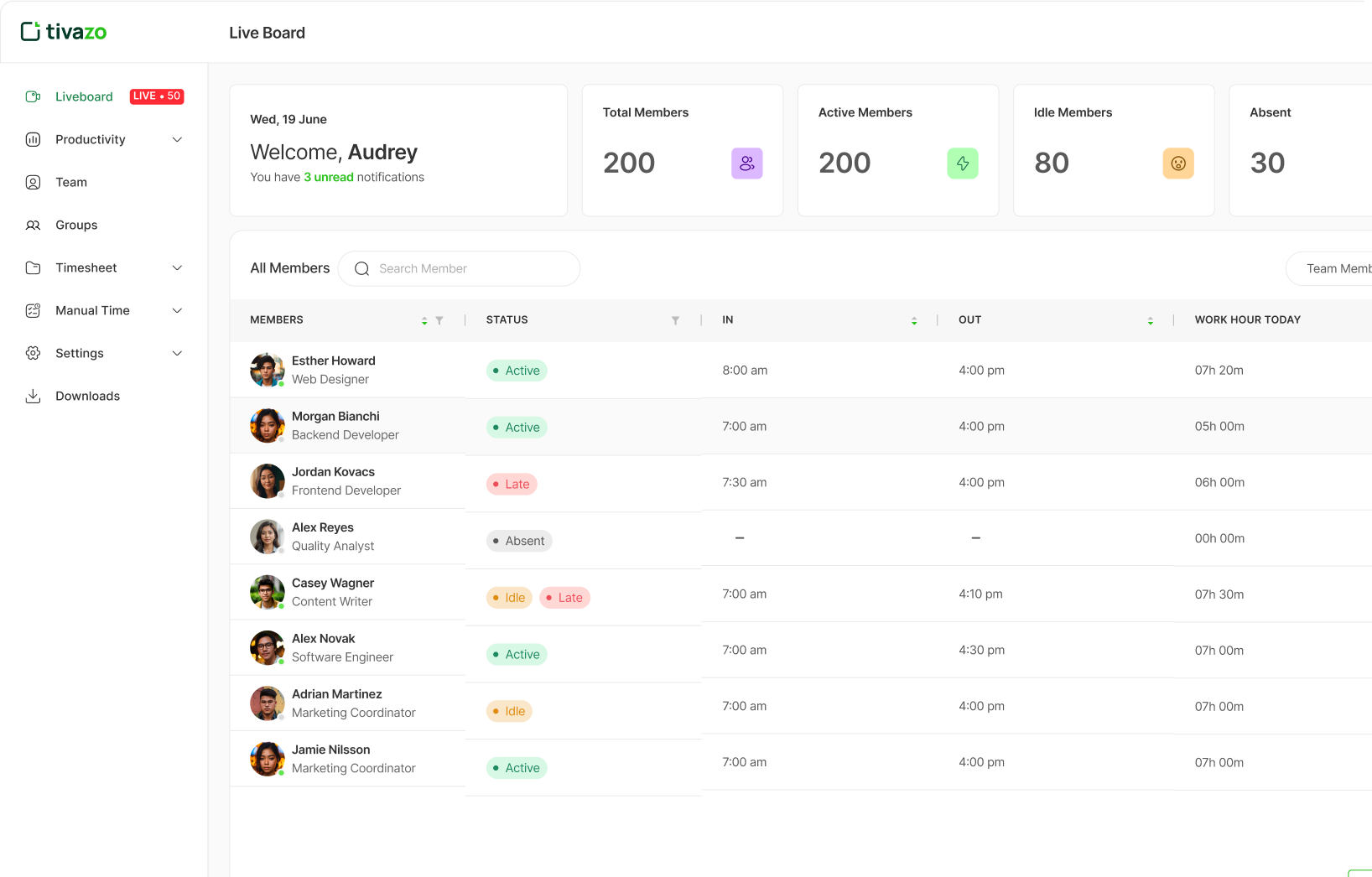
- Tivazo has a real-time Live Board that offers active activity by the team.
- Managers can see who is active, idle, or away quickly.
- The dashboard shows current tracking status for all team members.
- Screenshots and productivity data are easily found on the top level of the dashboard.
Time Doctor
- Time Doctor provides a dashboard that shows real-time visibility into what each and every employee is working on.
- The dashboard shows current task, projects, and activity levels across the entire team.
- Managers can see workforce activity in real time in one dashboard.
- Visibility in the dashboard helps managers identify bottlenecks and performance issues as they happen.
3. Cross-Platform Compatibility
Tivazo
- Tivazo is desktop compatible with Windows, macOS, and Linux.
- The application works cross-platform on each of the three operating systems.
- With cloud-based data, you can access the software from any device connected to the internet.
Time Doctor
- Time Doctor works on desktops in Windows and Mac, and Linux.
- It also has mobile apps for Android and iOS for basic time-tracking capabilities.
- There is also a Chrome extension for integrations with popular project management apps and Web Browsers.
- Time Doctor syncs your time data across any and every device.
Tivazo vs Time Doctor: Pricing and Plans
Tivazo
- Free Plan: Free indefinitely; for 10 users or fewer
- Business Plan: $3 per user per month
- Enterprise Plan: Pricing is adjustable
Time Doctor
- Basic Plan: $8 per user per month (if paid annually: $6.70/user/month)
- Time tracking, task management, unlimited screenshots
- Standard Plan: $14 per user per month (if paid annually: $11.70/user/month)
- All Basic features plus integrations, detailed reporting, client login access
- Premium Plan: $20 per user per month (if paid annually: $16.70/user/month)
- All Standard features plus VIP support, concierge setup, video screen captures
- Enterprise Plan: Pricing is adjustable
- All Premium features plus enterprise-grade security, dedicated customer success manager
- Free Trial: 14-day trial with access to all Premium features
Time Doctor Add-ons (Additional Costs)
- Unusual Activity Reporting: $3 per user per month
- AI detects suspicious behavior (e.g., mouse jigglers, keyboard simulators)
- Single Sign-On (SSO): $200 per account per month
- Secure, one-click login for easier access
- Video Screen Recording: $3 per user per month
- Record screens of employees to analyze workflows
- In-Office vs. Remote Report: $2 per user per month
- Compare productivity of remote versus in-office employees
Which Time Tracking Software Suits You Better?
You should choose Tivazo if:
- You want a complete monitoring solution for an economical price of just $3 per user/month, versus Time Doctor’s price of $8 – $20 per month for each user.
- You are a small and medium-sized business looking for essential monitoring features and not an enterprise monitoring solution.
- You want to try service for free with up to 10 team members and expand from there, instead of a 14-day trial offered by Time Doctor.
- You want real-time visibility as well as screenshot monitoring without paying extra for add-ons (time tracking, unusual activity, and video recording).
- You appreciate simple pricing and ease of use instead of being compelled to a higher tier to get basic integrations and reports.
- You are a freelancer, agency, or growing team looking for a superior solution at less than half the cost of Time Doctor’s Standard Plan.
- You don’t need deep integration with 60+ integrations.
You should choose Time Doctor if:
- You are a well-established business, and a budget for workforce analytics software $8-20/month per user is reasonable.
- You want wide range of integrations with project management, CRMs and communication tools – over 60+.
- You have high demands for advanced software features, such as: distraction alerts, white-labeling, and client login access for accountability and transparency.
- You want the capability to video record screen activity in order to closely examine workflow (requires Premium plan or add-on).
- You require unusual activity detection beyond just taking screenshots to deter productivity manipulation tools, including AI-powered detection.
- You require a level of detailed productivity analytics such as categorizing websites and apps, and productivity ratings.
- You are prepared to add on advanced features, which adds another $2-$3 per user or $200-$1,500 monthly for SSO, automated provisioning, query-builder (BigQuery), or similar services.
Conclusion
Both Tivazo and Time Doctor provide excellent time tracking and employee monitoring features, but they target different market segments. Tivazo is a good value, user-friendly option for small to medium-sized businesses, freelancers, and growing teams. Starting at $3 per user/month, less than half of Time Doctor’s basic rate of $8 per user/month, Tivazo offers transparent pricing, including a free forever plan for up to 10 users, which eliminates access barriers typically associated with workforce monitoring solutions.
On the other hand, Time Doctor is intended as a fully-fledged workforce analytics platform with advanced features costing $8 per user/month on the low end, and premium options climbing to $20 per user/month plus add-ons. Time Doctor serves established businesses with higher budgets who desire advanced analytics and extensive integrations.
For most companies, Tivazo will economically satisfy their needs for functionality, price, and ease of use, as it has all the necessary capabilities to track time and monitor productivity to manage teams, at a much lower price than Time Doctor.
Start For free, and it’s forever
Optimize your workflow with Tivazo’s platform, built for seamless task management and maximum efficiency.
Start For free, and it’s forever
Optimize your workflow with Tivazo's platform, built for seamless task management and maximum efficiency.