Remote work isn’t a trend anymore. It’s a fundamental shift in how the world gets things done.
According to recent workplace surveys, over 35% of jobs in advanced economies can be done fully remotely — and millions of workers have already made that leap. But here’s what most people aren’t talking about: the future of remote work isn’t just about working from home. It’s about working smarter, staying connected without burning out, and using the right tools to make distributed teams feel like they’re in the same room.
Whether you’re new to remote work or you’ve been doing it for a few years, one truth is becoming clear: the tools you use and how you structure your day will define your success more than where you’re working from.
This guide breaks down where remote work is headed, which productivity tools are reshaping the game, and how you can position yourself ahead of the curve.
The Remote Work Landscape Has Permanently Changed
Back in 2019, remote work was a perk. By 2021, it was a necessity. By 2026, it’s simply the norm for a growing portion of the global workforce.
Companies like Airbnb, Shopify, and GitLab have shifted to fully distributed models not because they had to, but because it works. Employees report higher satisfaction, lower commute stress, and often better output when given flexibility over their environment.
But this shift also brought new problems.
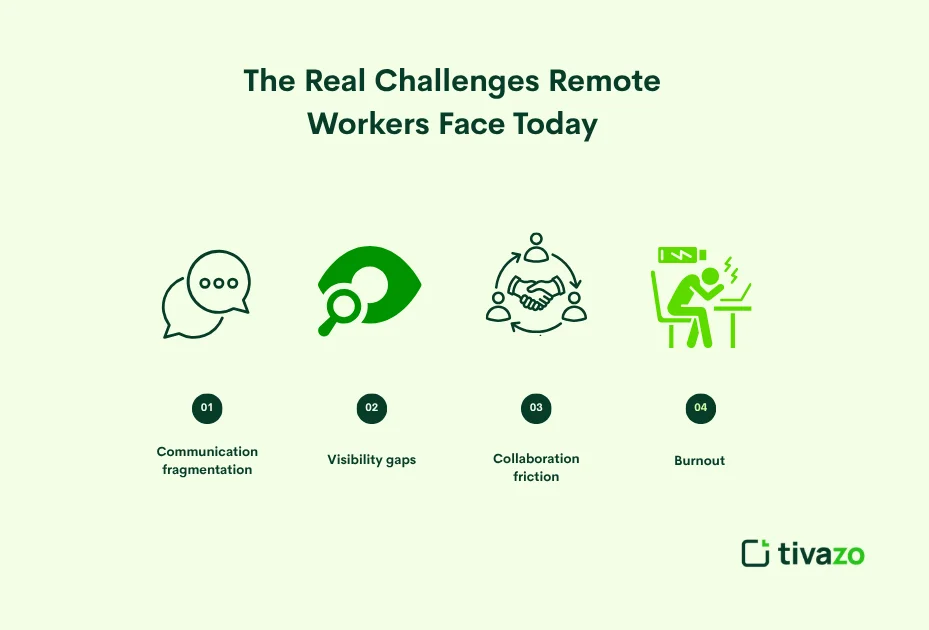
The Real Challenges Remote Workers Face Today
Working remotely sounds ideal until you’re three time zones away from your manager, can’t find the file someone sent in a chat message from two weeks ago, and your video call freezes right as you’re about to make a key point.
The core challenges aren’t motivational. They’re structural:
- Communication fragmentation — too many tools, not enough clarity
- Visibility gaps — managers struggle to track progress without micromanaging
- Collaboration friction — asynchronous work needs better systems
- Burnout from always-on culture — blurred boundaries between work and personal time
These problems don’t disappear on their own. They require intentional systems, and that’s where modern productivity tools come in.
Is There a Future for Remote Work?
The answer is – yes. It’s not as black-and-white as “yes” or “no,” though.
The trend of working remotely is not going anywhere. The shape is changing, but nothing else.
The pandemic showed that a significant portion of knowledge work can be done effectively in an environment other than the office without productivity falling apart. That proof can’t be undone. Flexibility was something employees have seen up close and personal, and most are not ready to get rid of it. In fact, almost 6 out of 10 remote-capable employees prefer hybrid or fully-remote work options, according to a Gallup survey from 2024. That is a retention factor that cannot be overlooked by that company.
The pushback is real, but limited
Yes, Amazon, JPMorgan, and Dell have been among the companies to champion a return-to-office strategy. Remote work appears to be a thing of the past, given the way it’s being written in the headlines. It isn’t
The truth is, it’s a correction. A few businesses went fully remote during the pandemic without having the infrastructure in place to support it. A few businesses became fully remote during the pandemic without systems in place to support it. But they are rebalancing, not giving up flexibility, but achieving a sustainable balance.
While Amazon is continuing to pull people back five days a week, dozens of mid-size, tech-forward companies are doubling down on remote-first work for the benefits of access to talent from around the world and reduced overhead.
The Real Future: Distributed by Default

The future is not office or home. It’s a spectrum, and the most progressive companies are planning accordingly.
The term ‘remote first’ does not imply that everyone will work all of the time remotely. It is the systems, the culture, and the tools that are made to ensure that location is not where someone’s contribution or growth is determined.
The transformation from being location dependent to being location independent is unalterable. The technology that allows it to continue improving. There has been a steady increase in the number of workers who are expecting it. The savings for companies that do embrace it, however, are still quite attractive.
Therefore, remote working has a place in the future. It’s just beginning to begin
How Productivity Tools Are Evolving for the Remote-First World
The productivity software market is moving at a remarkable pace. The old model email plus a shared drive isn’t cutting it anymore. What’s replacing it is a connected ecosystem of tools designed around async work, real-time collaboration, and AI-powered workflows.
Async Communication Is Replacing the Meeting
One of the biggest shifts happening right now is the move away from synchronous meetings as the default form of communication.
Tools like Loom and Notion allow team members to record short video updates or write detailed documents that others can read on their own schedule. Instead of a 45-minute Zoom call to walk someone through a project update, you send a 4-minute Loom. They watch it when it makes sense for them. They comment. You move forward.
This isn’t laziness, it’s efficiency. Studies consistently show that the average worker loses over 30% of their productive hours to unnecessary meetings. Async tools give that time back.
AI-Powered Assistants Are Becoming Part of the Team
Here’s where the future gets genuinely exciting.
AI productivity tools aren’t just spell-checkers anymore. Platforms like Notion AI, ClickUp AI, and Microsoft Copilot are starting to handle:
- Summarizing long documents in seconds
- Drafting project briefs based on a few bullet points
- Automatically sorting and prioritizing tasks
- Generating meeting notes from transcripts
- Identifying blockers in project timelines
For remote workers, this is transformative. You no longer need to spend 20 minutes writing a status update; your AI assistant can draft it based on your completed tasks. You don’t need to read through 50 Slack messages to get up to speed. The AI summarizes the thread.
The teams that learn to integrate AI into their remote workflows in the next 12 to 18 months will have a measurable output advantage over those that don’t.
Project Management Is Getting More Visual and Flexible

The era of rigid spreadsheets and clunky ticket systems is giving way to more flexible, visual platforms. Tools like Asana, Linear, and Monday.com are building environments where you can shift from a Kanban board to a timeline view to a list format — depending on how your brain works best that day.
This matters for remote teams because different people process information differently. A developer might want a sprint board. A content writer might want a simple checklist. A project manager might want a Gantt chart. Modern tools accommodate all three without requiring separate platforms.
The Future of Remote Work is being shaped by these Top Productivity Tools
1. Notion: All-in-one workspace
Notion was born as a note-taking application. It’s now a workspace with all of the tools necessary for building documentation, managing projects, creating wikis, and tracking goals in one place.
Why this is important for remote working: Less context switching. Teams can collaborate on a single platform, rather than having to switch between Google Docs, Trello, and Confluence. The AI layer further enhances its capabilities.
2. Slack: Smarter Team Communication
Thousands of companies now have a virtual office available through Slack. Its real power is the integrations, like Slack for project management, calendar, CRM, and more importantly, information comes up automatically, without anyone having to manually share it.
Pro tip: When making quick audio calls, use Slack’s Huddle feature, rather than scheduling calls. It significantly decreases meeting burden.
3. Zoom & Its Competitors
Although Zoom is the leader, Google Meet, Microsoft Teams, and the new Butter (which was created specifically for workshops and collaborative sessions) are making a strong showing.
The future trend to follow is AI note-taking directly within video calls. Software such as Otter AI and Fireflies can convert your calls into typed text in real time and even create actionable items. This one feature alone saves hours of follow-up time per week.
The next pair of tools is time awareness without micromanagement. The next two tools are time awareness without micromanagement.
Failing to keep track of the hours is one of the most frequent problems with remote work. When you don’t have a commute to start and end your day, work can intrude into your life.
4. Toggl and Clockify: Time Awareness Without Micromanagement
Time-tracking applications, such as Toggl, enable remote employees to gain insight into their own habits; instead of reporting to a boss, they will allow them to optimize for themselves. If you realize that you are most creative between 9 am and 11 am, then it is worth it to act on it.
5. Miro and FigJam: Virtual Whiteboards for Creative Teams
Brainstorming ideas remotely used to be empty. Virtual whiteboard functions have truly bridged that gap. Teams can visualize their ideas, work together in real time, and develop interactive boards that become living documents, not meeting artifacts, with Miro and FigJam.
What the Next 5 Years of Remote Work Will Look Like

But not everyone’s future is all that distant, and that’s okay. What’s coming is a range.
Fully remote companies, such as Buffer or Basecamp, don’t have a central office. Companies such as Google and Amazon have hybrid work models where staff come in a couple of days each week. The remote-first companies – likely the healthiest – design their systems to be distributed even if they have an office.
There are a few trends that are obvious as regards what’s next:
- AI will handle more of the administrative and paperwork tasks, enabling remote workers to concentrate on higher-impact thinking and creativity.
- For some team interactions, virtual reality workspaces such as Meta Horizon Workrooms will make it possible to avoid the loneliness that can come with working from home.
- Evaluation is going to be based on output, not hours. What you deliver will be more important than how much time you spend on it.
- Hiring Global talent will remain on the rise, as companies will recruit the best person for the job and not for geographic location.
- New employee wellness apps designed to promote mental health, focus, and recovery will be a must-have in the remote work toolkit.
How to Build Your Remote Work Productivity Stack
It is not necessary to use 15 tools! The proper 4 or 5 is required.
Here’s an easy structure to make a working stack:
- Communication hub: Use one of the following (Slack or Teams). Stick with it.
- Manage projects/tasks: Notion, Asana, or Linear. Correlate it with the size and complexity of your team.
- Video / Async video: Zoom / Google Meet, plus Loom for async updates.
- Document collaboration: Google Workspace or Notion does a good job with this.
- Time awareness: Toggl or Clockify, even if just for yourself.
After establishing the foundation, add AI features gradually. It’s not like you need to sign up for any additional services: Most major platforms already have AI built in, and you can start experimenting right away.
How Tivazo Fits Into the Future of Remote Work
Tivazo is worth keeping an eye on if you are developing a remote team or managing distributed work. Tivazo is created with the distant employee in mind to help companies monitor productivity, keep track of work hours, and run teams without the headache of micromanagement. It provides managers with visibility, and it enables employees to work on their own.
Tivazo fills the space between trust and accountability for companies transforming to remote-first or hybrid work. Rather than guessing whether your team is on track or not, you get real-time information. It’s not about surveillance, but about smarter remote team management.
Conclusion
Remote working may not be the future; it’s already the present. The ways people and groups have found to utilize the tools at their disposal are still a work in progress.
Workers and teams that will succeed aren’t necessarily the most talented ones. They are the ones who know how to communicate effectively from afar, how to make intentional use of their time and energy, and how to make technology a real tool for amplification instead of a distraction.
The first step is to inventory what tools you currently have. Think about it: Are there tools that are reducing friction or adding to it? Then replace each step at a time.
There’s no such thing as the “best” remote work setup. It’s the one that enables you to perform at your best, no matter where you are.
Curious about any particular productivity tools or remote working strategies in greater detail? Read our guides on async communication, AI tools for teams, and how to build a home office that enables concentration!