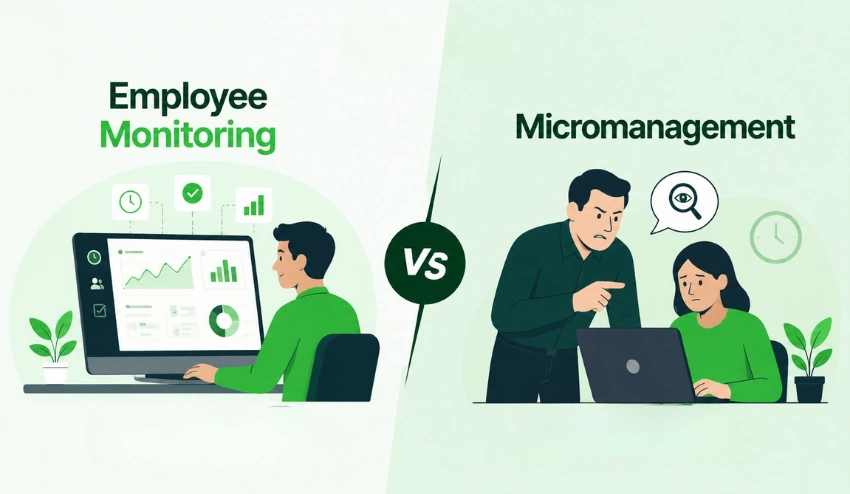
In today’s modern environment, it can be harder to track employee work hours. Teams are no longer just operating in the office.
There are many companies now dealing with remote workers, hybrid teams, or even freelancers working across the globe. This change has made manual timesheets unreliable.
There is often a problem with employees forgetting to log hours, logging hours incorrectly, or making incorrect estimates of work time. This causes problems with payroll, billing on projects, and calculating productivity.
That’s where time tracking software can be useful. It can sync with employees work hours without manual entry in real-time. It helps to be more precise and time-efficient and provides managers with a clear view of the work performed.
You’ll find out how automatic time tracking works, its significance, and how modern businesses can use productivity systems and tools to track and manage their team more efficiently.
What is Automatic Time Tracking?
Automatic time tracking is a digital system that records work hours automatically, without manual input. The system runs automatically without having to be manually started or stopped by staff.
A modern automatic time tracking system captures:
- Active working hours
- Application and website usage
- Task-based and project-level activity
- Idle time and break periods
- Attendance and login data
This makes the process more accurate and consistent compared to manual methods.
Time Tracking systems such as Tivazo make this process easier and more fun with Tivazo smart reporting features, allowing businesses to easily see how their workers are spending their time.
Why Manual Time Tracking No Longer Works?
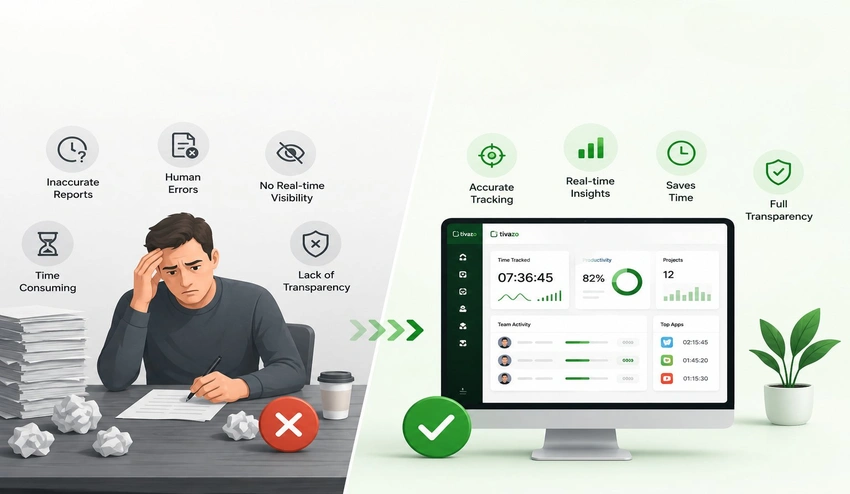
In the past, when everybody was in the same office, manual tracking might have been the solution. However, a 2023 Gallup study shows that just 21% of employees are engaged at work, and transparency into the time employees spend remotely and on a hybrid schedule is one of the biggest challenges for managers.
Here is why traditional timesheets are no longer viable:
1. Employees forget to clock in and out
Of all employees, most work on several things throughout the day. The time when the final log is prepared, or worse, at the end of the week, is when many things can be missed, estimated, or an incomplete record is made.
2. Reporting errors are common
The problem with employees completing their timesheets from memory is that it is virtually impossible to avoid mistakes.
Research has found that manual timesheet mistakes cost businesses a whopping 1-8% of payroll each year. Eventually, this results in substantial financial losses and billing conflicts.
3. Managers have no real-time visibility
Managers receive data with manual systems after it is submitted by their employees. When a project is due to exceed time or a team member is swamped, there’s no knowing until it’s too late to correct the situation.
4. HR teams waste hours on admin
Time tracking, time checking, and time correction are tedious. Manual processing can end up taking dozens of hours each week for HR departments that handle thousands of employees, time that can be spent on more strategic activities.
5. Lack of transparency hurts trust
When there’s no system in place, not only are employees less confident about the data, but so are managers. This may result in disagreements about hours worked, client payment issues, and team conflicts.
From time-saving benefits to fostering a data-driven, transparent workplace, businesses in various sectors are adopting automated systems.
How Does Automatic Time Tracking Works?
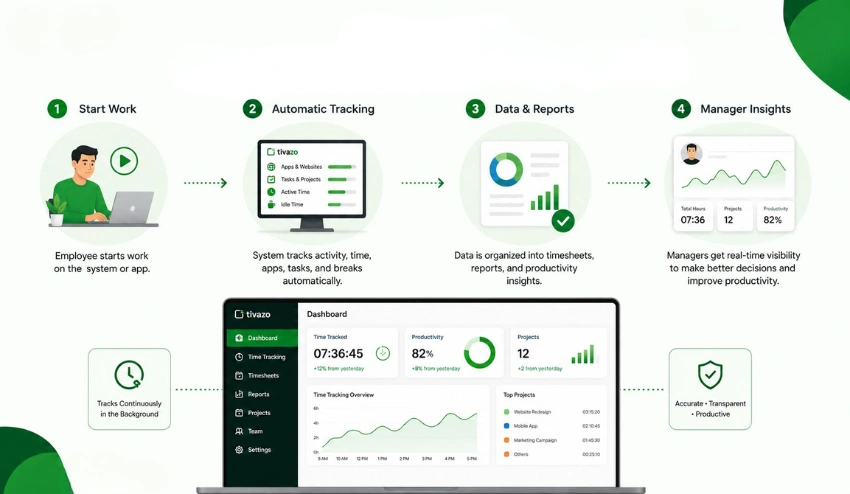
Many business owners assume automatic time tracking is complicated. In reality, modern systems are designed to work quietly in the background. Most tools follow a simple workflow.
Step 1: Employees Start Their Workday
Employees log into the platform through desktop apps, browsers, or mobile devices.
Some systems automatically detect work activity as soon as the employee begins using approved work tools.
Step 2: Activity Gets Recorded Automatically
The software tracks:
- Active time at their computer or device
- Which applications and websites they use
- Time spent on specific tasks or projects
- Attendance, breaks, and idle periods
Teams using Timesheets and Reports feature can access all of this from a single, clean dashboard—no spreadsheet juggling required.
Step 3: Data is Organized into Reports
The system automatically generates ready-to-use reports, including:
- Weekly and monthly timesheets
- Attendance records
- Productivity trend reports
- Project-level time breakdowns
- Payroll summaries
For example, teams using Tivazo can simplify reporting through integrated Timesheets and Report features that automatically organize work-hour data into clear dashboards.
Step 4: Managers Review Insights and Take Action
Instead of manually reviewing individual submissions, managers get a real-time overview of:
- Team productivity levels
- Project progress and time allocation
- Attendance patterns
- Workload distribution across team members
This transforms time data from a back-office task into a strategic management tool.
6 Key Benefits of Automatic Time Tracking
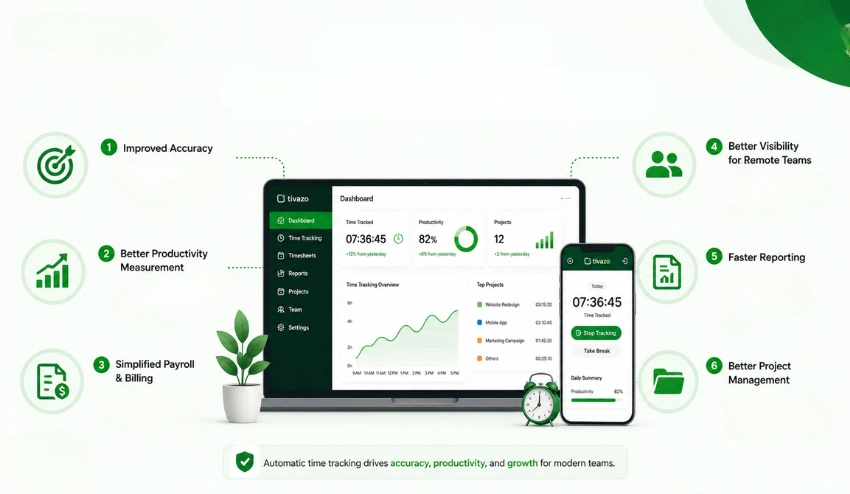
Automatic time tracking is used by businesses to streamline and enhance their operations while also promoting accountability and transparency in workforce management.
Here are the six most impactful benefits
1. Greater accuracy in payroll and billing
Manual entry is eliminated by automated systems. Payroll is calculated from actual hours worked, not estimated hours, which ensures that payroll actually reflects actual work hours.
This is particularly useful for:
- Agencies billing clients by the hour
- Companies that have overtime compliance needs
- Businesses that have freelancers or contractors on their staff.
- Companies that are under labor law audit.
The Overtime Calculator tool is here to assist HR teams in verifying overtime pay quickly and accurately, particularly when it comes to overtime calculations.
Overall, the U.S. Department of Labor also sets the legal requirements that companies need to adhere to when determining overtime, and automation simplifies compliance.
2. Clear visibility into employee productivity
One of the primary benefits of automated tracking is the visibility aspect.
Managers can understand:
- Which projects take the longest time to complete?
- Where production slows down occurs
- How employees use their time at work
- Which processes take time?
This assists organizations in working out efficiency without the uncertainty.
Employee Monitoring platforms support teams to stay accountable and to find out the workflow obstacles.
3. Simplified payroll processing
Payroll errors can cause employee dissatisfaction and compliance issues. With automated time tracking, you get real-time, accurate time tracking, which means there’s much less scope for dispute.
It also makes it easy for agencies and consulting companies to account for clients. Businesses can back up every line item with confirmed tracking data instead of sending time estimates. Time card calculator is a useful auxiliary application that can easily change the hours and minutes actually logged into the accurate pay amount.
Accurate work-hour records also help businesses stay aligned with labor and overtime compliance standards outlined by the U.S. Department of Labor
4. Better management of remote and hybrid teams
Remote work requires a different approach to accountability. Managers cannot see whether work is happening, they need data that tells them without requiring constant check-ins.
Automatic time tracking gives remote teams the flexibility to work independently while giving managers the visibility they need.
Features like live dashboards and Live Screenshots create accountability without creating a surveillance culture, employees know what is being tracked, and managers get the information they need.
5. Faster, more useful reporting
Manual reporting is slow. Collecting data from multiple employees, checking for errors, and building summaries takes time that could be spent on more valuable work.
Automated systems generate reports instantly, including:
- Daily activity summaries
- Weekly attendance analytics
- Project performance comparisons
- Productivity trends over time
For HR teams managing large workforces, this shift from manual to automated reporting alone can save dozens of hours per month.
6. Smarter project management and resource allocation
One of the most common reasons projects go over budget is poor time estimation. When managers do not have accurate data on how long tasks actually take, they cannot plan realistically.
Automatic tracking solves this by building a historical record of time spent on every project and task type. Over time, this data allows businesses to:
- Create more accurate project timelines
- Allocate team members based on real capacity
- Identify tasks that consistently take longer than expected
- Set more competitive and profitable pricing
For software agencies juggling multiple client projects, this kind of project-level time data is invaluable.
6 Best Methods to Track Employee Work Hours Automatically
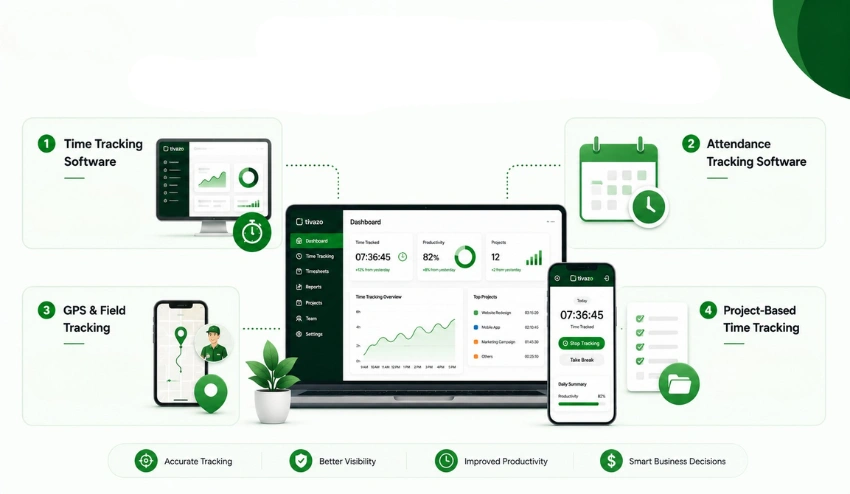
Not all automatic time tracking solutions are created equal. This will depend on your team’s size, industry, and working environment. These are the six best ways that businesses are currently going about it.
1. Dedicated time tracking software
This is the most common technique. Employee time tracking software automatically records work activity, project hours, and attendance without employees having to manually start or stop timers.
Modern platforms provide:
- Work activity-based automatic timers
- Analyze productivity and create performance dashboards.
- Team-wide attendance tracking
- Payroll-ready reporting
- Integrations with project management tools
Best for: SaaS Companies, Remote Teams, Marketing Agencies, IT Companies, Consulting Practices
2. Attendance tracking software
Tools that focus on attendance rather than what employees are doing are a better solution for businesses whose primary concern is knowing when employees are working.
These systems handle:
- Clock-in and clock-out records
- Shift scheduling and management
- Break and leave tracking
- Attendance summary reports
Best for: Call Centers, Retail Stores, Hospitals, Hotels
Automating attendance tracking helps to prevent payroll mistakes and eliminates the need for manual sign-in sheets or buddy punching. Check out our attendance tracking guide for a step-by-step overview of how to set it up.
3. GPS and field tracking tools
It is not always possible to locate field-based teams via the desktop-based application. Construction personnel, delivery drivers, and service technicians require location-aware tools to confirm where work is being performed, not when.
GPS work hour monitoring can assist businesses:
- Verify that field staff are on-site during working hours
- Record job site hours for specific locations
- Monitor travel time between assignments
- Improve coordination across dispersed teams
4. Project-based time tracking
Project time tracking is more than just time logged, it is time to specific tasks, clients, and deliverables. It can be especially beneficial for companies that invoice their clients per hour or those who want to track profitability on a per-project basis.
These systems track:
- Time spent per client or project
- Billable versus non-billable hours
- Task completion timelines
- Team efficiency across different project types
For instance, a web-development company might track the number of hours that designers, developers, and QA testers spend at the various stages and draw on that information when they go to work on new projects, pricing them more precisely.
Best for: Marketing agencies, software companies, law firms, and creative studios
5. Browser extension tracking
Browser extensions can auto-track time based on which tabs and sites are active for teams that work on the browser—research, email, web-based tools, etc.
This technique is lightweight, quick to deploy, and can be used in addition to other tracking techniques as a layer of cover.
Best for: Content teams, digital marketers, support teams, and research teams.
6. Integrated HR and workforce management platforms
Some businesses choose to manage all their time tracking, payroll, and HR needs in one place with an all-in-one workforce management platform instead of having to use separate tools.
This will eliminate data silos, enable fewer manual data transfers between systems, and provide HR leaders with one source of truth for all workforce data.
Best for: Midsize to enterprise businesses, businesses with more complicated payroll requirements, and HR teams with more high-volume staff.
Productivity Tools That Support Time Management
In addition to automatic tracking, businesses also require tools that aid planning and efficiency. Teams can use these tools to manage time more effectively and to be more focused.
A selection of time planning and calculation tools. A variety of time planning and calculation resources.
Tools can be used to help businesses get a better idea of workload and make better plans:
- Overtime Calculator: Quickly calculate overtime pay based on tracked hours and rates
- Time Card Calculator: Convert raw clock-in/clock-out data into accurate payroll totals
- Hourly Salary Converter: estimate earnings per hour for payroll planning and contractor management
These tools are particularly useful for HR and payroll teams who need quick, accurate calculations without switching between systems.
Focus and Work Efficiency Tools
There is more to productivity than just time tracking; it’s also about improving focus.
- The Pomodoro Timer aids employees in working in concentrated chunks.
- Online Timer allows task-based time blocking.
- For military teams worldwide, the Military Time Converter is a valuable tool in standardizing time formats.
They help facilitate structured work practices and enhance team efficiency.
How Tivazo Supports Automatic Time Tracking?
Tivazo is designed to help modern teams manage work hours efficiently using automation.
Instead of using multiple tools, businesses can manage everything in one system.
Tivazo provides:
- Automatic Time Tracking: accurate work-hour recording without manual input
- Employee Monitoring: activity visibility across remote and hybrid teams
- Performance Insights: productivity trend analysis at the individual and team level
- Detailed Timesheets & Report: detailed, auto-generated reports ready for payroll and client billing
- Team Management: structured oversight tools for managers
- Live Screenshots: optional visual accountability without micromanagement
This combination reduces operational complexity and gives businesses a clear, reliable picture of how their workforce spends time , without adding admin burden.
Industry Use Cases
In many industries, automatic time tracking is utilized.
- IT and Software Teams: Used for sprint planning, coding hours, and task tracking.
- Marketing Agencies: Validates the performance of the campaign and client project hours.
- Remote Teams: Make sure that responsibilities are met, even when the person is not present.
- HR Departments: Automates attendance and payroll.
- Consulting Firms: Records billable hours for reporting to clients.
- Customer Support Teams: Participates in shift time management and performance monitoring.
The following are Examples of Common Errors to Prevent
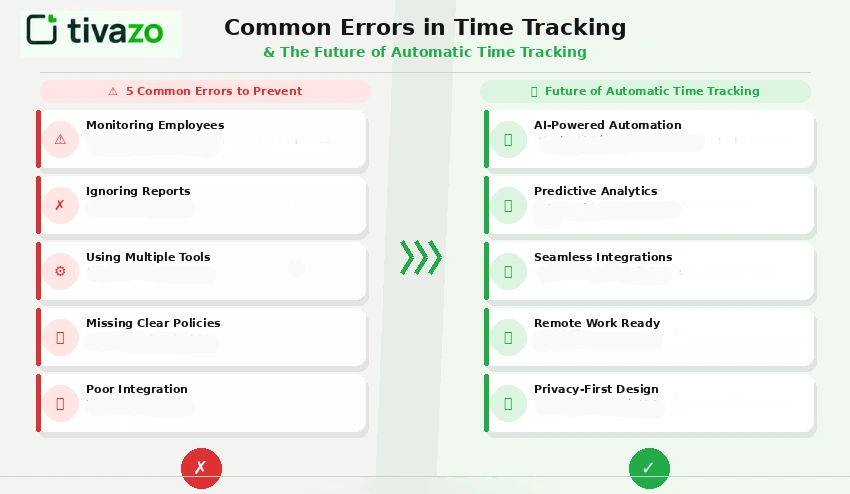
1. Monitoring Employees
Excessive tracking can lead to a decrease in employee satisfaction and trust.
2. Ignoring Reports
If data is not properly analyzed, it is not useful at all.
3. Using Multiple Tools
There are too many systems that diminish efficiency and confuse.
4. Missing Clear Policies
Staff need to become familiar with the tracking system.
5. Poor Integration
Time tracking should be integrated with payroll and project management systems.
Future of Automatic Time Tracking
Future of Automatic Time Tracking
There are many different tools available to businesses to monitor working hours, which are changing at a fast rate. That’s where the industry is going in the next several years.
1. AI-powered productivity analysis will move beyond tracking to recommendations. Future systems will not just show where time goes, they will suggest how to reorganize work patterns to reduce inefficiency.
2. Fully passive tracking will require zero interaction from employees. Systems will detect work context automatically and categorize time without any configuration.
3. Smart task distribution will use AI to match tasks to team members based on current workload, historical performance, and availability, making resource allocation a data-driven decision rather than a managerial guess.
4. Deeper business tool integration will connect time tracking seamlessly to CRMs, project management platforms, accounting software, and HR systems, creating a unified view of business operations.
5. Employee well-being monitoring will become a standard feature, with tools designed to flag overwork patterns, suggest breaks, and help prevent burnout before it affects performance.
Conclusion
Manual timesheets are in the past. For today’s distributed workforces, hybrid work environments, and project-driven businesses, they cause more issues than they address: Wrong data, inaccurate payroll, billing inaccuracies, and no real-time visibility.
Automatic time tracking can solve all these issues as it logs working time, produces reports on the spot, and provides management with the information they need to better manage their team.
Billable Hour (BH) tracking is just one of the most ROI-worthy changes you can make to your operations, whether you’re an agency that needs to be accountable for billable hours, an HR team that’s juggling many employees, or a remote-first company trying to keep track and be productive without micromanaging their team.
Time tracking, employee monitoring, and reporting have been consolidated on a single platform, such as Tivazo, eliminating the complexity and allowing your employees to focus on what matters.
Ready to get started? Try Tivazo free trial and see how automatic time tracking transforms the way your team works.