You had a plan for today. Some priorities, a couple of meetings, and some time to work on important tasks are scheduled. It all felt manageable. But then there was today.
It’s now the end of the day. You have half of your tasks left, your team has been “busy” all day, and you’re not exactly sure what you actually achieved – or what the day has even done. This happens more than you think.
It’s not the effort. It’s visibility. Without time awareness, there is no way to improve productivity. That’s where productivity time tracking comes in – not to manage time, but to understand it.
What is Time Tracking for Productivity?
Time tracking for productivity is about tracking the time spent on various tasks, projects, and activities – to improve productivity, attention, and results.
It goes beyond simple time tracking of employees for payroll or HR purposes.
It can help answer questions such as the following:
- What takes the longest?
- Where are we getting stuck?
- What’s important and what’s not?
With time tracking software, your team will quickly notice these patterns – not as finger-pointing, but as information the entire team can learn from.
Rather than guessing, you can understand the reality of what’s happening.
Does Time Tracking Really Make You More Productive?
Yes, but only if you use it correctly. There are a couple of longstanding theories.
Parkinson’s Law states that work takes up the time you have to do it. If the work isn’t constrained, it takes longer. Counting adds awareness and constraints.
Self-monitoring, as described in Harvard Business Review, illustrates that there is a tendency to modify behavior when people know someone is watching them – even if it’s themselves.
The Pomodoro Technique adds to this by promoting work sprints. Teams often do this anyway once they start time-tracking.
But the truth is, time tracking doesn’t make your team productive. It gives you visibility. And visibility allows you to improve.
When done properly, it helps your team:
- Prioritise important work
- Reduce unnecessary tasks
- Plan more accurately
- Stay accountable without pressure
The top workplace wasters of time (and how to spot them by tracking)
Productivity problems aren’t always glaring. They’re revealed as subtle wastes of time.
1. Constant context switching
Multitasking between emails, messages, and tasks. Even brief distractions can lead to less deep work.
Time logging can expose just how much time is wasted.
2. Ineffective meetings
Meetings are essential, but they’re often too long or unproductive.
When you log your time, you can see how much time is spent talking about things.
3. Underestimated tasks
Certain tasks take longer than others.
Without data, it seems coincidental. With data, patterns emerge – and planning improves.
4. Digital distractions
There are distractions you don’t see. Tools, pop-ups, and browsing can be time suckers.
Here, smart team productivity tracking is important to spot patterns without being intrusive.
5. Overworking without results
More time doesn’t necessarily equal productivity. They can indicate low productivity or exhaustion.
Monitoring your work hours can alert you when you’re not getting the job done in less time.
Here’s How to Get Started Tracking Time at Work
It doesn’t have to be complicated. The key is consistency.
Step 1: Set your goal
Have a purpose.
Are you trying to
- Improve productivity?
- Understand workload distribution?
- Fix delays in projects?
This will inform the rest.
Step 2: What to measure
Don’t track everything.
Focus on:
- Core tasks
- Key projects
- Important workflows
Keep it simple at the beginning.
Step 3: Select a tool
Spreadsheets don’t work in the long run
Time tracking software will make tracking time more efficient, precise, and less intrusive to your team.
Step 4: Talk to your employees
How you introduce time tracking matters.
Position it as
- A tool to eliminate wasted time
- A method to improve planning
- A way to achieve balance
Not as surveillance.
Step 5: Start small
Do this for a week or two.
Then evaluate:
- What did you learn?
- What felt unnecessary?
- What should change?
Step 6: Use the data
This is where most teams fall short.
Look at:
- Time spent per task
- Delays and bottlenecks
- Productivity trends
Then optimize workflows.
What to Look for in a Time Tracking Tool
Not all tools are about productivity improvement. You need insight, not information.
1. Automatic tracking
Manual entry is inconsistent.
Automatic tracking is more accurate but doesn’t get in the way of your team.
2. Team visibility
You must be able to see the work. An effective team management system will allow you to manage workload and support team members.
3. Insightful employee monitoring
Effective employee monitoring is about understanding, not micro-managing. It’s about understanding what work is being done – not just if it’s done.
4. Context through screenshots
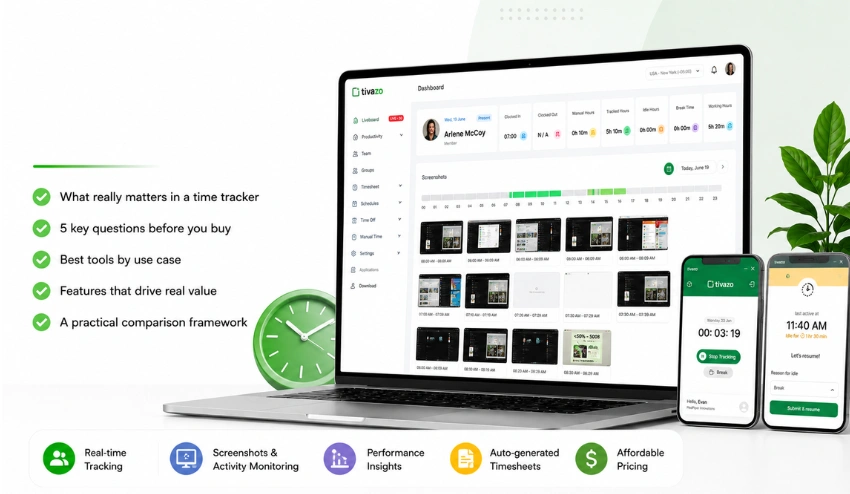
Live screenshots, for example, help explain time entries (particularly in remote work). They eliminate the need for micromanagement but keep things open.
5. Actionable reporting
Data alone isn’t helpful. You need insights on performance, as well as timesheets and reports, to make decisions.
How Does Tivazo Help Teams Track Time and Boost Productivity?
Tivazo is designed to make time tracking practical, not complicated.
Effortless work hours tracking
Tivazo tracks time automatically, reducing manual effort and improving accuracy. Your team can focus on work—not logging it.
Clear team visibility
With built-in team management, you can see who is working on what and how time is distributed across projects. This helps you plan better and avoid overload.
Smart employee monitoring
Tivazo’s employee monitoring focuses on understanding behavior patterns, not micromanaging individuals. This creates a healthier, more transparent work environment.
Real-time context with screenshots
Using live screenshots, managers gain visibility without disrupting workflows. This is especially useful for remote and hybrid teams.
Data that drives decisions
Tivazo provides actionable performance insights along with clear timesheets and reports.
This allows you to:
- Identify inefficiencies
- Improve planning
- Track progress over time
This is where time tracking for productivity becomes truly valuable – when it leads to better decisions.
5 Common mistakes when tracking time (and how to avoid them)
1. Tracking too much too quickly
Trying to capture everything can overwhelm your team.
Solution: Start small and expand gradually.
2. Treating it like surveillance
If your team feels watched, adoption will fail.
Solution: Focus on improvement and transparency.
3. Ignoring insights
Tracking without analysis doesn’t help.
Solution: Review and act on data regularly.
4. Not involving your team
Top-down implementation creates resistance.
Solution: Include your team and gather feedback.
5. Expecting instant results
Productivity improvements take time.
Solution: Focus on long-term trends rather than immediate results.
Ready to take control of your team’s productivity?
If you’ve ever wondered where your team’s time actually goes, you’re not alone.
Time tracking for productivity gives you the clarity to move beyond assumptions and start making informed decisions.
With the right approach, you can:
- Reduce wasted time
- Improve focus
- Support your team more effectively
Tivazo helps you do exactly that—with simple tracking, clear insights, and tools designed for real teams.
If you’re ready to bring more clarity and control to your workday, now is a good time to try Tivazo.