Most of your employees don’t object to a transparent time tracking system simply because they’re hiding something. They don’t like it because nobody told them why it’s there, what is being recorded, or how the data is being used against or for them.
The transparency issue is that. And it’s fixable.
It’s not a time tracking system that compromises accountability. It’s about making the process visible, fair, and clearly communicated, so that employees don’t perceive the system as a surveillance program, but as one that can work for them on their side as well.
This guide explains how to create that system, the policies, the communication, the features, and the daily habits that make a process that’s contentious, one that’s one your team trusts.
Why Employees resent time tracking: it costs you
Employees hate time tracking–and it is costing you.
If you want to solve a problem, it’s best to fully grasp it.
The majority of workers who don’t trust time tracking have one or more of the following concerns:
- They are unaware of the data that is being collected.
- They have no idea who it’s for or what they’re going to be used for
- They think it is used to criticise, not quantity.
- They have witnessed it in a non-uniform manner in the team
- They never had access to their own records!
That mistrust comes at a price. According to Harvard Business School research, there was an 89% rise in employee buy-in and a 76% drop in resistance when tracking times were transparent for tracking purposes. Businesses that enact tracking without informing the employees are not only facing resistance, but they are also facing disengagement, lower productivity, and, in some cases, loss of employees.
The fix isn’t a softer tool. It is a more effective process that fosters open communication, clear communication, consistency, and transparency.
What a Transparent Time Tracking System Actually Looks Like
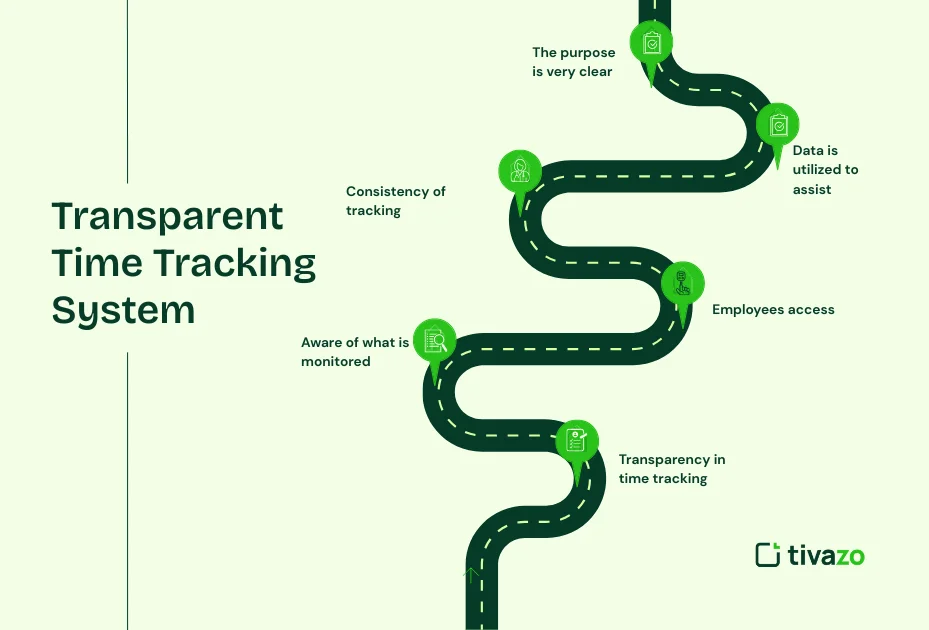
- Transparency in time tracking is about these five key principles
All your decisions on your system should relate to one or more of these. It should be clear what is being monitored and by whom - Staff are aware of what is monitored
The system shouldn’t be based on any confusion about what data it captures. The time tracking that employees spend on the job, on projects, during downtime, taking screenshots, whatever your system tracks, your employees should know about it, understand it, and agree to it before beginning their work. - This will give employees access to their own information
Transparency is only real when the people being measured have access to the data that their managers have access to. Disputes decrease, and accuracy increases when staff can access and view their own records as they correct their own records before anyone else does. - Consistency of tracking is applied across
There is no faster way to lose a customer’s trust than to have a policy that affects some and not others. If time tracking is enabled, it is equally applicable to all team members irrespective of their seniority, and as per the same rule - Data is utilized to assist and not to penalize
Staff should be exposed to the figures that are helping them. This would include when the employee is working too hard and the beginning to prevent burnout, to help with the distribution of work fairly, and to provide evidence when the employee has made a contribution that needs to be recognized. - The purpose is very clear and is repeated
Transparency is not an announcement, and it is not a single event. This is a continuous communication practice. As they become aware of the purpose of the system and when the purpose is supported by measurable results, over time, they begin to trust the system.
Step-by-step guide to creating a clear time tracking system
Step-by-step guide to creating a clear time tracking system.
In Step 1
Students identify what they will and won’t monitor. Students identify what they will and won’t monitor in Step
Any system launched should be based on a clearly understood set of data, not a set of data you don’t need! Gathering too much data poses a privacy risk, exposes you to legal liability, and brings resentment from employees.
Before launching, there are some questions to be answered:
- Do you keep track of hours worked or project time or both?
- Will the system take screenshots? If this is the case, what is the frequency?
- Will there be any form of monitoring of idle time? What does “idle” mean?
- Will there be the collection of location or GPS data?
- What is the amount of time that data will be kept for?
Make these decisions in writing. This document is your tracking policy, which is the basis of your transparency system.
Step 2

To develop a Clear, Plain-Language Tracking Policy
You don’t have to use legal terms in your transparent time tracking policy. It needs clarity. It should be readable to the employees and clear what will happen to their time data.
A good tracking policy includes:
- What is measured and what isn’t.The measurable and the unmeasurable.
- Who will be responsible for the data (manager only, HR, executive team)
- How data is used (payroll, performance review, project billing)
- The availability of access to employees’ records.
- If you have any concerns or have a dispute with an entry, please follow this procedure:
- The data retention/deletion timeline:
- Adherence to applicable data protection regulations (GDPR, CCPA if applicable)
Communicate this policy before going live with the system. Allow staff time to read, ask questions, and feed back concerns. This step takes care of the major resistance you will otherwise face.
Step 3
Select a system that enables employees to be visible
Not all time tracking software is created equal. There are tools that are specific to management oversight. To have a transparent time tracking system, a platform is needed that can be used by employees and not just managers.
Look for the following features:
The personal report dashboard allows employees to see their own work hours in real time, and there is a way to review the report to ensure transparency.
| Feature | Why It Matters for Transparency |
| The employee self-view dashboard | Employees have real-time visibility into their hours, and the report can be reviewed for transparency. |
| Manual time logging with approval | Employees to correct their own hours, and for the manager to review any changes |
| Activity categories | Allow for the tracking of time by activity category, not just as undifferentiated hours, and for employees to review their own hours to ensure they have the correct data. |
| The personal report dashboard | allows employees to download their personal report at any time, creating accountability in both directions |
| The change is visible for audit purposes | Recorded both ways, giving the employee and the manager visibility into the changes made. |
| Audit purposes | Sensitive data is masked or excluded from the report, and there’s a way to review the report to ensure transparency. |
Tivazo has everything that these features encompass. Employees also have their own visibility of hours logged, project time, and activity data. Team-level reporting is provided for managers. There is no unsighted side.
Step 4
Communicate before, during, and after the launch
Transparency isn’t a software setting; it’s a communication method. Here are the communication steps to reduce resistance and gain trust from the first day.
Before launch: (2-3 weeks out):
- Have a team meeting to discuss the importance of implementing time tracking.
- Share the tracking policy document for review.
- Accept questions and record responses publicly (FAQ document or shared Slack thread)
- Make sure they understand what will NOT be measured, not just what will be measured!
At launch:
- Show the team how to use the system during a session.
- Demonstrate ways to access employees’ data
- Make sure you know who to reach out to if there is an error or concern
- Establish guidelines for reviewing data, when, and how
Ongoing:
Review team data every month and share the aggregate data (e.g., “As a team, we logged 820 hrs last month across these project categories”)
- Support judgments with data in performance conversations, rather than relying on data alone.
- Encourage staff to raise any concerns they may have about their records.
- Examine tracking policy once a year and revise as necessary when practices change.
Step 5
Give employees control where possible
Employees have greater trust in tracking when they are closer to controlling it. Wherever possible in the workflow, involve them in it.
How to make employees feel more in control:
- Permit self-logging in certain instances, with manager permission, not exclusively automated silent tracking.
- Allow staff to record observations or explanations about times recorded
- Enable employees to mark up entries for disputes directly on the system
- Provide team leaders access to team data for their own team as well as HR or senior management.
- Let staff make their own break preferences as per policy guidelines
It is not a matter of less supervision. It’s about engaging employees rather than just telling them. This leads to improved data accuracy and much higher buy-in.
Step 6
It is not a matter of less supervision. It’s about engaging employees rather than just telling them. This leads to improved data accuracy and much higher buy-in.
These steps are explained in the following section. The following section explains these steps.
The key to establishing a long-term trust in any transparent time tracking system is to utilize the data to assist employees and to ensure that they are visible while doing it.
Concrete examples:
- Analyze your time spent on overtime and correct unsustainable workloads in time to avoid burnout
- Provide project time data to support an employee’s case for a raise or recognition (“this person contributed 340 hours to the highest-revenue project last quarter”)
- Apply attendance data to support flexible working requests, not on a gut level
- Use workload distribution data to detect when one team member may be taking on too many tasks/loads
If the data is being used to protect employees, rather than just to assess them, resistance will be reduced, and accuracy will be raised. They are beginning to record the hours truthfully since they know it is working in their favor and in the company’s favor.
Common Mistakes That Destroy Employee Trust in Time Tracking

The best wishes of systems do not help if they’re poorly implemented. Here are the top
| Mistake | Why Does It Damage Trust | What to do Instead |
| Launching without explanation | Employees assume the worst | Communicate the purpose in writing before launch |
| Tracking more data than needed | Creates surveillance anxiety | Track only what you will actually use |
| No employee access to their own data | Creates a power imbalance | Data creates a power imbalance |
| Applying policy inconsistently | Feels punitive rather than fair | Document and enforce the same rules for all roles |
| Using data only to flag problems | Employees see it as a trap | Actively use data to recognize contributions |
| Never reviewing or updating the policy | Trust erodes over time | Review annually and share changes |
What do you mean by a transparent time tracking System?
Teams that need to balance transparency and accountability come to Tivazo. It’s not a spy device. It’s a productivity platform that provides employees and managers with the visibility they need to be productive.
For employees:
- User dashboard with hours logged, project time, and activity overview
- Clear approval workflow with manual time entry.
- Screen masking to protect sensitive data from being captured in screenshots
- Personal reports to export for payroll verification or personal records
For HR managers and team leads:
- Team-level reporting between departments, project and individuals
- Being alerted to signs of burnout in real-time to prevent burnout issues.
- Attendance and work-hours information for correct evidence-based performance reviews
- Full accountability in both directions on all changes to the time record (audit trails)
For corporate companies:
- Enterprise-level workforce planning with cross-department timesheet visibility
- Data handling in compliance with GDPR principles (configurable data handling, retention, and access control)
- Role-based permissions, which means that only what they need to see is what they do see, at each level of management.
Tivazo makes time tracking an instrument for everyday working life, not a battle between the IT department and the workforce.
Conclusion
The key to a transparent time tracking system is to intentionally create a system to achieve that. Once staff know what they are monitoring, its relevance, and how it will benefit them, they will not be resistant and will be more accurate.
This six-step guide provides a practical approach: establish a clear scope for your data, develop a clear policy, select software that is designed to be mutually visible, communicate clearly, empower your employees to have a stake in your policy, and use the data to support your team, rather than to judge them.
Companies that are doing it right are not tracking more. They are monitoring more intelligently, and systems that their people trust and willingly join.
Tivazo is designed to provide HR managers, team leads, and corporate companies the visibility they require without the spy mentality that runs against trust.
When it comes to friction versus insight, your current system may be the problem – it’s time to change your approach. Start with transparency. Everything else follows.