
When different rates, shifts, and work schedules come into play, overtime pay can become quickly confusing.
Whether you are a worker looking at your paycheck or a business aiming to be more precise with payroll calculations, it’s important to know how to determine overtime pay.
Fortunately, the process is not as complicated as many people believe. With the overtime pay formula and the federal overtime regulations, you can use Free Overtime Calculators or a Time Card Calculator to calculate overtime pay in minutes.
This guide explains things step by step, with actual examples from the workplace, simple formulas, and practical payroll tips.
How Do You Calculate Overtime Pay?
Employers calculate overtime pay by:
- Tracking total weekly hours worked.
- Identifying overtime hours (typically over 40 hours in a workweek).
- Calculating the employee’s regular rate of pay.
- Applying the overtime multiplier (usually 1.5× the regular rate).
- Including eligible bonuses and commissions.
- Adding overtime wages to regular earnings.
What exactly is Overtime Pay, and why is it important?
Overtime pay is additional wages someone receives for working past their regular working hours.
The Fair Labor Standards Act (FLSA) sets the federal rules for minimum wage and overtime pay for employees in the United States. are eligible for overtime pay after working 40 hours in a workweek.
In most cases, overtime is paid at:
- 1.5 times the regular hourly rate
- Often called “time and a half.”
- Applied to hours worked over 40 per week
For example:
- Regular hourly wage: $20
- Overtime: 150% of the base rate
- Overtime hours: 5
As a result of this employee’s overtime, he would receive an additional $150 in wages.
Overtime is important because of its impact on:
- payroll management
- employee attendance tracking
- labor costs
- payroll accuracy
- employee satisfaction
The importance of accurate work hour tracking increases for businesses that work remotely or on a hybrid schedule.
To minimize payroll errors and make overtime tracking easy, many companies are now implementing Time Tracking systems, Timesheets, and Report tools.
How to Calculate Overtime Pay Step by Step
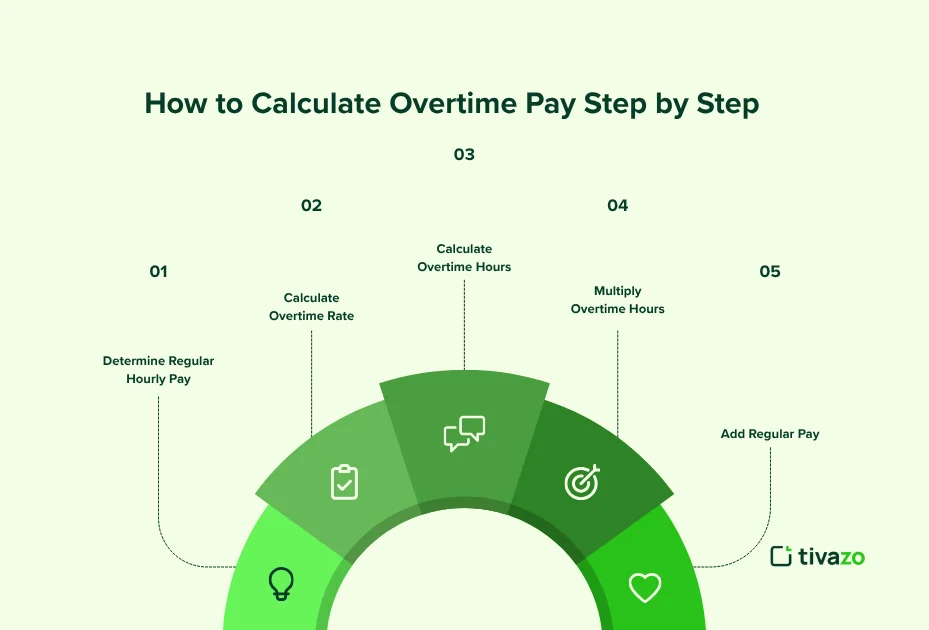
If you’re wondering how to calculate overtime pay after 40 hours, follow this simple process.
Step 1: Determine Regular Hourly Pay
Start with the employee’s standard hourly wage.
Example:
- Hourly rate = $18
Step 2: Calculate Overtime Rate
Most US employers pay time and a half.
The overtime pay formula looks like this:
Regular hourly rate × 1.5
So:
$18 × 1.5 = $27 overtime rate
Step 3: Calculate Overtime Hours
Subtract 40 hours from total weekly hours worked.
Example:
- Total hours worked = 47
- Overtime hours = 7
Using an Employee Monitoring system or a work hours tracker can help prevent missed overtime hours.
Step 4: Multiply Overtime Hours by Overtime Rate
7 overtime hours × $27 = $189 overtime pay
Step 5: Add Regular Pay
Regular pay:
40 × $18 = $720
Total paycheck:
$720 + $189 = $909
Businesses often automate this process using an [Overtime Calculator] and [Timesheets and Reports] software to avoid manual payroll errors.
What Is Time and a Half Pay?
“Time and a half” means employees earn 150% of their regular hourly wage for overtime hours.
It’s the most common overtime structure in the US.
Time and a Half Formula
Overtime Rate = Regular Hourly Rate × 1.5
Here’s a quick breakdown:
| Regular Rate | Overtime Rate |
| $15/hour | $22.50/hour |
| $20/hour | $30/hour |
| $25/hour | $37.50/hour |
| $30/hour | $45/hour |
Many employees use a time-and-a-half calculator or an hourly salary converter to estimate weekly earnings before payday.
Overtime Pay Calculation Examples for Hourly Employees

Real examples make overtime calculations easier to understand.
Example 1: Retail Employee
A retail employee earns $16 per hour and works 45 hours.
| Calculation | Amount |
| Regular Pay | 40 × $16 = $640 |
| Overtime Rate | $16 × 1.5 = $24 |
| Overtime Pay | 5 × $24 = $120 |
| Total Weekly Pay | $760 |
Example 2: Remote Customer Support Agent
A remote support employee earns $22 hourly and works 52 hours during a product launch week.
| Calculation | Amount |
| Regular Pay | 40 × $22 = $880 |
| Overtime Hours | 12 |
| Overtime Rate | $33/hour |
| Overtime Pay | $396 |
| Total Weekly Pay | $1,276 |
This is where remote employee tracking tools become useful. Businesses that manage distributed teams often rely on Team Management and Performance Insights features to monitor workloads before overtime costs increase.
Example 3: Healthcare Worker
Healthcare workers often deal with long shifts. An employee earns $28/hour and works 60 hours.
| Calculation | Amount |
| Regular Pay | $1,120 |
| Overtime Hours | 20 |
| Overtime Rate | $42/hour |
| Overtime Pay | $840 |
| Total Pay | $1,960 |
Using an overtime pay calculator with examples can save HR teams significant payroll processing time.
5 Common Overtime Calculation Mistakes to Avoid
Even experienced payroll teams make overtime mistakes. Here are the most common ones:
1. Miscalculating Total Work Hours
Missing clock-ins, forgotten breaks, or manual spreadsheet errors can create payroll problems. Using time-tracking software helps track work hours accurately.
2. Ignoring Overtime After 40 Hours
Some businesses accidentally calculate overtime daily instead of weekly. Federal overtime rules are generally based on total weekly hours.
3. Using the Wrong Hourly Rate
Bonuses, commissions, and shift differentials may affect overtime calculations. An accurate payroll overtime calculator helps avoid underpayment.
4. Misclassifying Employees
Not every employee qualifies for overtime exemption. This is a common compliance issue for small businesses.
5. Relying on Manual Timesheets
Manual calculations increase payroll errors. Automated timesheet and report systems improve payroll accuracy and reduce admin work.
Best Free Tools for Overtime and Work Hour Tracking

The right tools make overtime calculations much easier. Here are some useful options for employees and businesses:
1. Overtime Calculator
Useful for:
- calculating overtime instantly
- estimating weekly pay
- checking time and a half earnings
2. Time Card Calculator
Helpful for:
- tracking shifts
- calculating total weekly hours
- Reducing employee timesheet mistakes
2. Hourly Salary Calculator
Great for:
- converting hourly wages
- estimating payroll costs
- comparing compensation
3. Military Time Converter
Useful for workplaces using 24-hour time systems.
Common in:
- healthcare
- security
- logistics
- manufacturing
4. Online Timer
Helpful for:
- productivity tracking
- focused work sessions
- Reducing unnecessary overtime pay
Many businesses combine these tools with time tracking systems for complete work hour tracking and payroll reporting.
5. Pomodoro Timer
Helpful for:
- focused work sessions
- improving deep work habits
- managing breaks efficiently to avoid burnout
US Overtime Rules Every Employee Should Know
Understanding how overtime pay works in the US helps employees avoid paycheck confusion.
Here are a few key rules:
Most Employees Earn Overtime After 40 Hours
According to the U.S. Department of Labor (FLSA guidelines), most non-exempt employees must receive overtime pay after 40 hours in a workweek.
Overtime Is Usually 1.5× Pay
This is the standard “time and a half” rule.
Salaried Employees May Still Qualify
Some salaried employees are still eligible for overtime pay depending on job duties and salary thresholds.
State Laws May Differ
Some states have stricter overtime laws than federal requirements.
For example:
- daily overtime rules
- double-time pay
- additional break protections
Employers Must Keep Accurate Records
Businesses are responsible for tracking employee work hours properly.
That’s why many companies use timesheets, reports, and employee attendance systems to maintain compliance.
How Tivazo Helps Businesses Track Overtime Efficiently?
Tracking overtime manually can quickly become overwhelming. Tivazo helps businesses simplify overtime tracking through tools designed for modern teams.
With features like Time Tracking, Employee Monitoring, and Team Management, companies can:
- Monitor employee work hours in real time
- Improve payroll accuracy
- Reduce overtime disputes
- Automate employee sheets
- Manage remote teams more effectively
- Identify productivity bottlenecks
Businesses also use performance insights and Live Screenshots to understand workload patterns before overtime costs become excessive.
For payroll teams, combining these tools with an overtime calculator creates a faster and more reliable payroll workflow.
Who qualifies for Overtime Pay?
Overtime is not a right for all workers. FLSA is not a one-size-fits-all approach: exempt or non-exempt.
Non-exempt employees are eligible for overtime. This includes the majority of workers who are paid by the hour, such as warehouse staff, retail workers, drivers, healthcare aides, and others who are not excluded as executives or professionals and are paid by the hour.
Non-Exempt Employees
Non-exempt employees are generally entitled to overtime pay. Under the FLSA, they must receive at least 1.5 times their regular rate of pay for every hour worked over 40 hours in a workweek.
Common examples of non-exempt employees include:
- Hourly workers
- Customer service representatives
- Warehouse employees
- Retail associates
- Manufacturing workers
- Administrative support staff
- Healthcare aides
Most employees paid by the hour fall into this category unless a specific exemption applies.
Exempt Employees
Exempt employees are generally not eligible for overtime pay. To qualify as exempt under the FLSA, an employee must typically meet all of the following requirements:
- Be paid on a salary basis.
- Earn at least the applicable federal salary threshold.
- Perform job duties that fall under executive, administrative, professional, outside sales, or certain computer-related exemptions.
Common exempt positions include:
- Executives
- Managers
- Human resources managers
- Certified public accountants
- Attorneys
- Doctors
- Certain IT professionals
Hourly Employees
Most hourly employees are non-exempt, and therefore qualify for overtime pay. If you work more than 40 hours in a workweek, your employer generally has to pay you time-and-a-half, unless your state has a different law.
Salaried Employees
The idea that salaried employees never get overtime is a common misconception among many people. However, salaried employees may still qualify for overtime if they fail the FLSA exemption tests based on salary level and duties.
Employers need to look at salary thresholds and the job’s duties to decide whether a salaried employee is exempt or non-exempt.
Part-Time Employees
Part-time workers do not automatically get overtime exemptions. Just like a full-time non-exempt employee, a part-time worker who works over 40 hours in a single workweek may be entitled to overtime pay.
Overtime eligibility is based on hours worked, not on employment status.
Simply being paid a salary does not automatically make an employee exempt from overtime.
Remote Employees
Most of the time, remote workers are governed by the same rules around overtime as on-site workers. Non-exempt remote, hybrid, and work-from-home employees must be paid overtime as necessary, and employers must keep accurate records of all hours worked.
Time tracking software helps businesses accurately track remote work hours, reduce payroll errors, and stay compliant with overtime regulations.
Key Takeaway: Overtime eligibility depends on an employee’s exemption status—not whether they are paid hourly, salaried, full-time, part-time, or remotely. Employers should review employee classifications regularly to ensure compliance with federal and state labor laws.
New in 2026: No Tax on Overtime (OBBBA)
It’s the largest overtime pay adjustment in years, and the majority of workers aren’t even aware of it.
On July 4, 2025, President Biden signed the One Big Beautiful Bill, which contains a specific federal income tax deduction for overtime pay, effective for tax years 2025-2028.
In simple terms, what does this mean:
Up to $12,500 (single filers) or $25,000 (joint filers) of qualified overtime pay may be deducted from federal taxable income.
Only the “half” of the overtime wage counts, not the full overtime wage.
Only overtime defined by FLSA is counted as overtime under state law or union agreement, or the voluntary policy of the employer does not count.
You still don’t have any of your paycheck withheld, and you deduct it from your tax return.
Social Security and Medicare taxes are unaffected
That’s why it’s increasingly essential to accurately track overtime hours; you can’t claim what you didn’t track.
Common Overtime Calculation Mistakes

Accuracy becomes very important in overtime calculations — particularly on a team level. Here are the most common ones to be on the lookout for:
1. You calculate by the pay period rather than by the workweek
You work out wages based on a pay period rather than a workweek.
2. The FLSA overtime
Rules apply to a 7-day workweek, not a pay period. If the average is 40 hours per biweekly, that doesn’t balance out a week in which 48 hours were actually worked.
3. Including bonuses in the base pay
Non-discretionary bonuses and commissions are part of the regular rate of pay before overtime is calculated. If that is not done, employees will be earning less than OT rate.
4. Incorrectly treating employees as exempt.
Just because a person is classified as “salaried” does not mean that they are exempt. Whether they are paid an hourly rate or a salary, if they actually work overtime, they are entitled to overtime pay, especially if their job responsibilities do not fall under the FLSA classification.
5. Not taking all compensable time into account
Hours spent preparing for the shift, cleaning up after the shift, or required training are all considered hours worked. Not doing so leaves out total hours and may result in overtime without being counted.
5. Not considering part-time staff who work over 40 hours
There’s no exemption for part-time. A part-time worker who works 25 hours per week and then works some overtime to make up for the gap has two overtime hours to claim.
Why Manual Overtime Calculation Fails Teams
For one or two employees, spreadsheet or manual timesheets are fine. Otherwise, the cracks begin to appear rapidly.
Each manual entry can be a mistake – incorrect clock-in time, wrong bonus not included in rate calculation, etc. Do that times 10, 20, or 50 workers weekly, and payroll problems are sure to arise.
The stakes are higher in 2026. Now, the OBBBA mandates that employers track and report separately FLSA-qualified overtime on W-2s. That’s why accuracy is important for your records, beyond just payroll compliance.
Tivazo does away with all the guesswork. Automatically tracks hours, marks overtime as soon as it crosses 40 hours, and creates accurate timesheets for payroll processing — without having to do all the calculations.
Make Overtime Tracking Easier and More Accurate
Learning how to calculate overtime pay helps employees verify earnings and helps businesses maintain payroll accuracy.
The process becomes much easier when work hours are tracked consistently, and calculations are automated. Businesses that regularly manage employee overtime pay can simplify payroll and work hours.
For growing teams, accurate overtime tracking doesn’t just reduce payroll errors; it also improves productivity, budgeting, and employee trust.