If you’ve ever opened an online timer and stared at two options, Timer and Stopwatch, wondering which one to use, you’re not alone. Most people just pick one and figure it out. But using the wrong tool for the wrong situation is a bit like using a ruler when you need a measuring tape. They both measure things. They’re just built for different jobs.
This isn’t a page about what these tools are; it’s a guide to help you decide which one to use and when. Because in a work setting, that choice actually matters more than you’d think.
The Quick Version
Understanding online timer vs stopwatch comes down to one simple difference: a timer counts down, a stopwatch counts up
Online Timer = counts down from a set time to zero. Stopwatch = counts up from zero.
- Use a timer when you’re thinking: “I have 30 minutes to finish this.”
- Use a stopwatch when you’re thinking: “How long does this actually take me?”
That’s it at the core. But the nuances matter especially at work, so keep reading.
What a Countdown Timer Is Really Good For at Work
A countdown timer is about control. You set the clock, and it tells you when time’s up. That psychological pressure, even when it’s mild, is surprisingly effective at keeping you on track.
Where it shines in a work setting
- Meetings with a fixed agenda: Set a timer for each agenda item to keep the conversation on track. Nobody wants a 15-minute check-in turning into a 45-minute discussion.
- Task windows: Assign a specific time block to finish a piece of work. It creates a natural sense of urgency without the stress of an actual deadline.
- Pomodoro sessions: The standard 25 minutes on, 5 minutes off model is based on countdown timers. Pomodoro is one of the best-researched techniques for staying focused.
- Break reminders: Set a timer for 10 minutes to take your actual break, not the “five minutes” which can turn into two hours.
- Presentations and pitches: Whether you’re practicing or giving the presentation, the timer will ensure you stay within the allotted time.
Why it actually works
The countdown creates a soft deadline. When you can see time ticking down, your brain treats the task as more urgent. You’re less likely to drift to your inbox or get distracted mid-task. It also prevents a common trap for focused workers, spending too long on one task and leaving nothing for everything else.
What a Stopwatch Is Really Good For at Work
A stopwatch is for measurement. It doesn’t tell you to stop; it just quietly counts up and gives you data. That data turns out to be incredibly useful.
Where it makes sense professionally
- Tracking how long tasks actually take: Most people dramatically underestimate this. A stopwatch shows you the truth.
- Freelancers logging billable hours: If you charge by the hour, a stopwatch is your best friend. Start it when you begin, stop it when you pause, and you have an honest record.
- Time audits: Want to understand where your workday is actually going? Run a stopwatch for each activity across one week. The results are usually eye-opening.
- Process improvement: If part of your job involves repetitive tasks, tracking how long each run takes helps you spot inefficiencies and see whether changes actually improve speed.
- Workflow analysis: For team leads and managers, measuring how long certain workflows take is useful data for planning, staffing, and improving systems.
Why it actually works
A stopwatch gives you real, honest numbers. You can’t argue with them. And once you have those numbers, you can make smarter decisions about time management, how long to allocate for tasks, where you’re losing time, and what to delegate or streamline.
Online Timer vs Stopwatch: Side-by-Side Comparison
| Feature | Countdown Timer | Stopwatch |
| Direction | Counts down | Counts up |
| Purpose | Control your time | Measure your time |
| Best for | Deadlines & structure | Analysis & tracking |
| Use case | Meetings, Pomodoro, breaks | Work logs, task timing |
| Mindset | “Finish before time ends.” | “See how long it takes.” |
How to Decide: A Simple Decision Guide
Still not sure? Use this as your quick reference:
Reach for the timer when
- You have a fixed time limit and need to stay within it
- You want external pressure to keep you focused
- You need an alert when time is up
- You’re juggling multiple tasks and need structure around each one
Reach for the stopwatch when
- You want to understand how long something genuinely takes
- You’re logging hours for billing or reporting
- You’re doing a time audit to improve efficiency
- You want data to plan better in the future
The key question is really this: are you trying to stay within a timeframe, or are you trying to learn something about your time?
The Pro Move: Use Both Together

Here’s where things get interesting and where most people leave time management gains on the table.
The smartest workflow isn’t a timer or a stopwatch. It’s using both in sequence.
Here’s a simple example:
- First, use the stopwatch: Run it during a task you do regularly, writing your weekly report or reviewing a batch of emails. Don’t try to rush. Just let it run honestly.
- Now you have data: Let’s say it took 42 minutes.
- Next time, use the countdown timer: Set it for 38 minutes and try to beat it. You now have a realistic but slightly challenging target.
This is how you improve over time. The stopwatch teaches you reality. The timer pushes you forward. Together, they turn vague intentions into measurable progress.
Real Workplace Scenarios
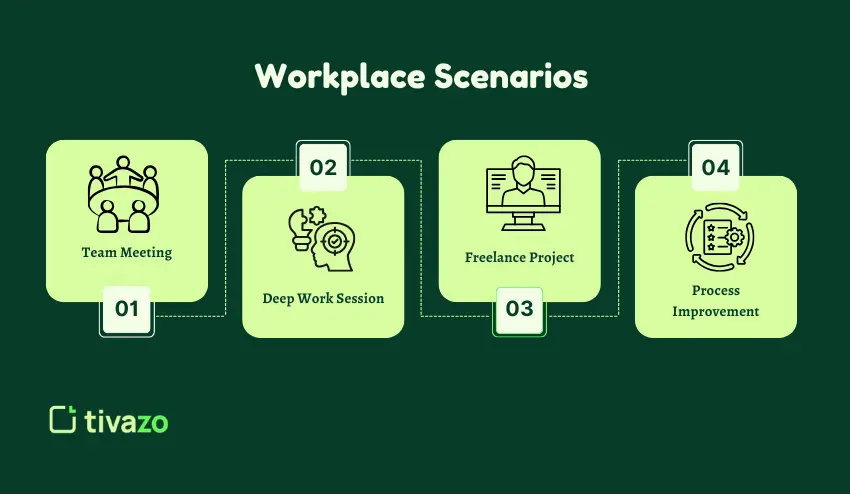
Scenario 1: Team Meeting
You have a 30-minute team sync with four agenda items. Set a countdown timer for each segment, roughly 7 minutes each. When it rings, move on. Meetings that used to run over suddenly start finishing on time.
Scenario 2: Deep Work Session
You have to write a proposal. You do not want to be sidetracked by your own mind. Set a 25-minute writing timer, then take a 5-minute break. Repeat. Your mind stays fresh, your work stays consistent.
Scenario 3: Freelance Project
You are a freelancer. You charge by the hour for your design work. A stopwatch tracks your hours honestly. No more guessing at the end of the day how many hours you really worked.
Scenario 4: Process Improvement
You have a slow onboarding process. Set a stopwatch over several iterations. Find the parts of the process that take the longest. Then, use a countdown timer on those parts of the process to challenge your team to work more efficiently.
Mistakes Worth Avoiding
A few common missteps people make when using these tools:
- Using a stopwatch when you have a deadline. If you need to be done by a certain time, a countdown timer will serve you much better. A stopwatch just tells you how long it’s been, not that you’re about to run out of time.
- Use a countdown timer when you need honest data. If you set a 20-minute timer and rush through a task in 18 minutes, you might feel productive. But if it normally takes 35 minutes and you just did it poorly, that’s a problem.
- Ignoring the data from your stopwatch. Tracking time is only half the job. Actually reviewing those numbers and adjusting your habits is where the value comes from.
- Setting unrealistic countdown targets. A timer works when it creates healthy pressure. If the target is impossible, it just creates stress and teaches you nothing.
So Which One Should You Use?
Here’s the simplest way to think about it:
- Timer = control your time. Use it when you know the limit and want to stay inside it.
- Stopwatch = understand your time. Use it when you want honest data about how long things take.
The best part? You don’t have to choose permanently. The real productivity gains come from using both strategic measuring with the stopwatch and then managing with the timer.
Try both modes in the online timer tool at the top of this page and see which one changes how you work.