If you’re looking for a professional billing format for a client, you’re not the only one. Whether you’re a freelancer, consultant, agency owner, contractor, or small business, a clean billing format will help you ask for payment professionally, reduce disputes, and get paid faster.
A good billing format for a client should include your business details, client details, invoice number, services rendered, price, taxes, payment terms, and due date. It gives customers a clear picture of what they are paying for, fostering trust in your business.
In this guide, you’ll learn:
- What a billing format for a client is
- How to bill a client step by step
- Different billing methods
- Free billing format examples
- How to create a billing format in Word
- Best practices to get paid faster
Key Highlights:
- Understanding client invoices: Billing format is important
- Three Types of Billing
- Creating Customer Invoices: Step-by-Step Guidelines
- How Should Freelancers Bill Clients?
- How to Bill a Client You Just Met?
- Convincing Your Clients to Pay You?
- How to Bill a Client in Word?
- How Do You Bill a Client for Shopping?
- Example of a simple Billing Format for Client
- Hints for Creating a Billing Format
What is a Billing Format for a Client?
A client billing format is a formal document that is used to request a client to make payment for products or services that have been rendered. It clearly shows the work done, the price, taxes, payment terms, and the total amount due.
A professional billing format is an official financial record for both businesses and clients, not just a simple payment request.
It helps to avoid confusion, keep accounting records accurate, and improve cash flow by clarifying what payments are expected.
Choosing the right billing format for client helps businesses create professional invoices, reduce payment disputes, and improve cash flow. A consistent billing format also makes it easier to manage multiple clients while maintaining accurate financial records.
A standard billing format typically includes:
- Business name and contact details
- Client information
- Invoice number
- Description of services or products
- Quantity or hours worked
- Rate per unit or hours
- Taxes and discounts
- Total amount due
- Payment methods
- Payment deadline
When billing clients based on hours worked, maintaining accurate work records makes invoicing easier and prevents disagreements about billable time.
Understanding client invoices: Billing format is important
Client invoices are more than just documents; they represent your brand, clarify your terms of payment, and help eliminate confusion. When using invoice formats, the client must understand what services/products they are paying for, how much, and when.
A clear invoice reduces confusion, leading to fewer disputes, provides quicker payments, and establishes trust. If you want your clients to pay on time and be happy, this is your starting point.
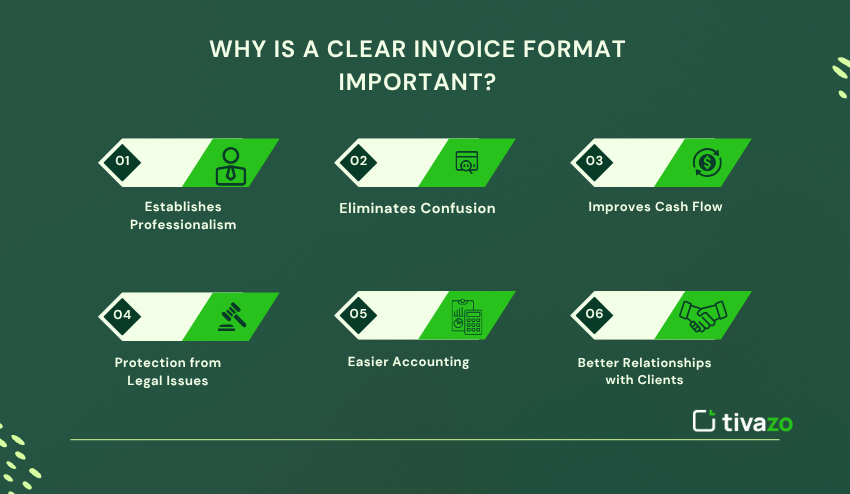
Why is a clear invoice format important?
- Establishes Professionalism – Using a consistent format indicates that your business is responsible and organized, and makes a strong impression on clients.
- Eliminates Confusion – Itemized services/products make it clear to your clients what they are being charged for and minimize the risk of disputes.
- Improves Cash Flow – Having a precise invoice with specified payment terms will help companies pay invoices quickly.
- Protection from Legal Issues – A well-constructed invoice acts as a legal document if there are any disputes over payment or in the event of an internal audit.
- Easier Accounting – All parties are using the same invoice (or close) format, allowing for easier tracking and more accurate bookkeeping and tax preparation.
- Better Relationships with Clients – When your billing is clear and straightforward, it adds transparency and builds trust, making it easier to retain a client and earn referrals.
In summary, investing your time into creating a clear billing format for client each month will allow you to save time later, relieve stress, and also deepen your relationship with your clients.
Billing Format vs Invoice vs Receipt
Many people use the terms “billing format,” “invoice,” and “receipt” interchangeably, but they do serve different purposes.
| Document | Purpose |
| billing FOrmat | Structure used to request payment |
| Invoice | Official payment request |
| Receipt | Proof that payment has been received |
| Estimate | Expected project cost before work begins |
Three Types of Billing
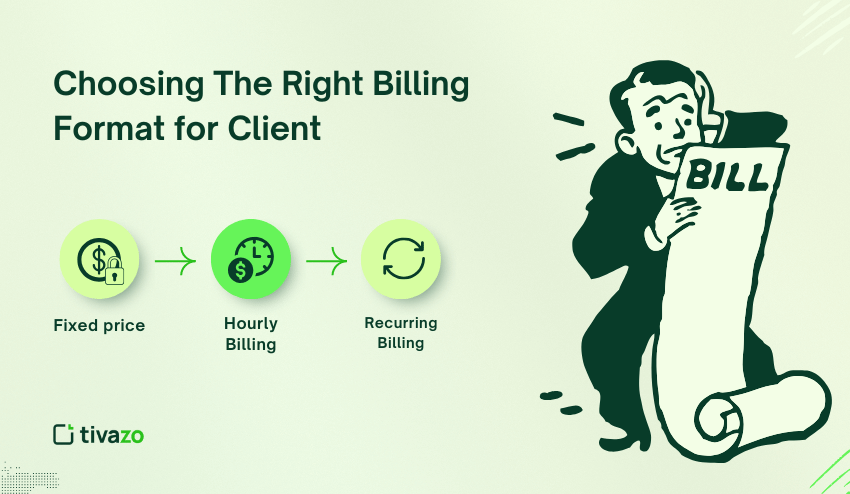
It is important to understand so you can choose the best method for billing format for client that suits your business model and your clients’ expectations. Here are three of the most common billing methods used in any industry:
| Billing Method | Description | Best For |
| Fixed Price Billing | The client pays an agreed-upon (fixed) price regardless of how much time is spent (A fixed price allows clients to have an upfront sense of costs | Projects that are based on work, product sales, or one-time services where the scope of work and deliverables are relatively defined. |
| Hourly Billing | The client pays for the actual hours worked. This is often estimated or tracked using spreadsheets or time-tracking tools. | Freelancers or consultants, agencies, or any projects that have an uncertain amount of time spent. |
| Recurring Billing | The client pays a fee on a regular cycle (weekly, monthly, annually, or other) for ongoing service or subscriptions. | Subscription-based services, retainers, memberships, or continuous service contracts. |
Which Billing Method Should You Choose?
Choosing the right billing method depends on your business model.
- Fixed-price billing works best for projects with clearly defined deliverables.
- Hourly billing is ideal for freelancers, consultants, and agencies that charge based on time spent.
- Recurring billing is perfect for subscription services, retainers, and ongoing client support.
If you bill your customers by the hour, accurate time-tracking software helps you create transparent invoices and reduce billing disputes.
Choosing The Right and Simple Billing Format for Clients
- Fixed price: projects help clients budget with costs and scopes, but are more prone to disputes further along because of the lack of a written agreement of deliverables and defined project scopes.
- Hourly Billing: provides flexibility and transparency but depends on accurate timekeeping.
- Recurring Billing: creates predictability in income and develops longer-term relationships with clients.
Choosing the best billing method that caters to your business, the needs of your clients, and allows for smooth cash flow and happy clients is important.
How to Bill a Client Step by Step
Many business owners know how to create an invoice but are unsure of the proper billing procedure. Using a consistent workflow allows you to bill clients professionally and get paid faster.
Step 1: Agree on Pricing Before Starting
Agree on the scope of the project, pricing model, payment schedule, and payment terms before you do any work. Writing it down helps avoid misunderstandings later on.
Step 2: Track Billable Work
If you charge clients hourly, accurately recording your work is essential. Instead of relying on manual spreadsheets, businesses can use automatic time tracking to capture work hours automatically. This makes it easier to track employee hours and create transparent invoices supported by accurate records.
Step 3: Prepare Your Billing Format
Include your business details, client information, invoice number, completed services, pricing, taxes, payment methods, and due date.
Step 4: Review the Invoice
Double-check all calculations before sending the invoice.
Step 5: Send the Invoice Promptly
Sending invoices immediately after completing work increases the chances of receiving payment on time.
Step 6: Follow Up Professionally
If payment is overdue, send a polite reminder while referencing the original payment terms.
Creating Customer Invoices: Step-by-Step Guidelines
The correct procedure for a simple billing format for a client & creating invoices should not take much time if you simply follow these step-by-step guidelines:
Step 1: Prepare Your Format
- You can use Microsoft Word, Microsoft Excel, or professional invoice and accounting software.
- Be sure to choose a blank or clean and professional template for your invoice. For a head start, you can download ready-to-use templates for business invoicing that cover common layouts and save setup time, or use tools like Zintego to create professional invoices quickly.
Step 2: Add Your Business Information
- You should enter your company name, address, email, and telephone number.
- As well as your client’s name and contact information.
Step 3: Assign a Billing Number and Date
- Provide a unique invoice number for internal tracking.
- Invoice date and payment due date.
Step 4: Enter Services or Goods
- List description, quantity, unit price, and total.
- Include any applicable taxes, especially if you sell across state or country borders, where VAT/GST and sales tax rules can vary by jurisdiction. In such cases, utilizing a global tax compliance software can help you consistently apply the correct tax treatment, minimize invoice errors, and maintain billing alignment with local requirements as you scale.
Step 5: Calculate Totals
- Subtotal and all taxes, etc., discounts, and total.
Managing invoices is much easier if employee work hours are already organized. Timesheets and Report enable businesses to calculate billable hours automatically, verify completed work, and minimize manual errors prior to sending invoices to clients.
Step 6: Offer Payment Terms and Methods
- The methods of payment that will be accepted.
- The due date of payment and any late payment terms.
Step 7: Check and Send
- Double-check all entries.
- Email the invoice or send it via professional billing software.
Businesses that bill clients based on hours can simplify invoice preparation by using Timesheets and Reports to automatically calculate billable work.
How Should Freelancers Bill Clients?
Freelancers usually charge clients by the hour or per project, so keeping accurate records of work is crucial.
For many freelancers, the best time tracking software is a smart alternative to manually logging hours, automating billable hours, improving invoicing accuracy, and providing transparent client reporting.
Reviewing Performance Insights before invoicing can also help justify project costs and demonstrate value delivered.
- Track hours diligently, often using tools like Memtime, Toggl, or Harvest.
- Create invoices using templates or embedded in their payment platform (e.g., PayPal, QuickBooks, or FreshBooks).
- Provide detailed descriptions of work performed.
- Clarify your terms of payment (i.e. 50% up front, the rest when done).
- Follow up (reminder) when payment is late.
How to Bill a Client Format You Just Met?
When billing a new client you’ve just met, there are additional steps to follow to create a professional image and trust from the onset. Creating a clear and professional and simple billing format for client helps the client know what to expect, decreases confusion, and makes payment more likely.
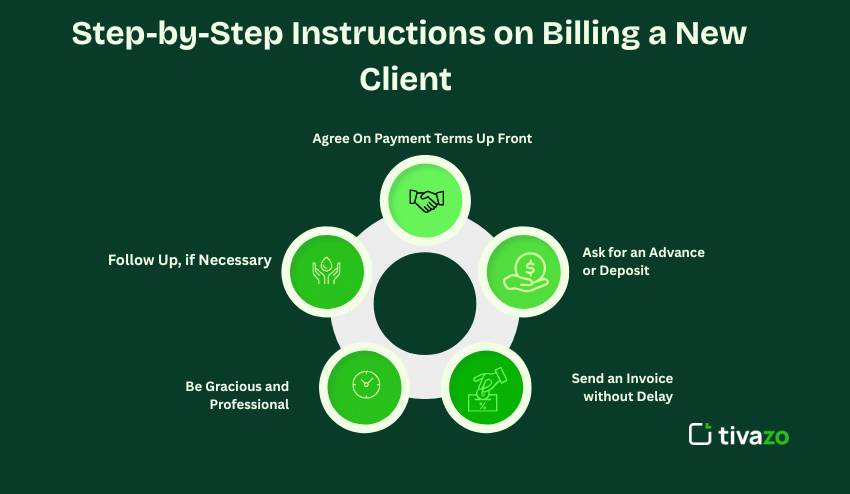
Step-by-Step Instructions on Billing a New Client
1. Agree On Payment Terms Up Front
Before doing any work, and before sending them your billing, sit down and discuss and confirm payment terms. Specifically, discuss the billing method (hourly, fixed fee, retainer, etc.), when you will send your bill (monthly/quarterly), payment modes, and the possible consequences for late payment. Anytime possible, please try to get an agreement on payment terms from the client in writing – a signed deliverable, or a clear email could suffice. Requesting this from the client in concrete terms and putting it in writing (and even charging them in your billing format for the client) defines everyone’s expectations. It builds trust, facilitates a strong relationship, and protects everyone from surprises later.
2. Ask for an Advance or Deposit
When working with new clients, it can be wise to ask for partial (or full) advance payment before you start work. Advance payment shows commitment to their project, and alleviates the non-payment risks involved. Including your advance payment in your billing format for client also sets the client’s expectation early.
3. Send an Invoice without Delay
If you provide a client with a service or product, do not hesitate to bill them. Bill them timely based on the terms you give them in a clear, concise billing format for client that includes descriptions of what you provided, quantities, rates, and total. When you bill them, you should spell out any payment directions or due dates that may help with timely payment processing.
4. Be Gracious and Professional
You should be gracious in your invoice email, and you should also be professional. Thank them for their business and ask if they have any questions. You can build goodwill and transparency in your communication business with this email and with the billing format you billed them in as well.
5. Follow Up, if Necessary
If you don’t receive payment on time, feel free to send a polite reminder and remind them of your payment terms that you communicated in your billing format for client. Always maintain a polite tone for your communication and a positive relationship.
Transparency and professionalism in billings using a billing format for client, lays the groundwork for a good client relationship, and faster payments.
Convincing Your Clients to Pay You?
If you ever face delays in client payments or temporary cash flow issues, options like 1 hour cash loans very quick funds australia no credit check can provide quick access to funds while waiting for invoices to clear.
- Provide excellent service and/or products that either meet or exceed the client’s expectations.
- Promptly send invoices in a clear and easy-to-read format.
- Gently, and firmly follow up with overdue payments.
- Provide reasonable payment options, if possible.
- Develop relationships with your clients be honest and communicative.
Implementing these strategies alongside your consistent and detailed billing format for client will significantly increase your ability to get paid, while maintaining positive relationships with your clients.
Businesses can also streamline financial workflows and monitor budgets more effectively by adopting a corporate spend management solution that automates expense tracking and helps improve overall cash flow visibility.
How to Bill a Client in Word?
- Microsoft Word can be a helpful tool to format a basic bill that will go to a client.
- Open up a blank document or retrieve one of their free invoice templates from Microsoft.
- Insert their company logo and then their business details and business practices.
- Ultimately, they will use some tables to organize their services, prices, and totals.
- Before they send the bill, they should save the document as a PDF before they send it so the styling is intact.
For the billing format for client, first ask the client if they prefer the invoice to be sent by text or by email; that way, they are able to reference it at a later date.
Simple Billing Format for Client in Word
One of the easiest tools to create professional invoices is Microsoft Word. Your invoice should be straightforward and contain your company logo and business information, the client’s details, invoice number, description of services, hours worked, pricing, taxes, payment terms, and total amount due.
Always save the invoice as a PDF before sending so the formatting stays the same across devices.
For any business that regularly bills clients based on working hours, creating Word invoices and using time-tracking software will make your entire billing process more accurate and efficient.
Billing Format Example
Here is a basic billing format for client you can adapt for freelancers, agencies, consultants, contractors, or small businesses. Contains all the necessary information to produce a professional invoice.
| Field | Example |
| Invoice Number | INV-1001 |
| Client Name | ABC Company |
| Date | June 30, 2026 |
| Description | Website Development |
| Hours Worked | 15 |
| Hourly Rate | $40 |
| Total | $600 |
| Due Date | July 7 |
This billing format for clients can be tailored according to the nature of your business, payment terms, and billing method. Having a standard format to invoice speeds up the process, whether you’re an hourly, per-project, or recurring biller.
Common Billing Mistakes That Delay Payments
Even a small billing error can cause payment delays or unnecessary confusion. Wrong client information, missing invoice numbers, vague service descriptions, inaccurate calculations, and unclear payment terms are some of the most common mistakes.
By combining standardized invoice templates with Timesheets and reports, companies can minimize the risk of these errors and generate invoices based on accurate work records and validated billable hours.
Example of Simple Billing Format for Client
| Description | Quantity | Unit Price | Total |
| Website Design | 10 hrs | $30/hr | $300 |
| SEO Optimization | 5 hrs | $25/hr | $125 |
| Content Creation | 3 articles | $50/article | $150 |
| Subtotal | – | – | $575 |
| Tax (10%) | – | – | $57.50 |
| Total Amount Due | – | – | $632.50 |
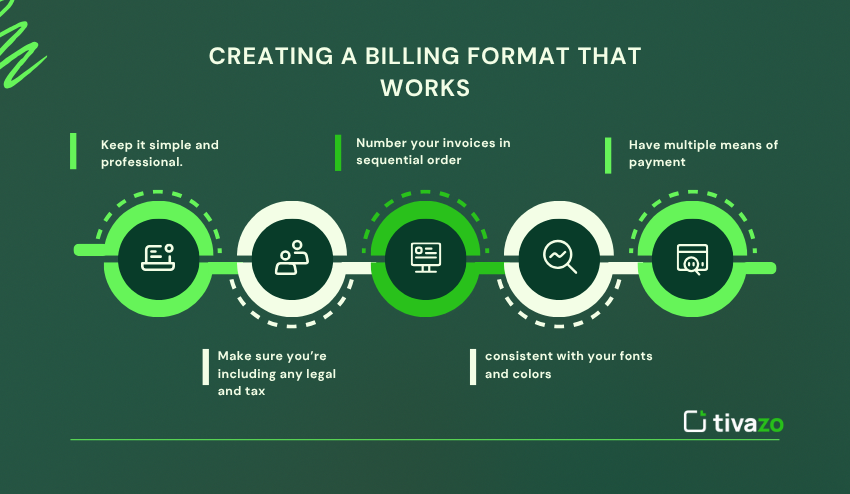
Hints for Creating a Billing Format That Works
- Keep it simple and professional.
- Make sure you’re including any legal and tax elements of your billing format for client.
- Always number your invoices in sequential order.
- Be consistent with your fonts and colors that match your brand.
- Have multiple means of payment.
Best Practices for Professional Client Billing
An efficient billing process ensures a healthy cash flow and helps build long-term relationships with clients. Make sure you always send invoices on time, use sequential invoice numbers, detail every service you provide, and offer several payment options.
Businesses with more than one employee should also have accurate payroll and work hour records before issuing invoices.
An effective time-tracking system used with an Employee Payroll Management Guide guarantees that every invoice is for actual work done and minimizes administrative errors.
Conclusion
It’s important for any entrepreneur, consultant, freelancer, or agency to use a solid, repetitive billing format for clients. Billing not only refers to asking for money, but it also refers to the experience your clients will face when paying you for services rendered and the professional impression you are providing. A good billing format for clients will also help guys ensure you minimize misunderstandings, create accuracy in the billing, and take the first initial steps to build long-term trust.
Designing a professional billing format for clients is more than just requesting payment. It shows your professionalism, improves communication, and builds long-term trust with every client.
A simple billing format reduces disputes, accelerates payments, and delivers a better customer experience across the board.
Time Tracking, Timesheets and Report, combined with accurate invoicing and tools to track employee hours, make the billing process more efficient and reliable for businesses that charge by the hour or manage teams.
These best practices can help you improve cash flow, reduce billing errors, and create a payment process that scales with your business.