Remote Worker Tracking was started by organizations as they wanted to maintain productivity and track performance among their off-site employees. Businesses must create a proper tracking framework for remote workers that maintains transparent operation and efficiency throughout, without unnecessary monitoring methods.
Organizations need to achieve equitable measurement of performance by giving employees freedom and establishing work cultures based on faith, instead of monitoring methods. The combination of defined guidelines with ethical tracking tools and result-based management allows organizations to keep productivity high without sacrificing the morale or privacy of their employees.
Tracking remote workers refers to the process of monitoring an employee’s activity or their output, or the time or availability of the employee in a remote work location. It leverages software, processes, and policies to provide managers with reliable information regarding the performance of distributed teams.
The need is real. Microsoft’s Work Trend Index recorded that 85% of managers noted significant challenges confirming the productivity of their remote employees. This uncertainty results in two negative consequences: either the problem is not addressed, and accountability is lost, or the problem is overcompensated by the implementation of invasive tools, which make employees feel like suspects.
Why tracking is important for your business:
| Business Need | What Tracking Solves |
| Payroll accuracy | Ensure that the hours worked are not different from the hours reported. |
| Project delivery | Alerts you of project delays in real-time. |
| Burnout prevention | Flag employees who are working overtime regularly. |
| Resource planning | Identifies team members who are over- or under-capacity. |
| Performance coaching | Provides specific information to managers to feed into development discussions |
| Compliance | Records work hours to meet labour laws requirements. |
The Difference Between Tracking and Micromanaging
The question every HR manager and team lead has to ask before acquiring any tool.
Micromanagement questions: “Are my employees working?”
Smart tracking is asking: “How are my employees working. What’s holding them back?”
The first question is that of the grown-up as a youngster who must be supervised constantly. The second sees the employees as professionals whose performance can be enhanced by good data.
Tracking remote employees to answer the second question is a system to help your employees, not a system to punish your employees. The data gathered should be used to help inform coaching conversations, workload balancing, and process improvement — not to send performance warnings for idle time percentages.
A golden rule: If what you are tracking will embarrass you to show to the employee, you’re tracking the wrong thing.
7 Methods for Remote Worker Tracking That Actually Work
1. Time-Tracking Software
Time tracking software tracks employee time spent on tasks, projects, or clients. Time is entered manually by the employee, or the software records the time automatically in the background.
It is most suitable for teams that charge hourly rates, are working on multiple projects at once, or are trying to determine where the work time is actually being expended.
The features to consider in a time tracking solution:
- Automatic capture (minimizes manual logging errors)
- Organizing projects and tasks into categories
- This integration is well done with your current project management software. This integration is “done” with your existing project management tools.
- Employee dashboards for staff to view the employee’s own data.
- Approval flows for timesheets
A typical scenario: A software development team wants to find out the number of hours that are spent on client work as opposed to internal meetings and admin. The data shows that 2 hours a day is an average loss of time due to context switching. They reorganize meetings and make up for the time.
2. Output-Based Tracking (Results Over Hours)
Rather than measuring time put in, measure what is produced. Employees are assessed against pre-determined objectives, milestones, and outcomes.
This is the most trustworthy way of tracking remote workers. It eliminates the lure of monitoring activities and maintains the premise of outcomes only.
How to track output based:
- Establish weekly or sprint-based deliverables for each team member
- Use a project management tool (Asana, Linear, Jira, Trello) as the source of truth
- Keep short check-ins (not about activity, but to remove blockers)
- Check outputs at the end of each cycle, rather than at the end of every day.
- It’s important to remember that Flag missed targets as a coaching conversation, not a disciplinary one.
The best time to use this approach: For knowledge workers, designers, writers, developers, and consultants, any job where the quality of work is more important than hours worked.
3. Integrated HR Platform with Time & Attendance Features

A comprehensive HR system with time and attendance capabilities eliminates the need for disparate tools for businesses operating in different time zones and time zones. Timesheet entry, timesheet management, and time off are all done in a single place.
It is particularly useful when working in multiple countries where there are a variety of labour law differences. If you have a good platform, overtime, paid time off, and maximum weekly hours are automatically calculated with local regulations in place.
Features to prioritize:
- Calculation of PTO by country/region, automated.
- Timesheet approval workflows
- Context notes to explain anamalous hours to employees
- Access for employees without a fixed desk – mobile access.
- Compliance alerts for hours in violation of local law.
4. Monitoring of Activity and Applications Usage
His approach records the apps that employees use during working time, how much time is spent in productive apps versus unproductive apps, and whether they are working continuously or taking regular breaks.
When used correctly, activity monitoring reveals true workflow issues. If 40% of the working day is devoted to email and chat tools, that team may need to improve their async communication methods, but not increase the amount of surveillance.
The proper use of activity monitoring is:
- Communicate clearly with staff what is being monitored and why
- Provide employees with the information, rather than only managers
- Don’t catch people out with a single screenshot; use aggregate team trends to improve processes.
- Never monitor keyloggers, webcam videos, or personal devices.
The wrong way: Employment of monitoring software that employees have no knowledge of. This kind of strategy would very quickly break down trust as soon as it is known, and it will always be known.
5. Virtual Check-Ins and Async Stand-Ups
Not all programs of remote employee monitoring are not software based. Structured check-ins – when implemented properly – give visibility into progress, blockages, and workload without any surveillance tools
The word here is structured. One “how are you guys doing??” each day. Slack message is NOT a check-in. It is noise. A quick async stand-up session is any session with a set of 3 useful questions:
- What did you finish up with yesterday?
- What’s your project this day?
- Are there any obstacles in your way?
Groups can use tools such as Geekbot, Range, or Loom to carry out these asynchronously, avoiding the need to keep employees in different time zones “awake,” needing to be on early mornings or late nights.
Best practice: Record information in a shared channel to see trends over time. Persistent blocking by the same entity is a process problem that should be addressed, not a performance problem.
6. Project Management Tracking

As long as you use a project management tool correctly, you already have a powerful tracking tool. Each task, deadline, comment, and status update leaves a trail of data behind, which demonstrates the progress of work.
Project-based tracking has the benefit that the data is intrinsically linked to outcomes. You aren’t viewing someone’s screen; you’re viewing tasks moving through a workflow. Such visibility is what really aids managers in making good decisions.
Making this method work:
All work in the system should be a task first before it starts.
Status updates are not something the manager should be following up on; it’s the employee’s responsibility.
Have a team-level overview by using dashboards or reporting views, without having to open each person’s ticket
Think about the percentage of reviews that are done rather than the number of deadlines that are met. If an employee completes 30 reviews in a sprint, all on time, that is a different story than if they complete 8 reviews, with 25 reviews missing the deadline.
7. Attendance and Schedule Adherence Tracking
Records are kept of the students’ attendance and schedule adherence.
If the job is one that needs someone to be available at certain times (customer support, live operations, client-facing, etc.) then it is a reasonable business need to determine if they are online and responsive during those hours.
Tracking adherence to the schedule is easy – do employees arrive and are they available at their scheduled time? This is not the same as watching them 24 hours per day.
This is supported by tools:
- Virtual time clocks – employees clock in/clock out from any device
- Status indicators on team communication channels.
- Calendar-based availability tracking
Caution: Tracking schedule adherence only makes sense for jobs that have set hours. When applied to a knowledge worker who works autonomously and has their own work schedule, friction without value.
Understanding Remote Worker Tracking
The practice of worker tracking involves employee performance monitoring through software systems alongside tracking tools and strategic methods for remote staff monitoring. The monitoring tools for remote workers encompass basic time-tracking solutions and high-tech AI-based systems that track employee activity rates as well as log-in durations and project output metrics.
Remote worker tracking emerged as a business necessity because companies transitioned to hybrid and fully remote workforce models. Remote worker tracking systems require proper implementation, which achieves the right privacy levels regarding employee monitoring capabilities.
Remote worker monitoring is essential for organizations for several key reasons.

The work environment of those who perform tasks outside of traditional offices can create performance-detracting distractions. The data gathered through remote worker tracking assists managers in discovering performance patterns for making decisions based on numbers. Employers can discover ways to manage workloads properly by analyzing data from their tracking system.
- Tracking remote workers leads to precise billing when dealing with freelancers or contract employees because it verifies their actual working hours.
- Remote worker tracking becomes essential for industries that need compliance fulfillment, together with the implementation of data protection systems.
What Methods Work to Improve Work Output When Avoiding Constant Supervision?
The implementation of remote work has caused businesses to use tracking solutions for remote workers to maintain productivity levels. Establishing remote worker tracking requires operational plans that avoid creating excessive worker monitoring. This article examines the positive aspects, along with management hurdles and successful methods for remote worker tracking systems, which combine satisfaction for both staff and employers.
Understanding Remote Worker Tracking
- The practice of remote worker tracking involves employee performance monitoring through software systems alongside tracking tools and strategic methods for remote staff monitoring. The detection capabilities of tracking systems can start with simplistic time-tracking applications that evolve into sophisticated artificial intelligence technologies that observe employee operation levels and record user log times and activity completion progress.
- Remote worker tracking emerged as a business necessity because companies transitioned to hybrid and fully remote workforce models. Organizations need to deploy such systems through proper enhancements of transparency protocols without jeopardizing employee privacy protections.
Remote worker monitoring is essential for organizations for several key reasons.

- The work environment of those who perform tasks outside of traditional offices can create performance-detracting distractions. The data gathered through remote worker tracking assists managers in discovering performance patterns for making decisions based on numbers.
- Employers can discover ways to manage workloads properly by analyzing data from their tracking system.
- Tracking remote workers leads to precise billing when dealing with freelancers or contract employees because it verifies their actual working hours.
- Remote worker tracking becomes essential for industries that need compliance fulfillment, together with the implementation of data protection systems.
Case Studies in Effective Remote Worker Tracking
- Tech Startup: The expanding technology startup decided to launch time-tracing software along with dynamic workplace scheduling. Workers could easily record their time shifts through the software system, whereas managers concentrated on outcome evaluation instead of screen monitoring. The remote employee tracking system improved worker job satisfaction and work output.
- Customer Support Firm: Remote agents at this customer service company stayed active on the job through AI tracking software during their work shifts. Remote worker tracking in combination with automated break alerts allowed the company to keep employee wellness up while sustaining service quality standards.
- Marketing Agency: Instead of surveillance-based tracking, the marketing agency replaced it with project management tools. Through Trello boards, teams recorded their achievements, thus decreasing supervisor oversight while enhancing team cooperation.
- Future of Remote Worker Tracking: Remote worker tracking will progress in three directions: artificial intelligence development along with predictive analytics capabilities, and employee-driven tracking solutions. Businesses that maintain open tracking systems that benefit their workforce will experience better employee loyalty.
How to Build a Remote Tracking Policy Your Team Will Accept

Take the guesswork out of building a remote tracking policy that’s going to be embraced by your team.
The number one problem with tracking workers on the road is not the technology. It is the rollout. When their work is being watched by their bosses, without their knowledge, employees tend to assume the worst — and they would be correct to be concerned.
There are five elements to a tracking policy that employees will accept and may even welcome:
- Transparency first. Communicate clearly with employees what is being monitored, the data being collected, the time period of data retention, and who can access it. No surprises.
- Clear purpose. Link tracking with a specific business objective. A reason is that we track project time to accurately bill our clients and plan resource allocation. Does not mean that we monitor your work to ensure you are on the job.
- Access of employees to their own information. When gathering information on someone’s working relationship, they must be able to view it. When employees can access their own metrics, it becomes a self-improvement initiative instead of a monitoring system.
- Privacy boundaries. Do not follow personal devices. Do not use a keylogger or webcam monitoring. Avoid gathering any data without clear business objectives.
- Proportionality. Monitor the level as per the needs of the business. Time tracking is necessary for billing accuracy. It doesn’t need to be monitored via applications, screenshots, location data, etc.
Common Mistakes Companies Make With Remote Tracking
Here are some of the most frequent mistakes that companies make with remote tracking.
Keeping track of what is going on rather than what is produced. Hours worked, mouse moves, and app usage are proxies of productivity. The actual output is his/her work actually done, his/her ticket(s) resolved, his/her project(s) completed. Make the latter the basis for your tracking.
- Monitoring without communicating. Don’t introduce tools to your team without explaining them. Make sure to put tracking policies in place before they are activated.
- Using one-size-fits-all rules Tracking of schedule adherence is required for a customer support agent. Senior developer requires output tracking. A one-size-fits-all monitoring strategy will lead to tension for some roles and a lack of accountability for others.
- Ignoring burnout signals. Many times, you’ll find out who’s overworking before they even complain, using remote worker tracking data. If individuals are working long hours or late at night regularly, it is a red flag. Don’t track your people to measure them, track them to protect them.
- Considering the tool as the solution Bad management, unclear expectations, and communication issues cannot be solved by tracking software. It surfaces information. It’s what you do with that information that counts.
Tivazo and Remote Worker Tracking
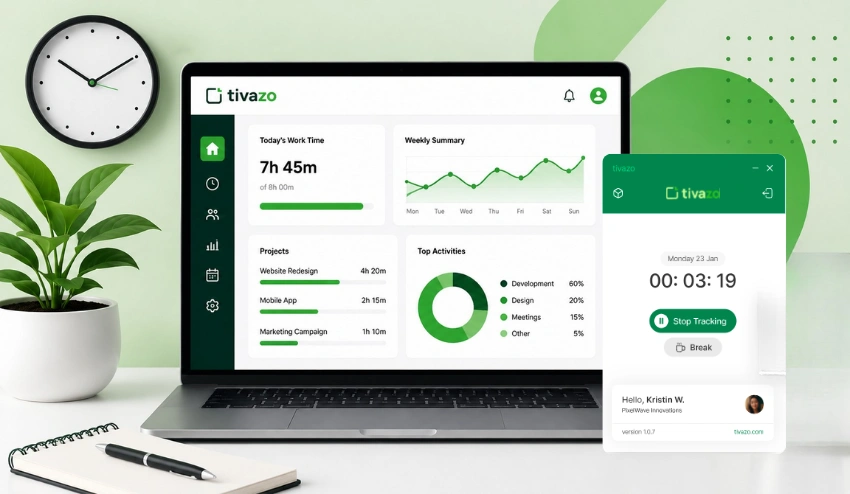
Tivazo is designed for teams seeking to see what is going on, but not to become watchers. The platform provides managers with the information they require to support the team: project status, time tracking, workload visibility, etc., as well as giving employees access to their own data.
When trust is paramount, but accountability needs to improve, or when your team is expanding, working across time zones, or simply wants to get things right without compromising trust, Tivazo offers the tools.
Discover how Tivazo can help remote teams thrive. →
Conclusion
For effective remote worker tracking, organizations need to maintain proper control while providing sufficient independence to their employees. Companies need to maintain three core elements of worker tracking, which include trust in employees and transparency alongside efficiency, without compromising personal privacy boundaries. Remote worker tracking implemented through suitable approaches allows organizations to improve productivity and accountability, coupled with job satisfaction, without fostering a controlling workspace. Businesses that adopt well-structured ethical remote worker tracking methods will preserve remote work as a viable and productive solution for present-day employees.