Imagine discovering on payday that 15 employees have been underpaid because one spreadsheet formula broke after a new hire was added.
Suddenly, HR is answering payroll complaints, finance is recalculating wages, and managers are spending hours verifying employee timesheets instead of focusing on business operations.
Payroll mistakes rarely happen because payroll teams are careless. They usually begin much earlier—with inaccurate work-hour tracking, inconsistent approval workflows, outdated attendance systems, or manual calculations that become harder to manage as a business grows.
Whether you’re processing payroll for 10 employees or 500, preventing payroll errors starts with accurate workforce data and standardized payroll processes.
In this guide, you’ll learn the most common payroll mistakes, why they happen, how to prevent them, and how modern workforce management practices can improve payroll accuracy while reducing compliance risks.
Key Takeaways
- Human resource management errors in payroll can lead to monetary fines, legal problems, and decreased worker morale.
- The top causes of payroll mistakes are improper timekeeping, incorrect calculations, out-of-date processes, and improper payroll audits.
- The first step to improving payroll accuracy is accurate employee time tracking and standardized approval procedures.
- Frequent payroll audits will prevent frequent payroll processing errors that might cause them to be costly.
- Manual errors and better reporting and compliance are achieved by automating repetitive payroll tasks.
- Having accurate workforce data in place makes it easier to budget, forecast, and make payroll decisions.
- Simple changes to the payroll today could avoid big business risks tomorrow.
Payroll Process at a Glance
Every step in this workflow is essential for payroll accuracy. One error in attendance taking or overtime approval can have repercussions for payroll calculations later on.
- Step 1: Employee Clocks In
- Step 2: Attendance Recorded
- Step 3: Manager Reviews Hours
- Step 4: Overtime Verified
- Step 5: Payroll Calculated
- Step 6: Payroll Audit
- Step 7: Employees Paid
What Are Payroll Mistakes?
Payroll Errors are those made when calculating, processing, recording, or distributing employees compensation.
These errors may include work hours, overtime, taxes, employee classification, benefits, deductions, and/or payroll reporting and cause incorrect employee payments and compliance problems.
Payroll is much more than calculating employee wages. Accurate employee data, authorized work time, proper tax computations, overtime verification, deductions, reporting, and timely payroll must be done for each payroll period. Payroll mistakes happen when the information in any of these steps is incorrect.
There are some payroll mistakes that are not particularly big, like working out the wrong hours. Others can cause significant legal or financial liability, such as underpaying workers, missing tax filing dates, or failing to comply with the rules of wage and hour laws.
How Payroll Errors Affect the Entire Business
Payroll mistakes, many business owners believe, only impact payday. In fact, payroll errors can have a ripple effect throughout the entire organization.
That one mistake can mean more paperwork, later financial reports, less employee trust, and even put the business at compliance risk.
If an employee is underpaid because of wrong work hours, he or she may lose confidence in the payroll process.
Rather than dealing with daily operations, HR then takes time to investigate the issue, finance processes an off-cycle payment, and managers check attendance records. One payroll mistake can eat up hours of productive labor in many departments.
The best way to avoid these problems is to calculate payroll based on actual employee work data, not manual estimates.
With solid Time Tracking, companies create a better foundation for payroll accuracy. Every approved hour of work is automatically logged before the payroll cycle has even begun.
Common Causes of Payroll Mistakes
People, processes, and technology often are responsible for payroll errors, not one or two. Some of the most widely seen reasons are:
- Manual spreadsheet calculations
- Incorrect employee Time Records
- Missed overtime calculations
- Outdated employee information
- Poor attendance tracking
- Difficulty approving payroll on a consistent basis
- Errors in the calculation of payroll taxes
- Failure to keep payroll records.
- Human data-entry mistakes
- Frequent regulatory changes
If an employee doesn’t submit a timesheet and a manager fills in the hours on their behalf, rather than checking them, for instance, the employee could be paid incorrectly.
A minor error can lead to payroll corrections, administrative time, and loss of employee trust in the accuracy of payroll.
Examples of Payroll Mistakes
Payroll errors can occur throughout the payroll cycle. Common examples include:
| Payroll Mistake | Example |
| Incorrect work hours | An employee is paid for 36 hours instead of 40. |
| Overtime errors | Extra hours are paid at the regular rate instead of the overtime rate. |
| Duplicate payments | Payroll is processed twice for the same pay period. |
| Incorrect deductions | Health insurance or retirement deductions are applied incorrectly. |
| Tax calculation mistakes | Incorrect withholding results in payroll tax issues. |
| Delayed payroll | Employees receive their wages several days after payday. |
| Employee misclassification | A worker is incorrectly classified, affecting overtime eligibility and tax obligations. |
These errors might appear on their own, but repeated payroll errors can actually be a sign of more serious problems in payroll management.
Why Small Businesses Struggle with Payroll
Small business payroll has its challenges, as the business may have limited staff, budgets, and increasing operational needs.
For many businesses, payroll duties are split across business owners, human resources managers, accountants, or office managers juggling their work and duties with others.
Payroll gets more complicated as a business expands. Payroll errors can be caused by a variety of factors, including new hires, evolving tax laws, overtime, remote workers, fluctuating pay schedules, and employee benefits.
Organizations that are heavily dependent on manual timesheets or spreadsheets can also find it hard to ensure accurate tracking of employee time. If processes are not standardized, managers might be approving payroll with incomplete or inaccurate data.
The best way to minimize payroll errors is to design payroll processes around correct employee work data, not guesswork.
As outlined in the Employee Payroll Management Guide, businesses can build a solid foundation for payroll by creating a clear approval process and ensuring that payroll records are properly documented.
Why is Payroll Accuracy Important?
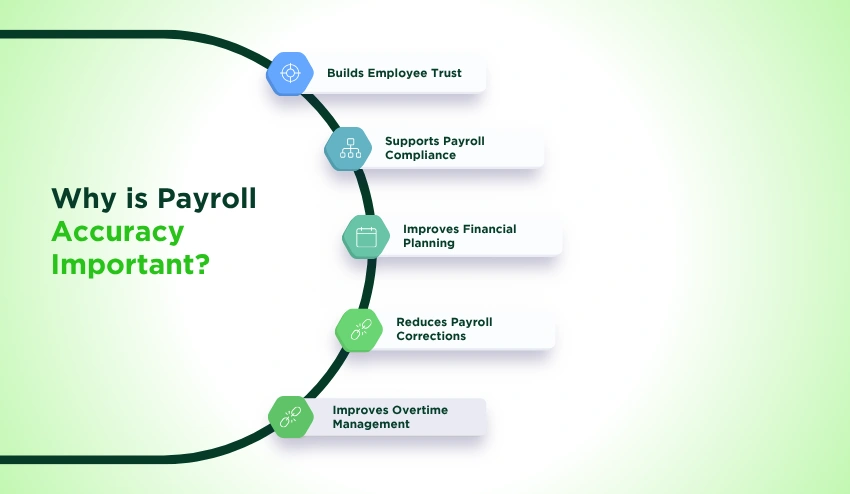
Payroll accuracy benefits employees by ensuring they receive the correct amount and payment for their work, while enabling businesses to stay compliant, better plan for finances, lower administrative expenses, and gain employee trust.
There are almost no parts of a business that do not impact payroll accuracy. Labor compliance, cash flow, employee satisfaction, tax reporting, budgeting, and operational efficiency are the ways business owners also need to take care of in addition to paying the right check.
If you have an accurate payroll process, that helps to build trust across the entire organization.
Staff don’t have to ask themselves what their paychecks are for, managers don’t have to waste time with payroll corrections, and finance people don’t have to spend time on payroll corrections—they can spend time strategizing for the business.
1. Builds Employee Trust
Employees expect their wages to be accurate every pay period. Ongoing payroll issues can lead to decreased employee satisfaction, engagement, and turnover.
Suppose a technician always works overtime and starts to see that he is not getting overtime pay on more of his paychecks. If the error is repeated, it may cause the employee to wonder whether future payments will be correct.
Consistent payroll practices indicate professionalism and build a trust between employers and employees.
2. Supports Payroll Compliance
Payroll compliance is more than just timely paychecks. In addition, businesses have to keep up accurate payroll records, make appropriate tax deductions, adhere to wage laws, hold documents, and abide by the proper overtime standards.
Audits are more challenging, and compliance risks are raised when payroll records are missing.
The first step to maintaining accurate employee records is to get the hours right, which means you should use a reliable way to track employees hours so you do not have to base payroll on estimated hours.
3. Improves Financial Planning
For the majority of businesses, payroll is one of their biggest operating costs.
Bad payroll information impacts:
- Budget forecasting
- Department labor costs
- Hiring decisions
- Profitability analysis
- Cash flow planning
Inaccurate information in the payroll reports can lead management to make business decisions based on inaccurate labour costs.
4. Reduces Payroll Corrections
Changes to the payroll organization involve extra administration.
Human Resources personnel can be expected to:
- Investigate discrepancies
- Recalculate wages
- Issue off-cycle payments
- Update accounting records
- Correct payroll reports
- Answer employee questions/concerns
In the prevention of payroll errors, it’s always more efficient to do it right the first time.
5. Improves Overtime Management
Overtime is one of the most common reasons for payroll errors.
If businesses do not have accurate attendance records, they could:
- Underpay overtime
- Overpay overtime
- Miss overtime entirely
- Miscalculate premium pay
Reliable attendance records and a clear understanding of what is timesheet data help managers verify overtime before payroll is finalized, reducing disputes and improving payroll accuracy.
Practical Example
Imagine two companies both with 40 workers.
Business A receives paper timesheets that employees submit at the end of each week. Managers manually review hours before processing payroll.
Common challenges include:
- Signatures not found
- Incorrect sums
- Late approvals.
- Errors in manual calculations
- Delays in payroll processing
Business B employs digital time tracking, standardized approval processes, and payroll-ready reports.
Managers have the ability to review employee hours prior to payroll closing, overtime is automatically flagged, and payroll reports are generated from verified work data.
Both companies pay their employees on a bi-weekly basis. Business B spends much less time correcting payroll errors and has more confidence that its payroll records are accurate.
Payroll Risk Score: Which Payroll Mistakes Have the Greatest Business Impact?
There are all different types of payroll errors. And as with many mistakes, they don’t all present the same type of risk. Many payroll errors only require a little time to sort out.
But others risk regulatory compliance and penalties, as well as damaging employees’ faith in their employer.
The severity of payroll risks (common to most employers) is detailed below in the table:
| Payroll Risk | Business Impact | Compliance Risk | Difficulty to Prevent | Priority |
| Incorrect employee hours | High | Medium | Easy | High |
| Overtime calculation errors | High | High | Moderate | High |
| Manual timesheet mistakes | Medium | Medium | Easy | High |
| Delayed payroll | High | Medium | Moderate | High |
| Time theft | Medium | Medium | Moderate | Medium |
| Employee misclassification | Very High | Very High | Difficult | Critical |
| Payroll tax errors | Very High | Very High | Moderate | Critical |
| Poor attendance tracking | Medium | Medium | Easy | High |
| Weak payroll reporting | Medium | Low | Easy | Medium |
| Outdated payroll processes | High | Very High | Moderate | High |
Most companies spend time fixing payroll issues when they come up instead of looking to prevent them in the first place.
It takes less time and costs much less money to look through work time, overtime, taxes, and payroll reports before you send out a payroll to minimize the need for fixes down the line.
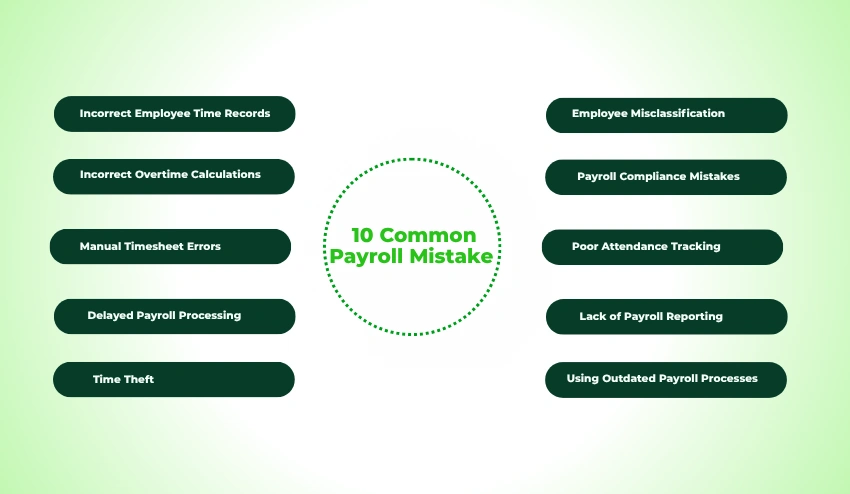
10 Common Payroll Mistakes
1. Incorrect Employee Time Records
Payroll problems are rarely a surprise. Many businesses see warning signs that their employee time tracking system needs an upgrade before frequent payroll errors become an issue.
Watch for these warning signs:
- Employees regularly forget to clock in or out.
- Managers frequently edit employee hours manually.
- Payroll corrections happen every pay period.
- Overtime calculations change after payroll approval.
- Employees dispute their recorded work hours.
- Attendance records differ from work schedules.
Addressing these issues early helps payroll teams reduce manual corrections and improve confidence in payroll data.
How Can I Stop All This Nonsense?
Businesses should:
- Require employees to record work hours daily.
- Establish manager approval deadlines.
- Review missing clock-ins before payroll.
- Standardize attendance policies.
- Maintain consistent Time Tracking procedures across departments.
The Best Practice
Never rely on estimated employee work hours for payroll. Every single hour of work needs to be verified and accounted for.
How Payroll Software Helps
Thank goodness for modern payroll software that integrates directly with digital time tracking tools.
This means that approved hours are automatically pulled into your payroll, eliminating much of the manual work, the errors, and the confusing audit trails.
Key Takeaway: It’s simple, really. Accurate payroll is born from accurate employee work hours. The only way forward is through verified data.
2. Incorrect Overtime Calculations
One of the most costly payroll mistakes is the overtime error, as it can have an impact on how employees are paid, on compliance requirements, and on payroll reporting. Small mistakes in the calculations can add up over time.
Why It Happens
Common causes include:
- Manual overtime calculations
- Incorrect overtime rules
- Missing employee hours
- Inconsistent attendance records
- Multiple pay rates
- Inappropriate review procedures were lacking.
Example
The employee is scheduled to work 47 hours a week, but weekend hours were not scheduled in the approved timesheet, and 40 hours are entered into payroll. Therefore, overtime will not be included and will need to be adjusted on payroll after the employee has been paid.
Business Impact
It is possible that, if overtime is not calculated correctly, the following can occur:
- Employee payroll errors
- Wage disputes
- Payroll compliance risks
- Payroll corrections
- Reduced employee trust
- Higher administrative costs
How to Avoid It
Businesses should:
- Check overtime prior to approval of payroll.
- Create clear overtime procedures.
- Check staff attendance records with work schedules.
- Provide training to train managers to recognize overtime discrepancies.
- Regularly calculate overtime pay using consistent methods and validate results before payroll is finalized.
Verify Overtime Rules Before Every Payroll Cycle
Employment laws, and potentially employee classification and jurisdiction, determine overtime eligibility and pay. Employers should ensure their overtime calculations are in line with the most up-to-date legislation before processing payroll, not their company’s old policy.
The U.S. Department of Labor Wage and Hour Division has issued the new overtime rules for businesses in the United States.
Best Practice
Check overtime reports before each payroll cycle instead of overspending employees’ payrolls later.
How Payroll Software Helps
Overtime can be automatically calculated by the payroll software, depending on the set work hours and company policy.
A Business Overtime Calculator can also be used to make sure that the overtime calculation is correct in the payroll process.
If there is existing employee time data, do not estimate or manually calculate overtime.
3. Manual Timesheet Errors
Handwritten timesheets introduce a risk of payroll inaccuracies since they rely on manual labor, data entry, and repetitive calculations. These processes are more challenging to manage accurately as businesses expand.
Why It Happens
The following are examples of why manual timesheet time is entered incorrectly:
- Handwritten entries
- Illegible records
- Spreadsheet formulas
- Duplicate data entry
- Lost paperwork
- Late timesheet submissions
- Calculation mistakes
Example
A worker enters the wrong hours on a paper timesheet by recording 68 hours when it should have been 58. Payroll is done without a detailed review, which means that the error isn’t discovered until after the payment has been issued.
Business Impact
Human error with timesheets can cause:
- Overpayments
- Underpayments
- Payroll processing delays
- Incorrect labor reporting
- Increased administrative workload
- Reduced payroll accuracy
How to Avoid It
Businesses should:
- Establish standardization of timesheet approval practices.
- Set submission deadlines.
- Check odd hours counts.
- Use electronic systems instead of paper whenever possible.
- Establish processes that focus on Reduced Timesheet Errors by validating and approving timesheets prior to processing payroll.
Best Practice
Check the exceptions (not all entries). Indicate unusual hours, double shifts, or if there are gaps in the record to help payroll staff prioritize their tasks and ensure they have the most time to double-check the transactions that are most likely to have errors.
How Payroll Software Helps
Digital timesheets automatically add up work hours, save time on manual calculations, and create approval history. This reduces repetitive data entry and allows payroll workers to better and more confidently process employee hours.
One of the quickest ways to make payroll more accurate and avoid unnecessary payroll errors is to eliminate manual timesheet processes.
4. Delayed Payroll Processing
Late payments to employees can affect a company’s reputation, cause cash flow problems for the employees, add to a company’s workload, and, in certain jurisdictions, lead to legal action against the company. With standard workflows and automation, most payroll delays are preventable.
Why It Happens
Usually, the cause of delayed payroll processing is related to earlier problems in the payroll process rather than on payday. Common causes include:
- Late timesheet submissions
- Last-minute payroll changes
- Missing attendance approvals
- Manual payroll calculations
- Lack of communication among HR, managers, and finance.
- Accounting or payment processing delays
- Last-minute Payroll processing
For companies that use spreadsheets, the time it takes to verify data before payroll can start is often hours long, and there’s little time to fix the mistakes.
Example
A marketing agency has been steadily expanding and needs to pay its staff on the second Friday every month. Many managers don’t approve of hours on Friday morning, and payroll staff are left rushing to confirm overtime, record the hours, and manually run the payroll.
This causes employees to be paid late on Monday and do extra administrative work.
Business Impact
Delayed payments can cause a number of serious consequences, such as:
- Reduced employee morale
- Decreased management trust
- Increased payroll corrections
- Penalties for late payment in relevant jurisdictions
- Other payroll administration expenses
- Lower employee retention
Regular wages are essential to employees to cover rent, bills and personal needs. Multiple delays can have a significant impact on employee job satisfaction.
How to Avoid It
To minimize payroll delays, businesses can:
Creating Payroll Due Dates
The manager should set cut-off dates for the approval of all settings.
Reconcile payroll a few days before payday!
Standardizing payroll workflows
Manual data collection minimized using automatic time tracking
Additional review time also enables payroll teams to iron out discrepancies prior to the release of payments.
Best Practice
Payroll should be an ongoing process and not an ad hoc administrative chore. Maintaining and communicating a clear payroll calendar that sets out a schedule of payment deadlines for both employees and managers, HR and finance, can help to minimize payment delays.
How Payroll Software Helps
Payroll software automatically pulls approved employee hours, flags missing information, and makes the payroll preparation process easier. Automated workflows minimize manual follow-ups and ensure payroll is processed on time.
Key Takeaway: Payroll delays are not necessarily caused by payroll processing; they are usually due to poor preparation. Predictable and reliable payroll through standardized workflows.
5. Time Theft
Time theft is when employees are paid for time they are not working. Some of these events are unintentional, but frequent time theft can raise payroll expenses, skew labor data, and stifle employee productivity.
Why It Happens
Time theft can happen due to:
- Buddy punching
- Extended breaks
- Early clock-ins
- Late clock-outs
- Personal activities during paid work hours
- Lack of attendance verification
- Weak timekeeping policies
Not all the differences are deliberate. Inaccurate attendance and clock-out data can also lead to incorrect payroll records.
Example
An employee works a regular time of 20 minutes before starting to work and 20 minutes after leaving the workplace. Those minute differences add up over a number of months to dozens or more of unworked paid hours.
If attendance reviews are not conducted regularly, then payroll records these hours as actual work hours.
Business Impact
If left unchecked, time theft can cause:
- Increased payroll expenses
- Incorrect reporting of labor costs.
- Reduced profitability
- Payroll disputes
- Lower accountability
- Management challenges
Miscommunication between different employees can lead to big payroll issues over time.
How to Avoid It
Businesses should:
- Have consistent attendance policies.
- Regularly review attendance exemptions.
- Need permission from the manager for an irregular work schedule.
- Train staff members how to log accurate time.
- Provide time theft monitoring without fostering a culture of over-surveillance.
The goal should be to have accurate and fair payroll, not a lot of policing.
Best Practice
Look at trends rather than individual incidents of attendance. Frequent audits can identify true errors from ongoing violations of the program.
How Payroll Software Helps
Today, people’s work schedules are compared to the hours they logged, and any attendance irregularities are reported to management for payroll processing.
Key Takeaway: By preventing time theft, you can help to maintain the accuracy of your payroll system and ensure that employees are being paid what they deserve for the work that they do.
6. Employee Misclassification.
Misclassifying employees can lead to significant payroll, tax, and compliance issues. Misclassification as an independent contractor or an exempt employee can impact overtime, taxes, and employment benefits.
Why It Happens
The most common causes of employee misclassifications include:
- Misunderstanding employment laws
- Rapid business growth
- Inconsistent hiring processes
- Outdated worker agreements
- Wrong preconceived notions around work tasks
- Failure to review employment classifications regularly and regularly.
Job titles should never be used to make classification decisions.
Example
A computer software company brings on a number of contractors who start working full-time for the company under direct supervision.
Their duties are similar to what you would find in a payroll system, but payroll treats them as independent contractors without checking their status.
This can lead to payroll reporting and compliance issues that can get increasingly complex as time goes on.
Business Impact
Misclassification may result in:
- Payroll tax issues
- Wage disputes
- Overtime liabilities
- Compliance investigations
- Retroactive payroll adjustments
- Fines as required by law.
Employers need to update their workers’ classifications on a regular basis, as there are varying regulations in different countries, states, and regions, and they should seek professional advice when required.
Review Worker Classification Regularly
How employees are classified impacts payroll taxes, overtime, benefits, and legal compliance. Job duties change over time, and the responsibility for reviewing worker classifications and keeping them up-to-date should be shared between the employer and the workers.
The Internal Revenue Service (IRS) offers guidance to determine if a worker is an employee or independent contractor for businesses in the United States.
How to Avoid It
Businesses should:
- Re-evaluate workers’ classification each year.
- Make sure to document employment contracts carefully.
- Provide HR staff training on classification needs.
- Compare job roles and not jobs.
- When classifications are ambiguous, seek advice from payroll or legal experts.
Best Practice
Classification reviews should be conducted on a regular basis as well as at the time of employment, when there is a change in the employee’s duties, job status, or working conditions.
How Payroll Software Helps
Payroll software keeps employee classification records, activates the proper payroll settings, and helps you to maintain uniformity in payroll recordkeeping throughout the payroll cycles.
Employers are responsible for ensuring classifications are in compliance with applicable laws, software helps with documentation.
Key Takeaway: Proper employee classification is a critical payroll compliance issue that should be revisited regularly as companies grow and change.
7. Payroll Compliance Mistakes
A payroll compliance error is any violation of the wage laws, tax laws, payroll documentation laws, or payroll reporting laws. Ensuring compliance is a continuous process as rules are constantly evolving.
Payroll laws vary by country, state, and industry. Employers should regularly review the latest wage, overtime, and recordkeeping requirements published by the U.S. Department of Labor to help maintain compliance.
Why It Happens
Common errors that lead to compliance failures:
- Changing employment regulations
- Outdated payroll policies
- Incomplete payroll records
- Incorrect tax withholding
- Missed filing deadlines
- Failure to provide compliance training.
- Manual recordkeeping
Growing businesses are especially susceptible, as the number of people on the staff increases and the number of payroll elements grows.
Example
A business makes changes to overtime policies for employees but does not update payroll procedures. Managers are still approving hours based on old guidelines, and payroll continues to be calculated incorrectly and not in keeping with the company’s payroll policy.
Payroll staff have to spend extra time making the corrections and updating the report, although it is done correctly sometime in the future.
Business Impact
Common payroll mistakes can result in:
- Payroll corrections
- Compliance notices
- Increased administrative work
- Financial penalties
- Audit challenges
- Loss of reputation for the business.
The bigger the workforce, the more expensive recurring compliance mistakes will be.
How to Avoid It
Businesses should:
- Regularly review payroll policies.
- Keep up to date with relevant payroll legislation.
- Keep complete payroll records.
- Perform regular payroll checks.
Clearly understand the difference between productivity tools and monitoring practices when implementing workforce technology.
If any businesses are considering using workplace visibility devices, it is also crucial to understand the difference between Employee Monitoring vs Employee Surveillance, so that businesses can ensure that all payroll-related data collection is done in compliance with privacy expectations and the business’s privacy policy.
Best Practice
Develop and maintain a quarterly payroll compliance review schedule that covers tax, employee, payroll, attendance, and documentation policies and procedures.
Payroll Software: How It Helps
Today’s payroll applications make compliance easier by centralizing employee information, documenting payroll history, creating reports, and eliminating manual calculation mistakes.
Automation is a tool that helps with compliance, but it is important to periodically review payroll processes and keep up to date on evolving legal obligations.
There is a difference between payroll compliance setup and payroll compliance processes. Frequent audits lower the threat and make sure that payroll procedures occur accurately.
8. Poor Attendance Tracking
The first step to accurate payroll is accurate attendance. Poor employee attendance tracking leads to inaccurate wages, overtime discrepancies, and overcorrected payroll, as businesses don’t always consistently track employee attendance.
Why It Happens
Attendant problems can arise due to antiquated or inconsistent processes. Common causes include:
- Paper attendance registers
- Employees forgetting to clock in or out
- Multiple attendance systems across departments
- Manual attendance adjustments
- Missing manager approvals
- Remote or hybrid employees without standardized attendance tracking
Example
The employees of a retail company have different shifts in 3 stores. Some stores keep attendance on paper, some on spreadsheets, and some on a digital system.
HR obtains several hours’ worth of attendance data and begins the payroll process, only to find that several employee shifts were entered twice and some were not at all.
Business Impact
Lacking good attendance tracking can lead to:
- Incorrect employee payments
- Payroll processing delays
- Overtime calculation errors
- Increased payroll corrections
- Inaccurate labor reporting
- Reduced workforce visibility
Payroll departments may base payroll decisions on guesswork when there are inaccuracies in attendance records.
How to Avoid It
To better track attendance, businesses can:
- Having a common attendance system.
- Ensuring worker attendance is being tracked regularly.
- Attending prior to payroll approval.
- As soon as possible, investigating missing or duplicate records.
- Implementing a reliable clock in clock out app to ensure that employee’s work hours are accurately captured from anywhere.
Best Practice
Attendance should not just be checked at payroll time but throughout the pay period as well. Periodic reviews can help management determine if there is any missing information before it turns into a payroll problem.
How payroll software helps
Integrated attendance tracking automatically syncs approved work hours with payroll, minimizing manual data entry and giving managers a comprehensive view of attendance before payroll is run.
Key Takeaway: Accurate attendance information impacts payroll accuracy, decreases administrative workload, and minimizes the risk of costly payroll corrections.
9. Lack of Payroll Reporting
Missed recurring payroll problems, increased labor expenses, attendance patterns, and compliance dangers are among the various problems that can result from not reviewing the payroll reports.
Payroll reporting is the process of converting payroll data into insights that can be used for business decisions.
Why It Happens
Many small businesses use payroll reports to prepare their accounting reports, but not for the benefit of streamlining the way they process payroll.
Common reasons include:
- Limited reporting tools
- Lack of reporting standards
- Time constraints
- Spreadsheet dependency
- No scheduled payroll reviews
- Unclear payroll performance metrics
If reports aren’t meaningful, payroll errors can go undetected for months.
Example
A company observes that its payroll costs have been on the rise and thinks that the increase must be due to higher overtime.
Management finds that the actual problem is that two departments are approving overtime at the same time.
If it had not been reported, then it would have likely gone on.
Business Impact
Some of the consequences of poor payroll reporting include:
- Hidden payroll errors
- Budget overruns
- Weak workforce planning
- Inaccurate labor forecasting
- Delayed decision-making
- Compliance challenges
Payroll reports give visibility to help businesses detect issues before they get costly.
How to Avoid It
Businesses should check payroll reports at the end of each payroll period, such as:
- Total payroll costs
- Overtime expenses
- Attendance summaries
- Payroll corrections
- Department labor costs
- Payroll exceptions
These reviews are quicker and more accurate since they’re based on centralized Timesheets and Report data.
Best Practice
Avoid just saving payroll documents. Analyze each payroll cycle and observe if there are any irregular trends, discrepancies, or unexpected spikes in labor expenses.
How Payroll Software Helps
Modern payroll software will automatically create payroll summaries, attendance reports, overtime reports, and labor cost analyses.
Key Takeaway: Payroll reports are not just accounting records, they are valuable management tools. Standard reporting allows businesses to spot and avoid frequent payroll errors.
10. Using Outdated Payroll Processes
Those companies that still use paper forms, spreadsheets, and disparate systems may be facing increased payroll error rates, decreased efficiencies, and increased compliance risks. The contemporary payroll system boosts the accuracy and the operational transparency.
Why It Happens
Outdated payroll processes may exist for the following reasons:
- Current systems seem good enough.
- Companies don’t like to alter old business processes.
- Employees lack knowledge of contemporary payroll technology.
- The changes in payroll roles have outpaced internal processes.
- Data is scattered around across several isolated systems.
These are inefficient ways of working and become more difficult to manage as organizations grow.
Example
After doubling in size in two years, a growing construction company still relies on paper timesheets, manual overtime methods, and spreadsheets for payroll.
Payroll used to take 4 hours to process, and now it takes almost 2 days, and payroll corrections are on the rise.
Business Impact
Legacy payroll systems can lead to:
- Increased payroll processing expenses
- More payroll errors
- Delayed payroll completion
- Limited reporting capabilities
- Increased compliance risks
- Reduced workforce visibility
As the number of employees grows, businesses might also face challenges in scaling up their payroll efficiently.
How to Avoid It
Organizations should:
- Check in on payroll processes once a year.
- Automate tasks that can be automated.
- Standardize payroll documentation.
- Include attendance and payroll management systems.
- Make informed decisions on payroll based on trusted workforce information.
Instead of simply buying technology, businesses should aim to streamline payroll processes and enhance accuracy.
Best Practice
Assess payroll processes once a year by asking the following questions:
- What are the most time-consuming payroll activities?
- What are some common payroll errors?
- What are the manual processes that can be automated?
- Which reports are overly time-consuming to prepare manually?
Improvement is the key to continuous evolution of payroll, which helps it grow as the business grows.
How Payroll Software Helps
Today’s Workforce Management Apps integrate Employee Monitoring, Performance Insights, attendance tracking, and Payroll-ready reports in one workflow. Payroll teams save time correcting payroll errors and more time reviewing payroll quality with accurate employee work data from the start.
Technology is now enabling organizations to support the workforce with accurate information in an organized manner throughout the payroll process—rather than replacing payroll professionals.
Key Takeaway: Modernization is not about replacing your people—it’s about providing your payroll teams with data, fewer manual tasks, and more confidence in payroll accuracy.
Manual Payroll vs. Automated Payroll Software
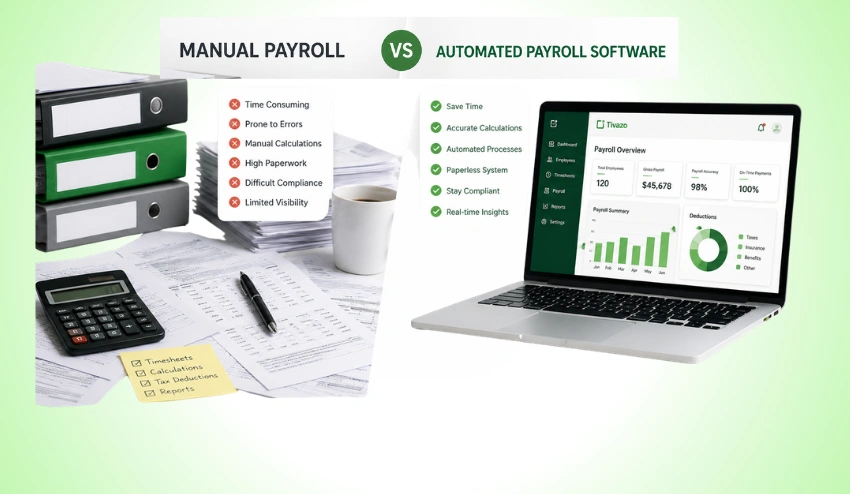
Choosing the right payroll approach has a significant impact on payroll accuracy, efficiency, and scalability. The table below compares common payroll methods.
| Feature | Manual Payroll | Spreadsheet Payroll | Payroll Software |
| Payroll Accuracy | Low–Medium | Medium | High |
| Human Error Risk | High | Medium–High | Low |
| Overtime Calculations | Manual | Formula-Based | Automated |
| Attendance Integration | No | Limited | Yes |
| Payroll Reporting | Limited | Basic | Advanced |
| Compliance Support | Limited | Limited | Better Recordkeeping |
| Scalability | Low | Medium | High |
| Processing Speed | Slow | Moderate | Fast |
| Audit Trail | Minimal | Limited | Comprehensive |
Common Payroll Myths
| Myth | Reality |
| Manual payroll is cheaper. | When you’re looking for ways to cut costs on your payroll, you’ll probably be tempted to do it manually. While it’s cheaper in the short term, you’ll spend more on fixing errors. |
| Payroll software is only for large companies. | You could even extend that to your own small business if it’s a growing business where payroll can get complicated with multiple employees! |
| Payroll automation replaces HR professionals. | With Automation, repetitive work gets taken off the plate of HR/Payroll, and their energy is free for things like compliance, helping out employees, and future-thinking! |
| Payroll mistakes are unavoidable. | There are some measures that can be put in place to avoid most payroll errors. They are standardized processes, good time management, frequent audits, and payroll software. |
| Payroll only matters on payday. | But you can’t even get to accurate payroll unless you do payroll data entry, timekeeping, approvals, and payroll reports every day during a pay period. |
Payroll Audit Checklist Before Every Payroll Run
To help reduce payroll errors and increase accuracy, review the following checklist before running payroll.
- Verify employee work hours
- Review overtime calculations
- Check attendance records
- Confirm employee classifications
- Validate deductions and benefits
- Review payroll tax calculations
- Confirm manager approvals
- Generate payroll reports
- Resolve missing timesheets
- Perform a final payroll review
Following this checklist each payroll cycle can help businesses improve their payroll consistency while avoiding costly payroll corrections.
Team Management tools can aid managers in streamlining this process by consolidating employee approvals, attendance, and workforce data.
Conclusion
Payroll errors are seldom the result of payroll calculations alone. The errors are mostly due to wrong work hours of employees, irregular attendance, manual approvals, or old payroll processes. As companies grow, these small issues can become major financial and compliance problems.
To improve payroll accuracy, begin with strong processes for employee time data. Standardized approvals, regular payroll audits, accurate attendance tracking, and consistent reporting all contribute to a more efficient payroll operation and reduce unnecessary administrative work.
Modern workforce management platforms like Tivazo help businesses streamline these processes by integrating Time Tracking, Employee Monitoring, Timesheets and reports.
Performance Insights and Team Management into one workflow. By validating the workforce data that they have before running payroll, organizations can run payroll with more confidence, reduce payroll corrections, and improve overall operational efficiency.